4: Element Operations • 40
©2008 Axia Audio — Rev. 3.0
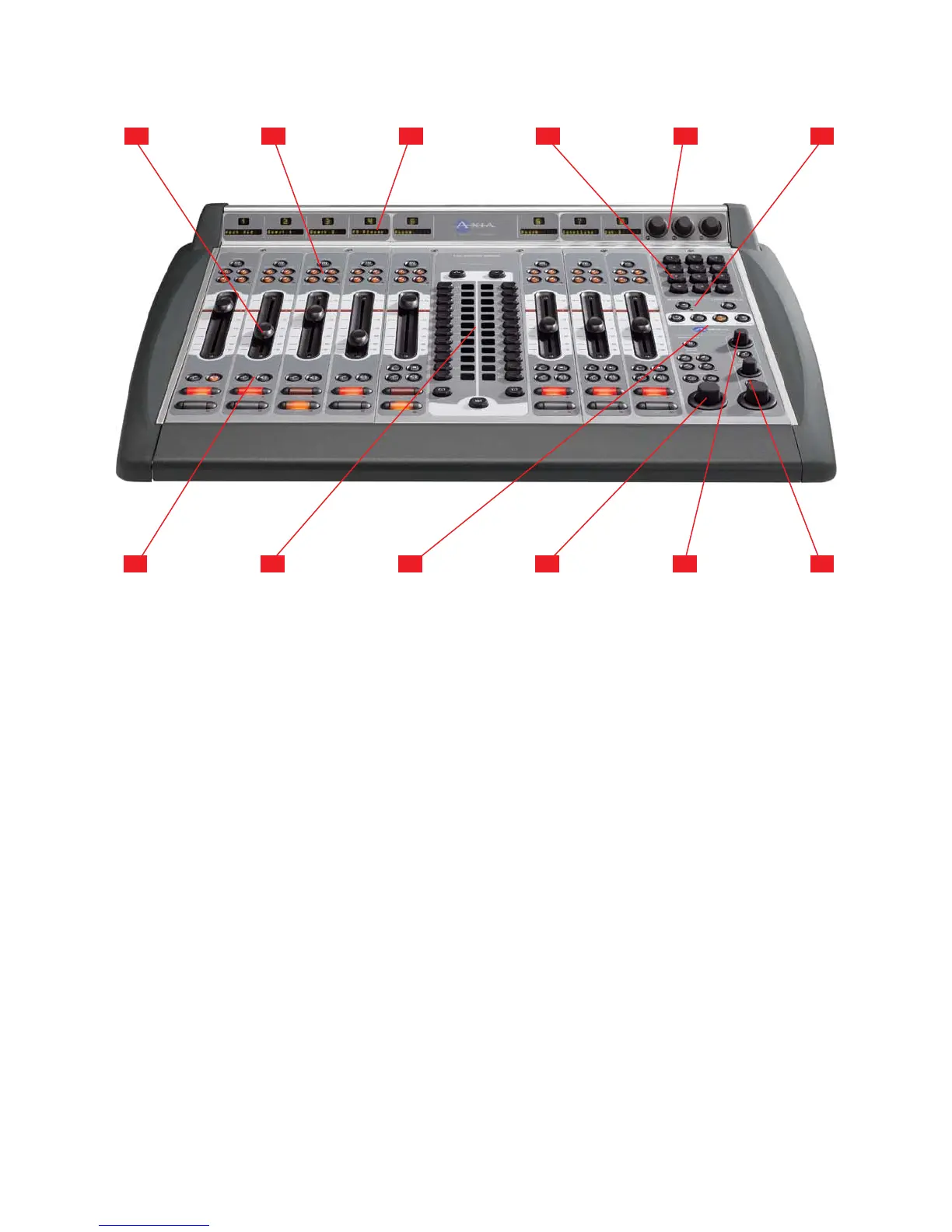
Faders can accommodate any input source. Each
channel’s Options button (at the top of the fader
strip) lets operators change sources and call up ex-
panded channel features.
Assignment Buttons for the four stereo main
output buses – Program-1, Program-2, Program-
3 and Program-4/Record – are located atop each
fader strip.
Channel Displays contain a 10-character text
readout and a window for fader position numbers
and Status Symbol icons. Text is fixed for static
sources like microphones and CD players, but can
be set to show song/artist information, etc., when
computer-based audio sources are connected.
Numeric Keypad lets operators dial phone sys-
tems or codecs directly. Also provides numeric
input during surface setup.
Three SoftKnobs are context sensitive; when any
Direct Access key is pressed, the on-screen dis-
play shows the function affected by rotating and/
or pushing each knob.
Record Mode and Load Prole Keys let opera-
tors recall customized Show Profiles and activate
1.
2.
3.
4.
5.
6.
Record Mode to quickly capture off-air bits to an
external recording device.
Talkback & Preview Keys let operators preview
(cue) selected sources off-air, or quickly talk to
any source(s) with associated backfeed(s).
2-Fader Phone Module provides direct control
of all hybrid and line control functions for Telos
Nx12, TWOx12 or Series 2101 Broadcast Talk-
show Systems.
Timer Controls help keep track of on-screen
elapsed and remaining time displays.
Monitor 1 Section contains volume and selec-
tion controls for monitors, headphones, Aux Send
buses and Preview.
Monitor 2 Talkback & Volume Controls let op-
erators easily talk to hosts and guests in a second
studio, and control their monitor volume.
Headphone and Preview Volume Controls let
operators adjust Host headphone volume and con-
trol Preview (cue) volume and options.
7.
8.
9.
10.
11.
12.
1 2 3 4 5 6
7 8 9 1110
Element with 2-Fader Phone Module and 2-Fader + Monitor Module
12



 To Next Page