26 pro+ Surface Instruction for Use (209196 REV 8)
CENTRELLA Smart+ Bed
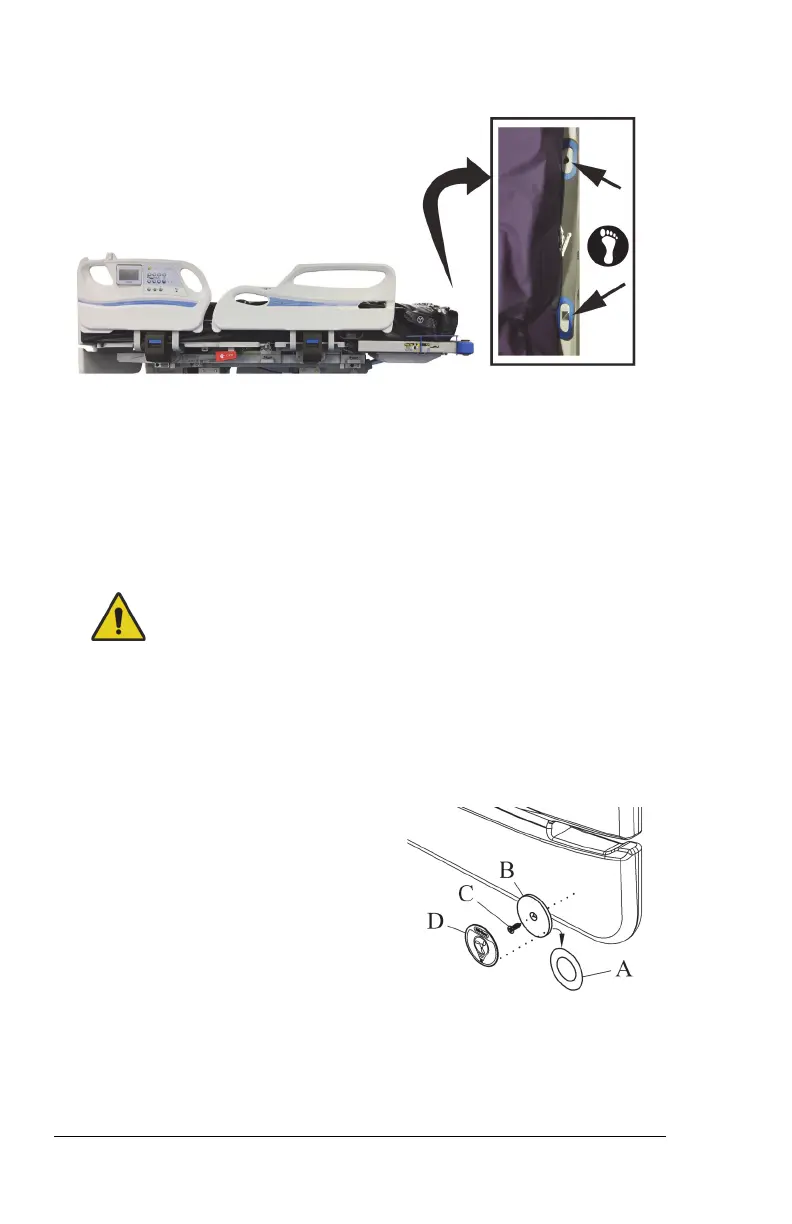
22. Align the footboard posts to go through the holes on the flap, and
install the footboard.
Make sure that the status indicator cord is not between the installed
footboard and bed.
23. Make sure the status indicator can reach the mount location before
you start to install the mount assembly.
Warning—Alcohol-based cleaners are flammable and toxic to skin,
eyes, and respiratory tract. Do not use near an open flame. Do not
use in confined areas. Injury could occur.
24. On the outside of the footboard, use the alcohol-based cleaner to
clean the area where the status indicator mount is to be installed
(this includes new footboards). Let the area dry.
25. Remove the adhesive covering (A)
from the metal plate (B) on the
mount assembly. Firmly press the
metal plate into position for 10
seconds.
26. Install the screw (C) to attach the metal plate (B) to the footboard.
Installing the screw on to the footboard will not void the warranty of
the product.












 To Next Page