pro+ Surface Instruction for Use (209196 REV 8) 43
VERSACARE Bed—pro+ Surface Installation Instructions
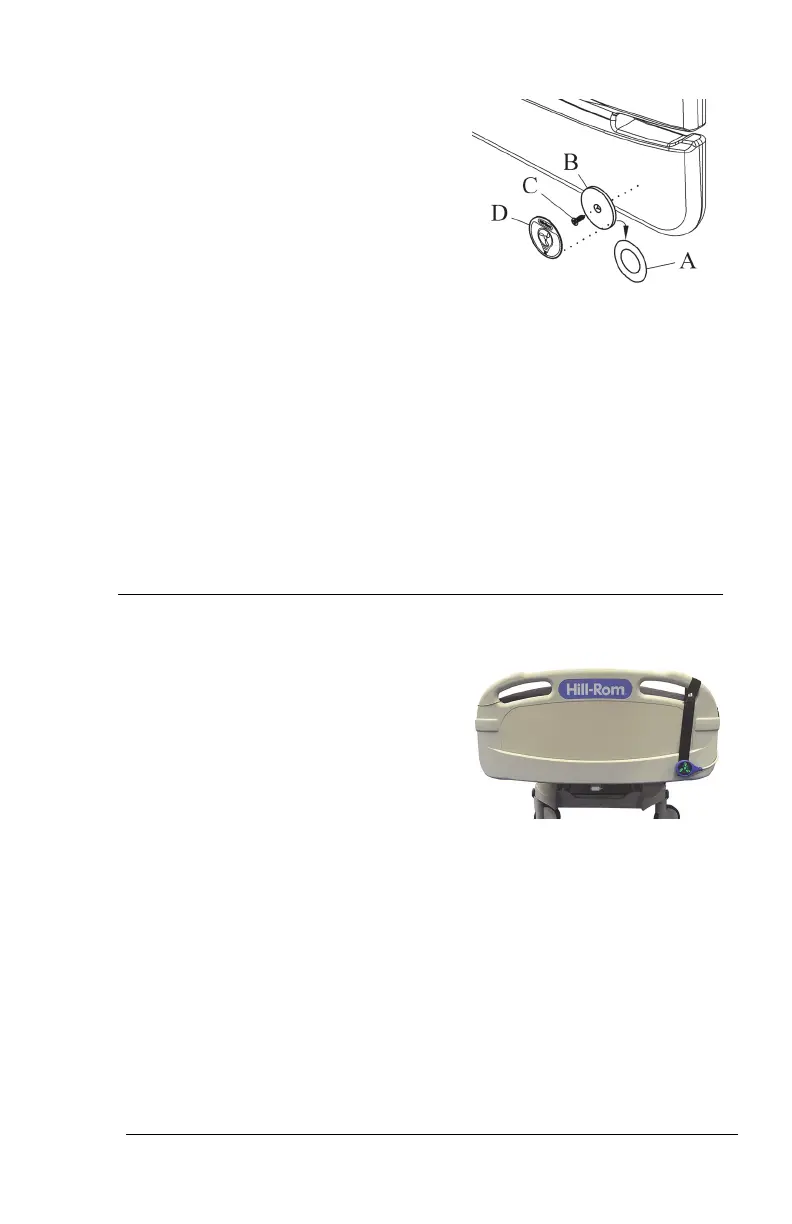
21. Remove the adhesive covering (A)
from the metal plate (B) on the
mount assembly. Firmly press the
metal plate into position for 10
seconds.
22. Install the screw (C) to attach the metal plate (B) to the footboard.
Installing the screw on to the footboard will not void the warranty
of the product.
23. Use the alcohol-based cleaner to clean the metal plate (B). Let the
plate dry.
24. Remove the adhesive covering from the mount label (D).
25. Make sure the label (D) is in the correct orientation, then install the
label on to the metal plate (B). Firmly press the label into position
for 10 seconds.
26. Go to “Step 4: Final Steps” on page 44.
Step 3B: Install the MCM Status Indicator Mounting Kit
(Rental Only)
The mount for the MCM status
indicator is to be installed on the
outside of the footboard. The rental
MCM indicator strap can be put on the
right or left side of the footboard.
27. Install the footboard.
Make sure the status indicator cord is not between the installed
footboard and bed.












 To Next Page