IQC 5000B Operation Manual
13
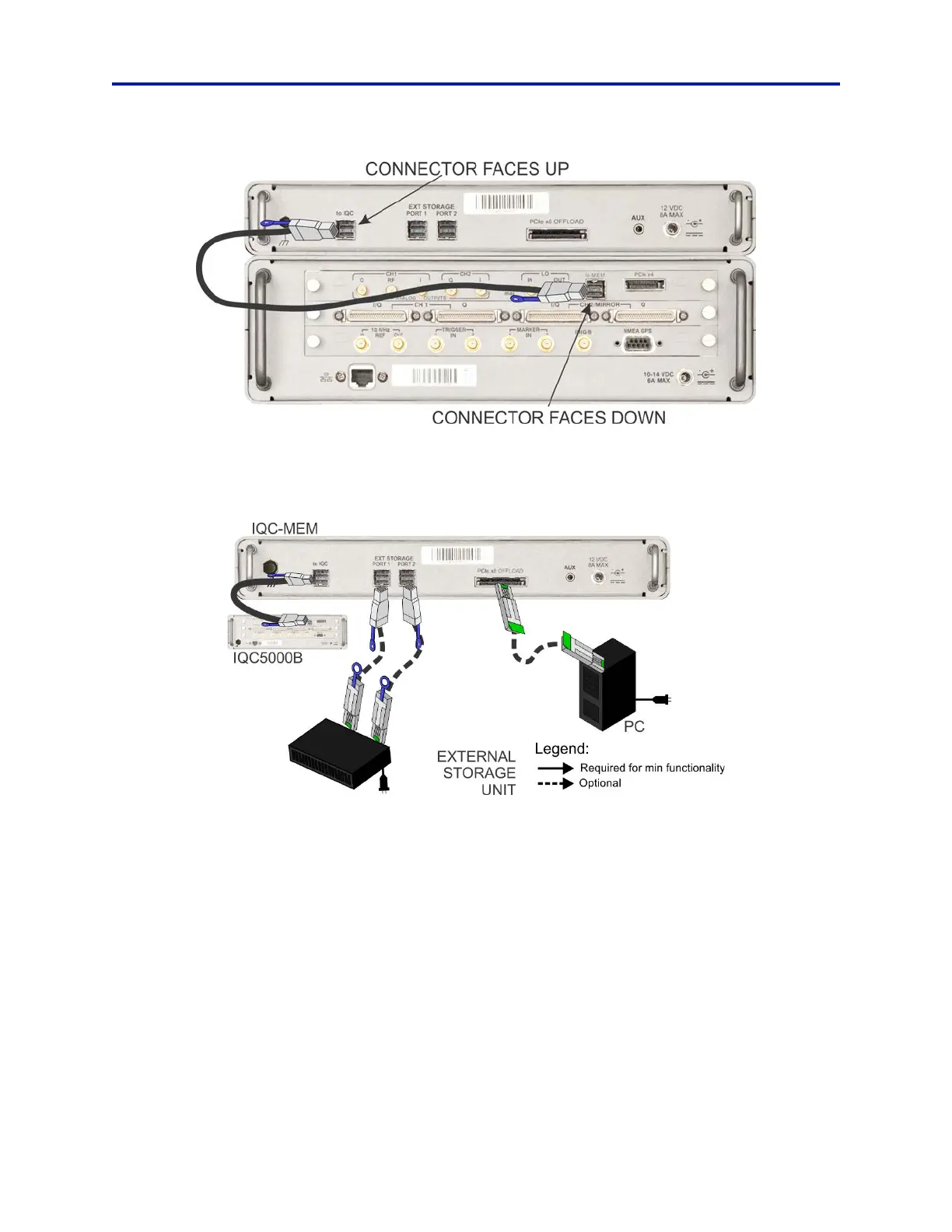
Figure 8 IQC-MEM Cable Connection
b. Connect one end of the External MiniSAS HD cable to the IQC-MEM EXT STORAGE PORT 1, connect the
remaining end to External Storage Unit 1 data port.
Figure 9 IQC-MEM External Storage Cable Connections
c. (Option: 2-channel recording with ONE external SSD storage unit) Connect one end of the External
MiniSAS HD cable to IQC-MEM EXT STORAGE PORT 2, and the remaining end of the cable to the Exter-
nal Storage Unit data port.
3. Connect Ethernet cables from the Ethernet Switch to the following:
a. IQC5000
b. Computer Workstation
4. Determine whether an I/Q baseband or fix
ed frequency playback is desired.
a. If I/Q baseband playback is desired go to Step 5.
b. If fixed frequency playback is desired go to Step 6.



 To Next Page