Setup
12
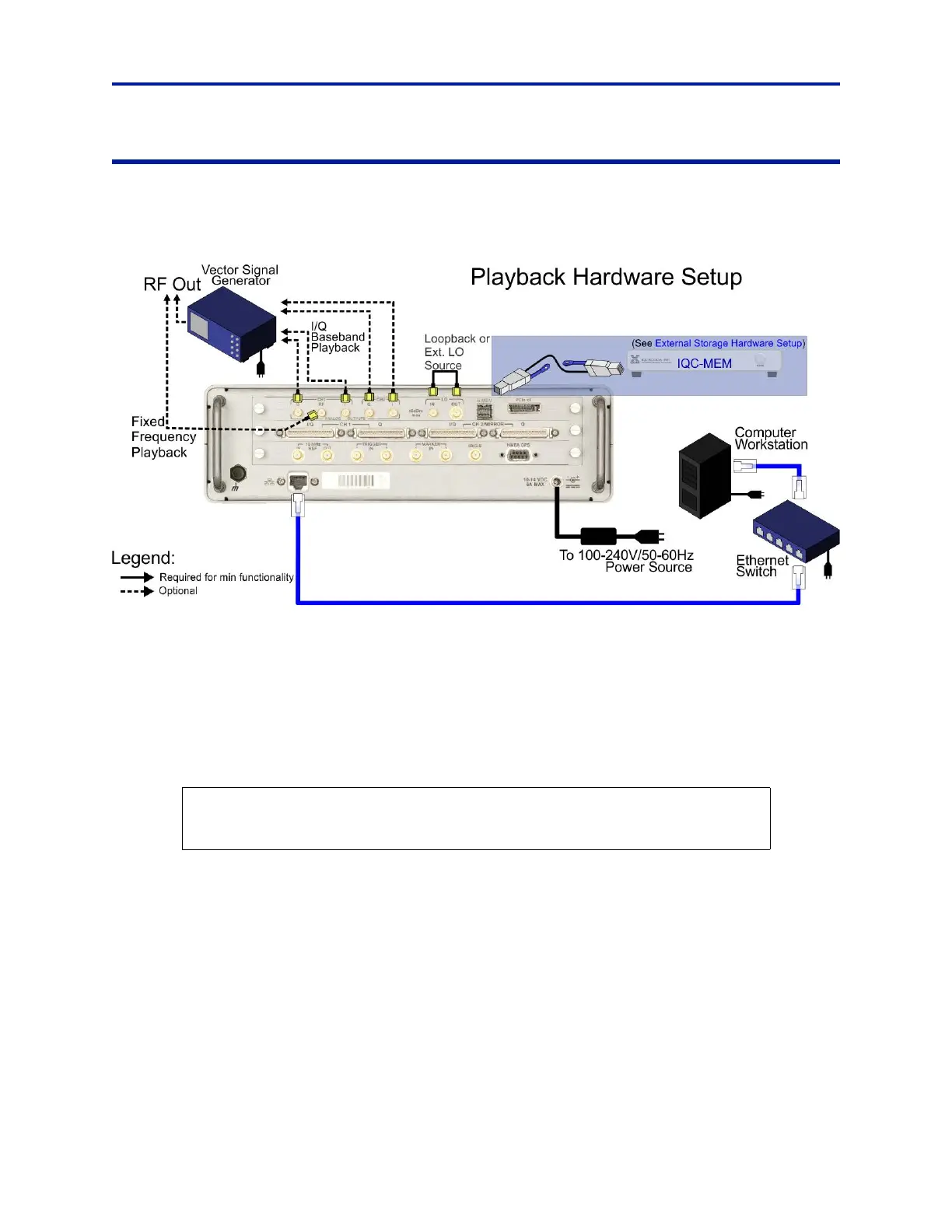
Hardware Setup – Playback
The IQC5000B is capable of I/Q baseband and RF playback. The I/Q Baseband playback is intended for normal use,
RF playback capability should be used for testing and system validation only. Do not use RF Playback for normal use.
Figure 7 Playback Hardware Setup
To playback, perform the following steps:
1. Connect the Power Cables to the following devices:
a. IQC5000 (Note: requires 10-14V power adapter)
b. Ethernet Switch
c. Computer Workstation
d. IQC-MEM (Note: requires 10-14V power adapter)
e. (OPTION) External storage unit (s)
2. (Option: external storage) Connect
c
ables for the IQC-MEM and external storage units.
a. Connect the External MiniSAS HD to
External MiniSAS HD cable to IQC5000B to MEM port – with tab
facing down – connect remaining end to the IQC-MEM to IQC port – with tab facing up.
CAUTION
Use extra
care
when connecting External MiniSAS HD connectors, the ports are keyed,
but can be forced in upside-down.



 To Next Page