8
Chapter 2 Setup
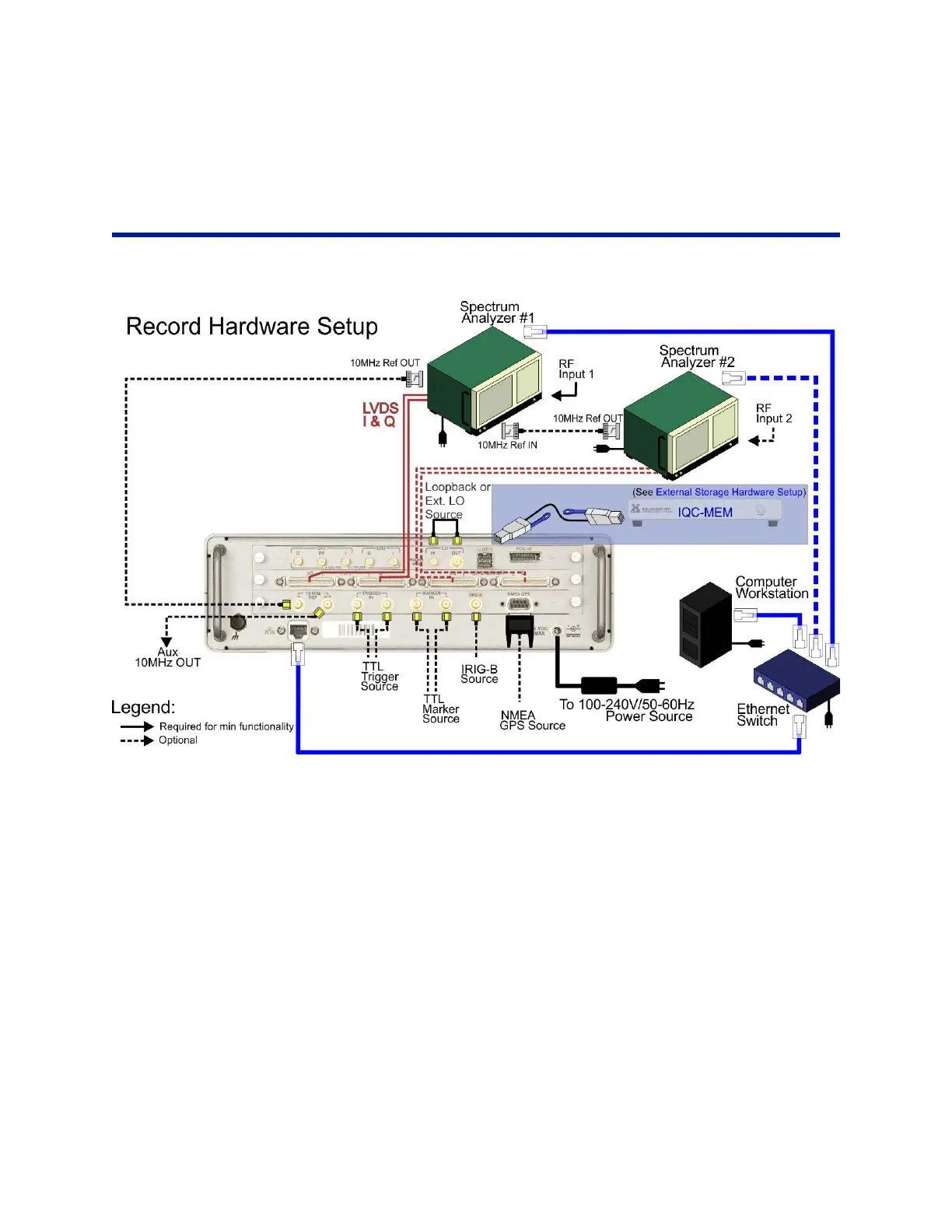
Hardware Setup – Record
Figure 4 Recording Hardware Setup
To set up the hardware for recording:
1. Connect the Power Cables to the following devices:
a. IQC5000 (Note: requires 10-14V power adapter)
b. Spectrum Analyzer (SA)
c. Ethernet Switch
d. Computer Workstation
e. IQC-MEM (Note: requires 10-14V power adapter)
f. (OPTION) External storage unit (s)
2. Connect the LVDS Data Cables fr
om Spectrum
Analyzer to IQC5000:
Keysight X-Series (Narrowband Interface up to 40 MHz)
a. Connect the wide end of the LVDS c
able from the X-Series Digital Bus Out to the IQC5000 CH 1 I/Q
Input
Keysight X-Series (Wideband Interface up to 255 MHz)
a. Connect from the X-Series I Out to the IQC5000 CH 1 I Input



 To Next Page