IQC 5000B Operation Manual
43
The IQC5000 Control Tab Layout and Visual Components
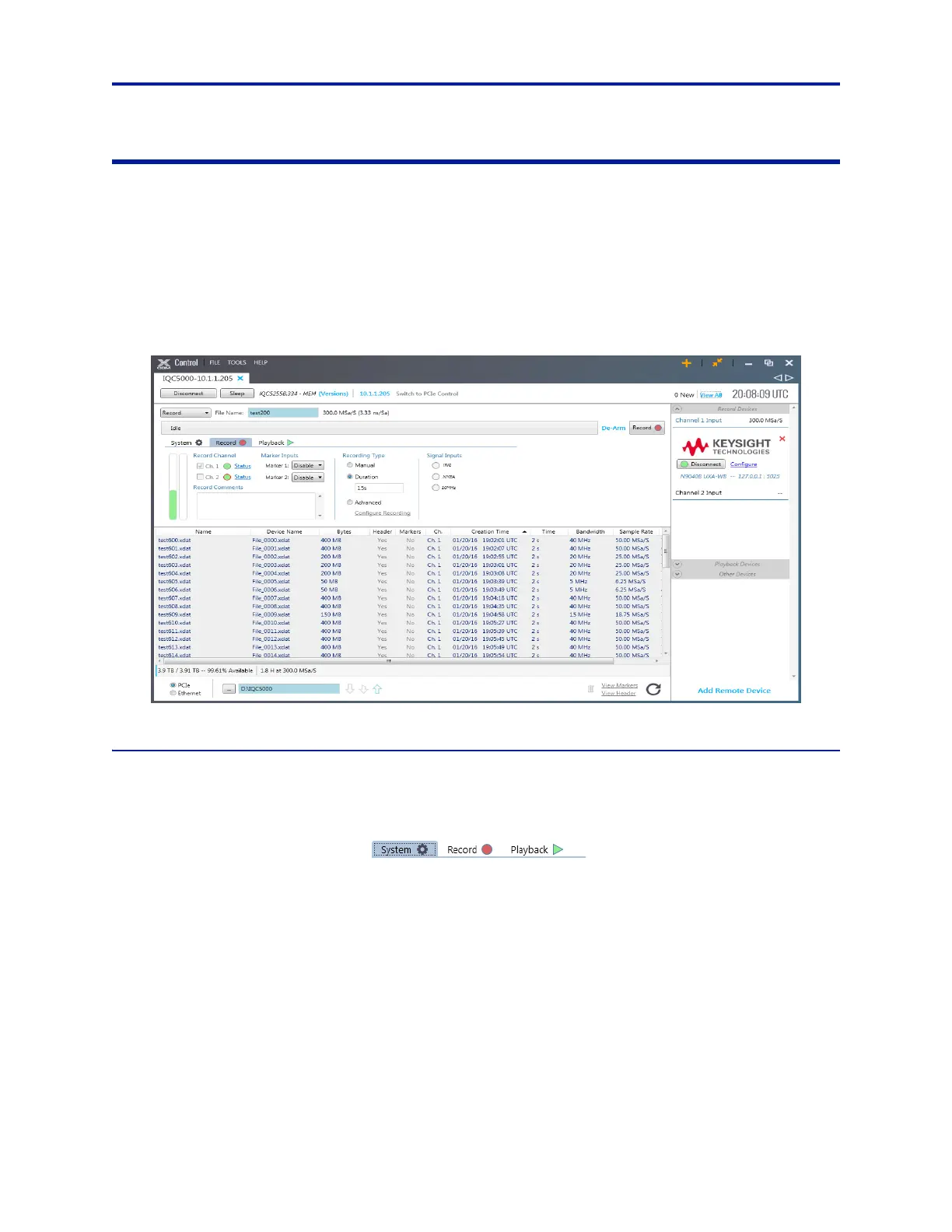
The IQC5000 control tab can be broken down into 3 main sections (See “IQC5000 Control Tab” on page 43):
IQC5000 Management – at the top left of the tab, this pane manages recording, playback, marker, and trig-
ger parameters.
File Management – at the bottom of the tab, this pane shows all recorded files.
Remote Device Management – at the right of the tab, this pane manages peripheral devices (including the
spectrum analyzer and other auxiliary devices).
Figure 32 IQC5000 Control Tab
System, Record, Playback Tabs
The System, Record, and Playback Tabs are used to configure system operation.
Figure 33 System, Record, and Playback Tabs
System tab is used to select and configure RAIDs, set maximum record file size, set NMEA GPS baud rate,
and monitor system temperatures. See “Managing IQC5000B-MEM External
Storage” on page 46.
Record tab is used to select input channels, enable marker inputs, select recording type and view presence
of external input signals. See “Recording with IQC Control” on page 53.
Playback tab is used to select playback channels, output type, and start and stop times. See “Playback with
IQC Control” on page 58.



 To Next Page