IQC 5000B Operation Manual
49
Remote Devices
The IQC Control UI offers users a quick way to manage supported peripheral devices.
Table 23 - Supported Devices for Remote Control
Device Type Vendor Supported Devices
Device Listening
Po
r
t
Spectrum
Analyzer
Keysight UXA 5025
PXA
MXA
EXA
Rohde & Schwarz FSV/FSVR 5025
FSW
DigIConf (Configurable as a subsystem of the
FS
V
/FSW)
5026
Tektronix RSA 6000 Series 4000
RSA 5000 Series
Anritsu Field Master Pro MS2090A 9001
Accessory Dowkey RF Switch 10
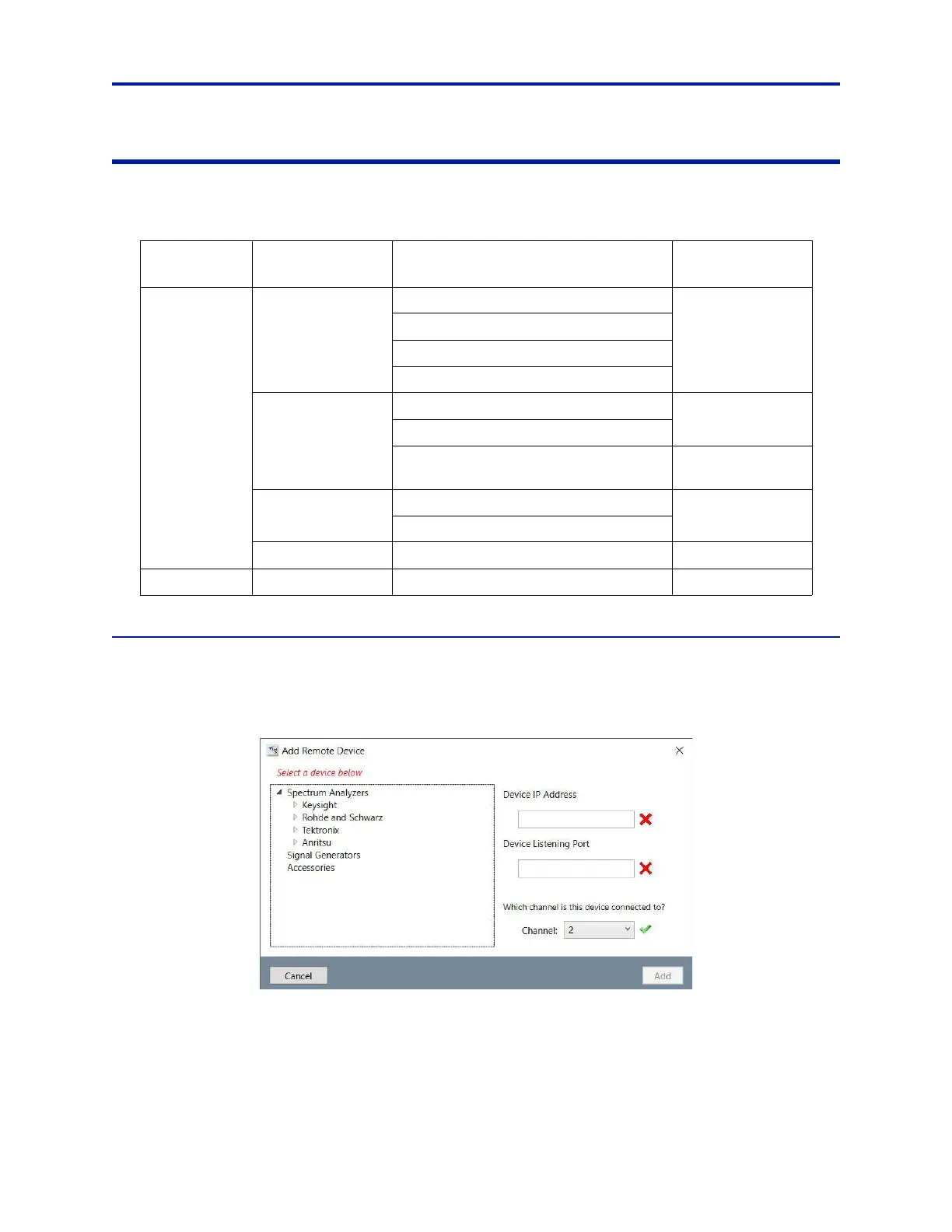
Adding a Remote Device
To add a device:
1. Click Add Device at the bottom of the Remote Devices panel. A co
nnection wizard appears.
Figure 39 Add Remote Device
2. Select the device from the list tree of supported devices in the left pane. The default Device Listening Port for
the chosen device is pre-filled.
3. Enter the IP Address.
4. If adding a spectrum analyzer, select the Channel the device is c
onnect
ed to.
If adding an accessory, such as the DowKey RF Switch, no channel w
ill be assigned (see "DowKey RF
Switch" on page 51 for details).



 To Next Page