IQC 5000B Operation Manual
23
Setting the IP Address
Setting the IP address on the RSA follows the standard method of setting an IP address in Microsoft® Windows
Vista™ or Microsoft® Windows 7™, depending on the operating system installed on the RSA.
Set the IP address as outlined in "Network Setup" on page 15.
Turning On the SCPI Socket Server
The SCPI socket server must be running on the RSA for recording. Follow these steps:
1. Right-click on the TekVISA LAN Server Control icon in the system t
ray:
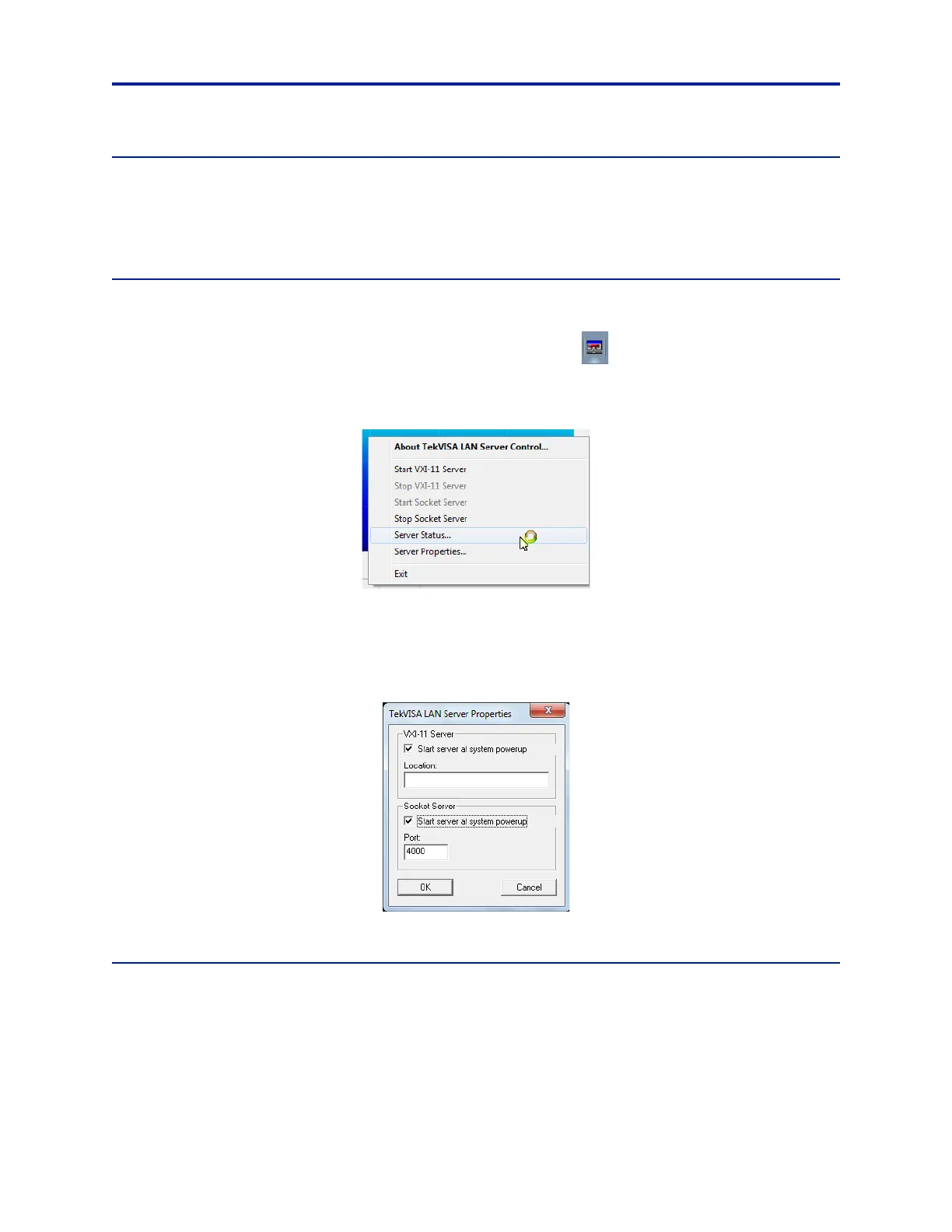
2. Select Server Status from the menu that appears:
Figure 17 TekVisa Server Control Menu
3. Click the Start Socket Server button in the upper-right corner.
4. To start the socket server during power-on of the RSA, click Ser
ver Properties as seen in Figure 17. Next, under
the Socket Server section, click the check box
Start server at system powerup (see Figure 18):
Figure 18 TekVisa LAN Server Properties
Hardware Alignment
Note: The alignment mode should not be set to automatic, else the I/Q streaming data is interrupted by an
automatic calibration. Alignment should be performed after a 20-minute warm-up, and immediately before
recording for best results.
To set Hardware Alignment from Automatic to Manual:
1. Go to Tools > Alignments.



 To Next Page