Setup
16
Keysight X-Series Spectrum Analyzer Setup
Note: Refer to the X-Series Operating Manual for more detailed instructions on signal analyzer opera-
tion. The following represents the minimum steps required to perform a recording with the IQC5000.
Setting the IP Address
Setting the IP address on an X-Series spectrum analyzer follows the standard method of setting an IP address in
Microsoft® Windows™.
Administrative Access
Before setting the IP address, you must gain administrative acces
s. To do so, follow these steps:
1. Log off user Instrument.
2. Log on as user administrator (no caps) with password Keysight4u!
(agilent4u for Analyzers labeled Agilent).
3. Set the IP address as outlined in "Network Setup" on page 15.
4. Log off user administrator and log back
on a
s user Instrument.
Turning on the SCPI Socket Server
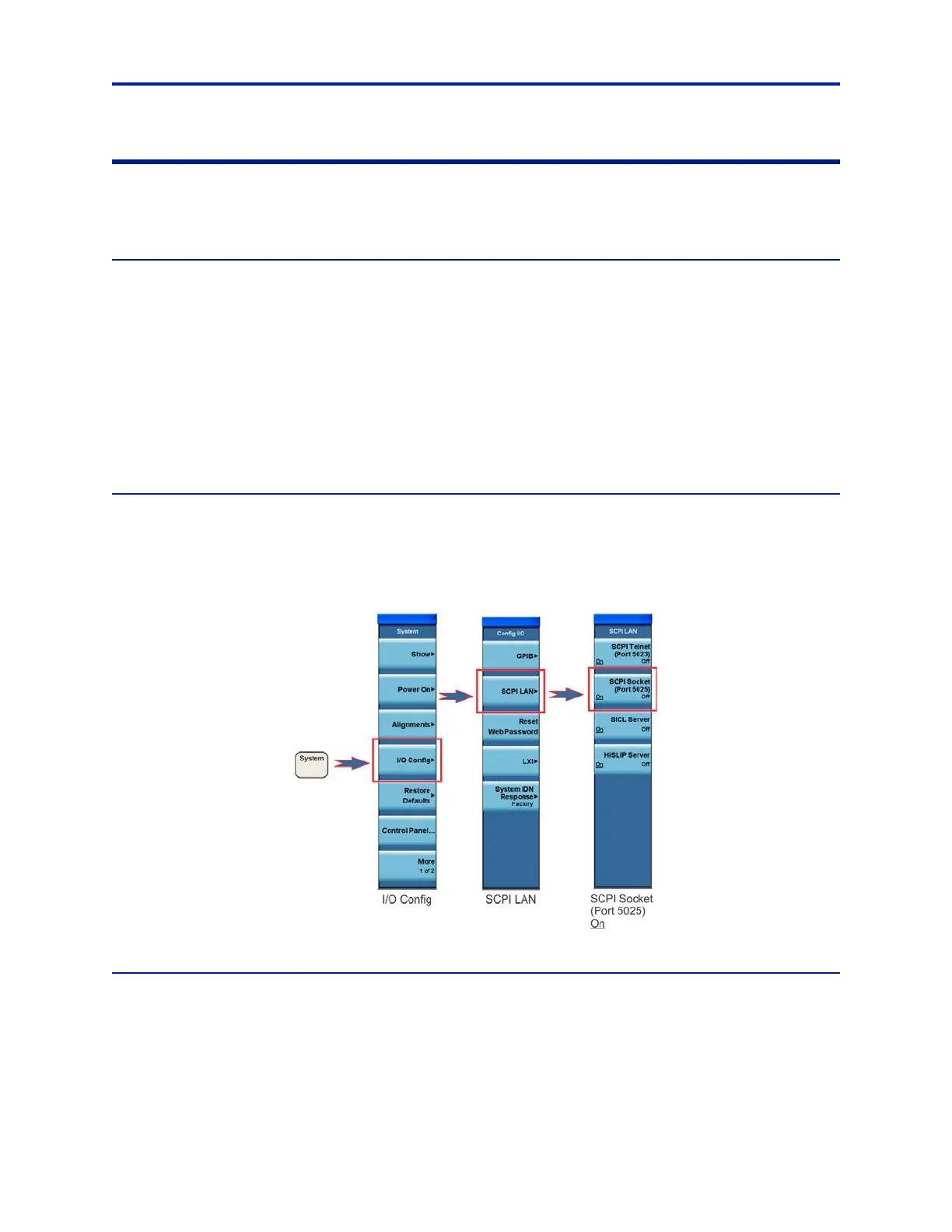
The SCPI socket server must be running on the X-Series to record. Follow these steps:
1. Press System on the front panel.
2. Press IO Config > SCPI LAN > SCPI Socket (Port 5025) On.
Figure 10 SCPI Socket Server
Hardware Alignment
Note: The alignment mode should not be set to automatic, else the I/Q streaming data is interrupted by an
automatic calibration. Alignment should be performed after a 20-minute warm-up, and immediately before
recording for best results.
To set Hardware Alignment from Automatic to Manual:
1. Press System on the front panel.
Press Alignments > Auto Align > Off.



 To Next Page