Using IQC5000 with IQC Control
46
5. Storage System Check – The storage device is checked and the list of files currently stored on the storage device
are retrieved to populate UI fields
6. Other User Connected – Checks to see if another client is contr
olling
the same IQC5000
If the connection halts on the Other U
ser Connected step, the other user may be forcibly disconnected by right-
clicking the step and selecting Override IP Verification.
For more help diagnosing connections problems, see "Connection Problems" on page 69 in the Troubleshooting
section.
Disconnecting
Press the Disconnect button to disconnect from the IQC5000.
At any time during normal operation, the device may be disconnect
ed in order to shut down IQC Control, or to allow
operation from another workstation.
Managing IQC5000B-MEM External Storage
If an IQC-MEM module is being used to record data to external storage units, the RAID Selection settings will be
configurable.
If a valid RAID isn’t detected, the borders of the UI will flash r
ed and the progress bar will display NO RAID, indicating
that a RAID needs to be selected before recording can begin.
Specific procedures for creating Single
and Dual RAIDS are located in "Advanced RAID Configuration Modes" on
page 82.
Configuring RAIDs
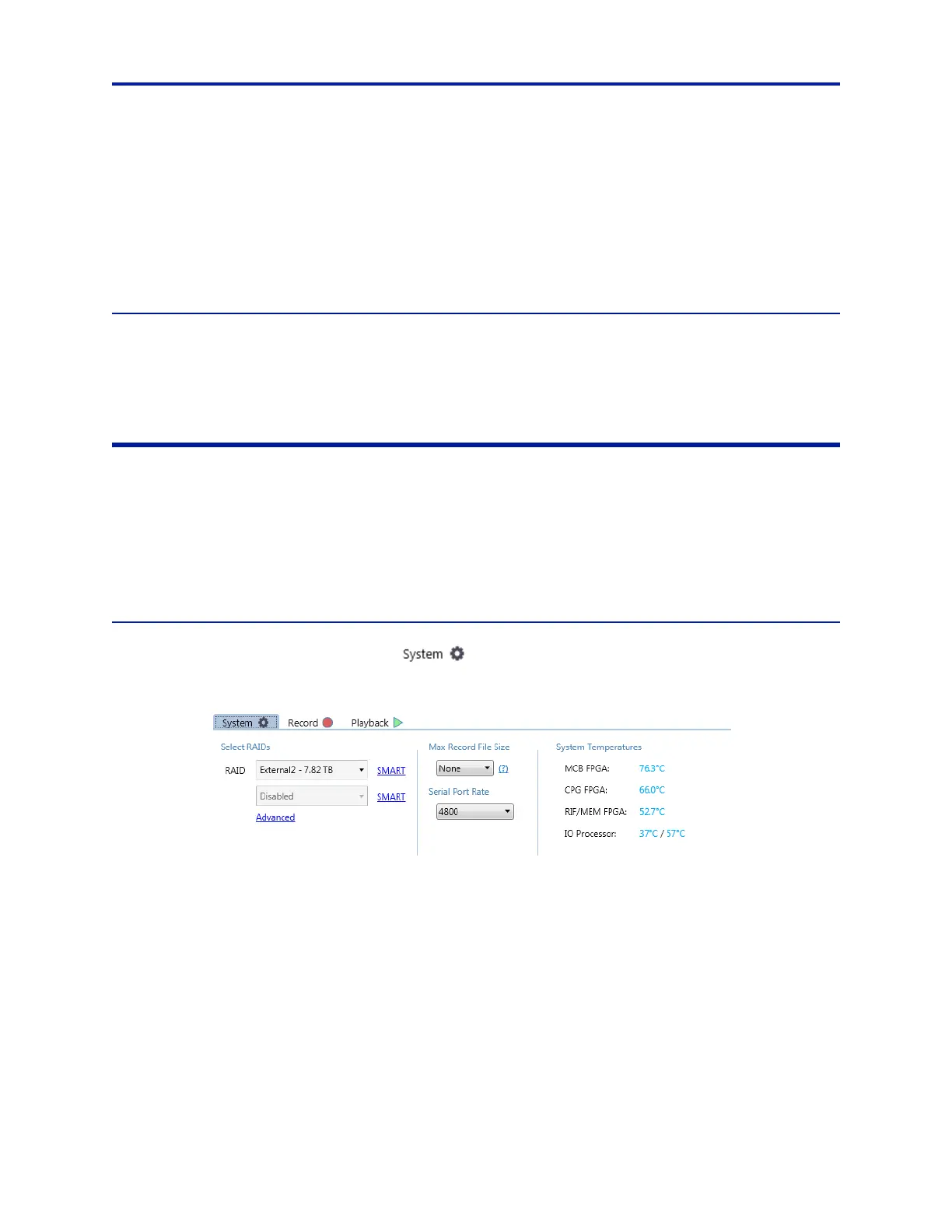
To configure a RAID, click on the System Tab ( ).
Figure 37 System Tab
Click on Advanced in the RAID section of the System Tab to bring up the RAID Assembly/Disassembly menu.



 To Next Page