Using IQC5000 with IQC Control
60
Playback Calibration
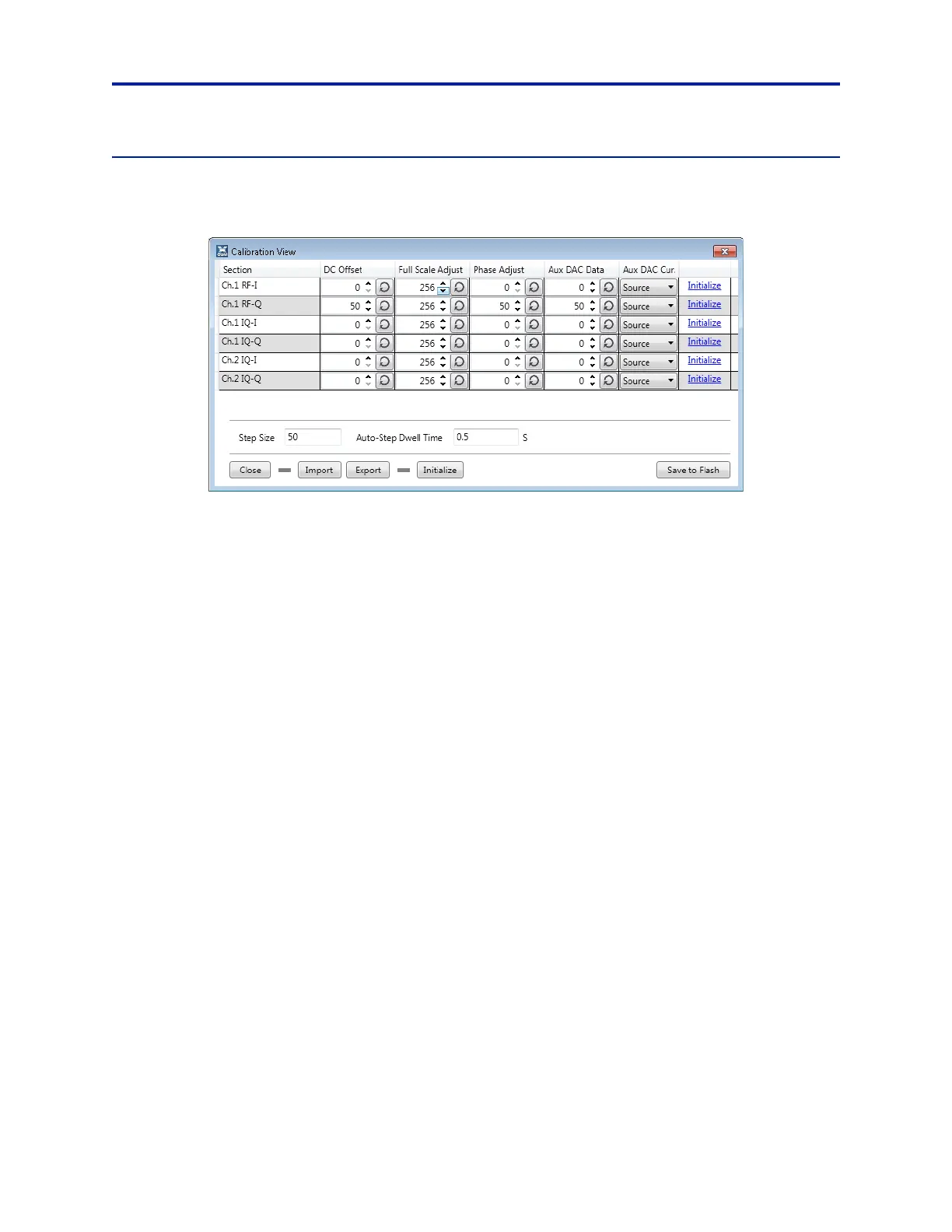
Select the Calibration button to view the current RF and IQ playback calibration parameters on the IQC5000.
Figure 49 Playback Calibration Dialog
There are 3 I/Q pairs which correspond to the playback modes for each channel:
Channel 1 RF – I, Q
Channel 1 IQ – I, Q
Channel 2 IQ – I, Q
The I and Q for each playback mode are calibrated separately, res
ulting in a total of 6 items to calibrate. Each item
has 4 calibration parameters: DC offset, Full Scale Adjust, Phase Adjust, and Aux DAC Data.
Modifying Calibration Values
Each cell value can be modified by clicking in the cell and entering a
value within the column parameter value range,
automatically updating the IQC5000. Pressing the up and down arrows in the cell accomplishes the same thing; this
method works well for manually calibrating the unit.
To save all calibration values to the IQC5000, select Save to Fla
sh. The c
alibration values will not be saved to
nonvolatile memory unless they are saved to flash.
Importing/Exporting Calibration Values
To import saved calibration values, select Import and navigate to
the desired filepath. To export calibration values to
a configuration file, select Export and navigate to the desired file path.
To load the manufacturer calibration va
lues, import the default calibration file at:
%APPDATA%\XCOM\XCOMControl\config\IQCFlashConfig.xcfg.



 To Next Page