Using Blackmagic Focus Demand
This section describes the features and connectors on Blackmagic Focus Demand.
3
2
1
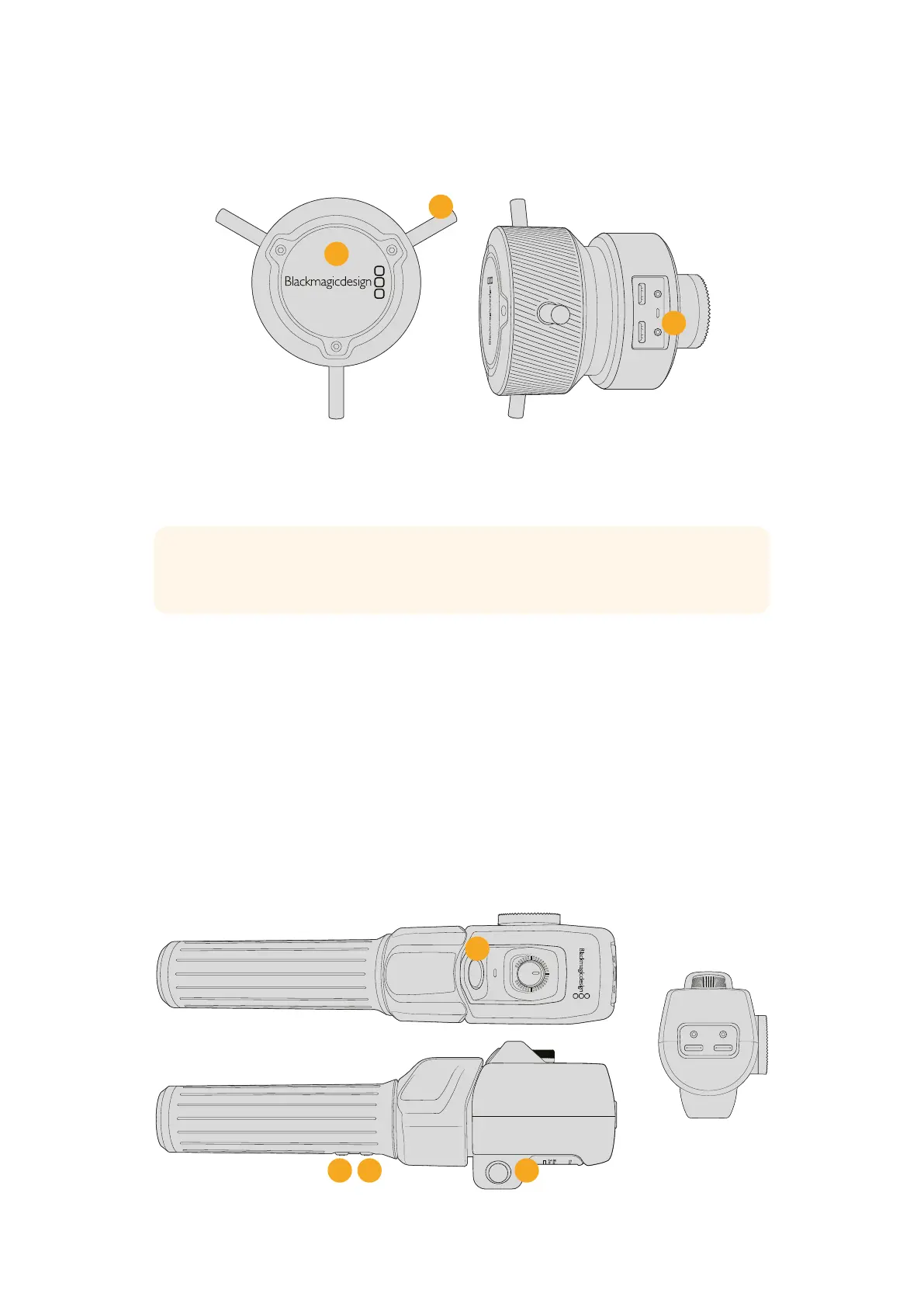
1 Control Knob
Rotate the focus wheel clockwise to focus on subjects closer to the lens, or
counterclockwise to focus on subjects further away. You can change the focus direction in
the menu by setting it either ‘forward’ or ‘reverse’.
TIP If you are also using a Blackmagic Zoom Demand, press the quick zoom button to
magnify the image as you focus using the focus demand.
2 Control Pins
These three pins expand the diameter of the control surface to let you make finer focus
adjustments with the tip of a finger.
3 USB ports
Allows for connecting the focus demand to the camera and daisy chaining to the zoom
demand. The ‘cam’ port is also used for updating the internal software via the Blackmagic
Camera Setup utility.
Using Blackmagic Zoom Demand
The controls on the Zoom Demand are mappable through the Camera settings. To change the
button functions, refer to the ‘setup menu’ section for more information.
The following commands are set as default:
2
3
4
1
71Blackmagic Zoom and Focus Demands



 To Next Page
 Loading...