EasyManua.ls Logo

Blue Sonic Multimedia PC - System Map: Rear View

Blue Sonic Multimedia PC
304 pages
Print Icon
To Next Page IconTo Next Page
To Previous Page IconTo Previous Page
Loading...
System Map: Rear View 1 - 17
Quick Start Guide
1
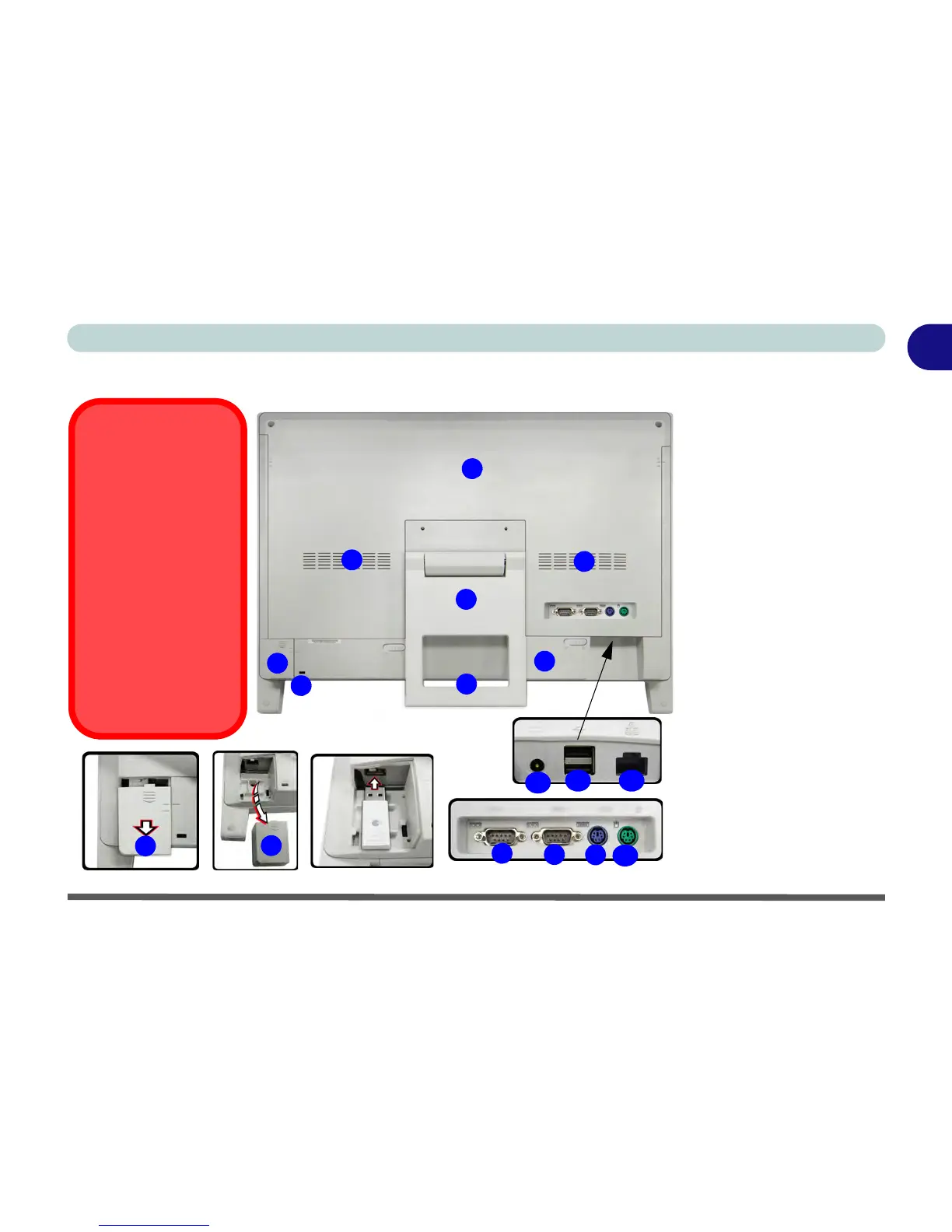
System Map: Rear View
Figure 1 - 10
Rear View
1. Rear Component
Cover
2. Stand
3. Vent/Fan Intake
4. Carrying Handle
Area
5. USB Wireless
Transceiver Cover
(for an RF
Keyboard & Mouse
Kit USB Dongle -
not supplied with
this model)
6. Security Lock Slot
7. Battery
8. 2 * RS-232 Serial
Ports
9. PS/2 Port (keyboard)
10.PS/2 Port (mouse)
11.DC-In Jack
12.2 * USB Ports
13.RJ-45 LAN Port
1
2
3
8
3
8
9
4
13
5
5
5
12
USB Port for
Wireless
Transceiver
Note that the USB port
for the wireless trans-
ceiver is designed spe-
cifically for a USB
dongle for an RF Key-
board & Mouse kit (not
supplied with this
model).
Do not use any other
USB devices in this
port.
6
11
7
10

Table of Contents