S83/85 Ultrasonic Generator Installation
A40-064 Rev 0 Page 25
3.6 Connecting the Ultrasonic Power Supply
Connect the ultrasonic power supply as follows:
Step Action
1 Make sure that the ultrasonic power supply is unplugged from the
AC voltage source.
2 Make sure the Main On/Off switch (located on the back panel) is
off.
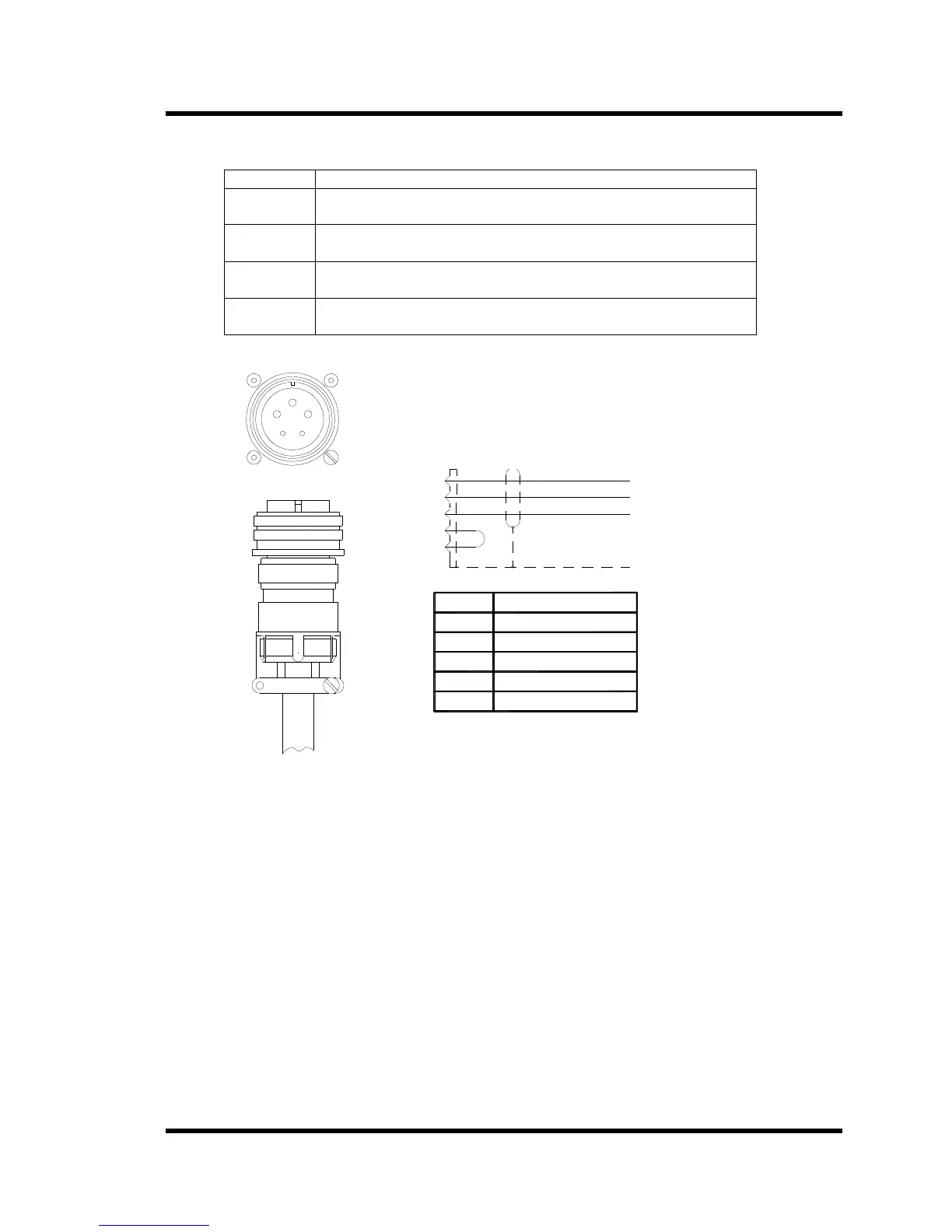
3 Align the notch of the RF cable and the slot of RF connector on the
back panel (Figure 3-4 shows the alignment).
4 Plug the RF plug into the RF socket; secure the RF plug by
threading the knurled ring and turning until the end of travel.
Figure 3-4 Alignment of RF Plug
Pin
D
C
B
E
A
D
E
C
B
A
Wire In
Green
Black
Red
S
H
I
E
L
D
S
c
h
e
m
a
t
i
c
R
F
C
a
b
l
e
Interlock
Interlock
A
C
E
D
B
R
e
d
(
+
)
B
l
a
c
k
(
-
)
G
r
e
e
n
(
G
r
o
u
n
d
)
Note: If the RF connector is not fully engaged by the knurl ring, the External Lock LED will light.



 To Next Page