S83/85 Ultrasonic Generator Operation
A40-064 Rev 0 Page 33
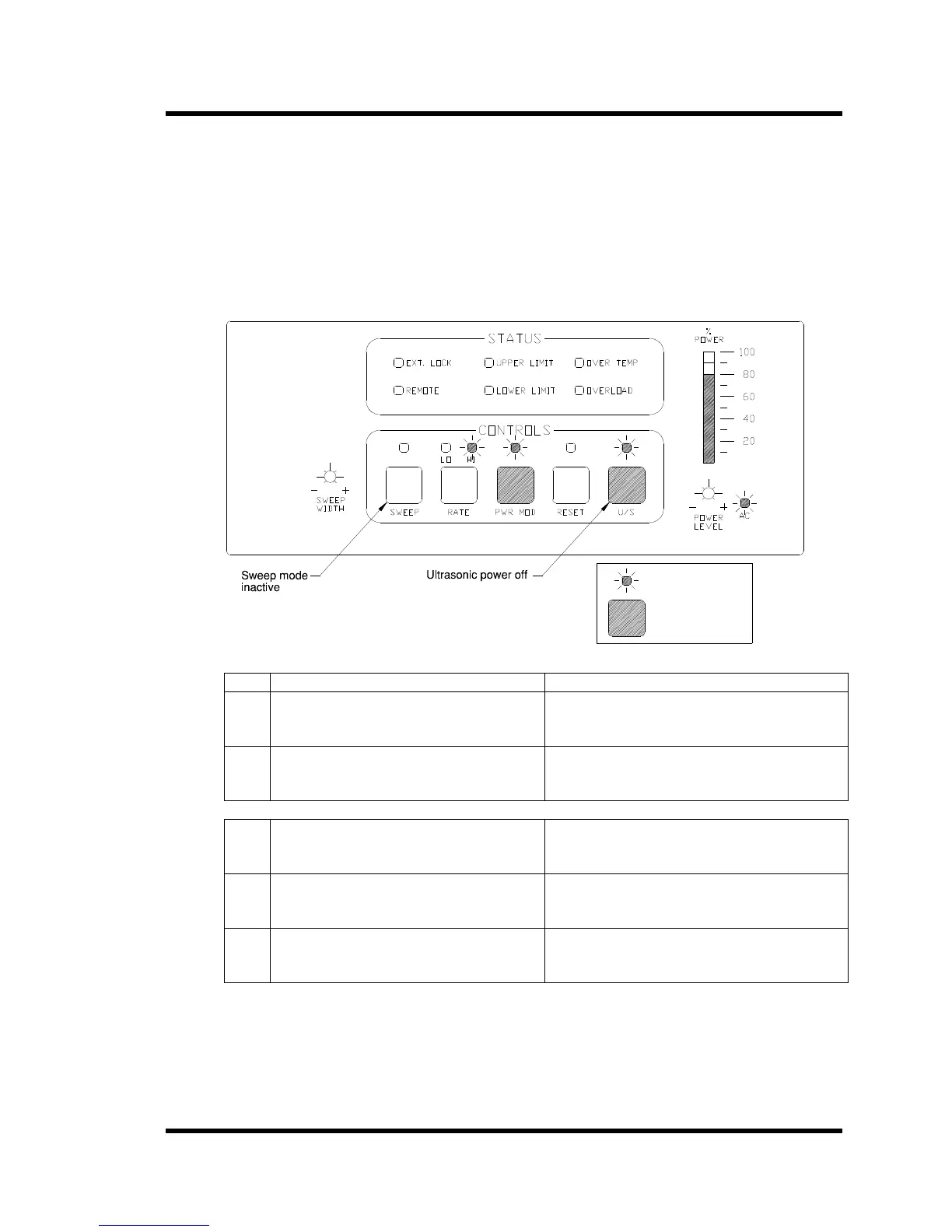
4.5 Power Modulation Mode (S85 only)
Power modulation creates power bursts at a 4 : 1 ratio between peak power and the average power.
When not in power modulation, the ratio between the peak and average power is 2:1. This feature
is helpful when working with liquids that are normally difficult to cavitate such as semi-aqueous
solutions. Activate power modulation by pressing the PWR MOD button on the front panel.
• The generator must be off to enter the power modulation mode.
• Sweep will be inactive in the power modulation mode.
• Power modulation can be set from the panel when operating in the remote mode.
Figure 4-5 S85 Setting Power Modulation Mode
LED lit
Press key
Step Action Result
1 Power up the ultrasonic power supply
and make sure that U/S LED is off.
AC LED on;
U/S LED off.
2 Press two control switches in this order
(a) POW MOD and (b) U/S.
POW MOD LED lights;
Tank liquid agitates.
3 To turn POW MOD off: press the U/S
switch.
U/S Off
4 Press the POW MOD switch. POW MOD mode inactive and the LED goes
off.
5 Press the U/S switch. Ultrasonic power supply returns to standard
operating mode.



 To Next Page