S83/85 Ultrasonic Generator Operation
A40-064 Rev 0 Page 35
Step Action Result
1 Press the Sweep switch. Sweep LED lights.
2 Press Rate to select 80 Hz (LO) or 1000
Hz (HI).
Rate HI or LO led lights. Refer to Rate
on next page.
3 Turn the Sweep Width adjustment port
to set the bandwidth.
Figure 4-8 Sweep Width Adjustment
WIDTH
SWEEP
Decrease Increase
−
+
4 Press the Sweep switch. Sweep LED goes off.
5 Press the U/S switch. Ultrasonics activates.
4.7 Rate Function (S85 only)
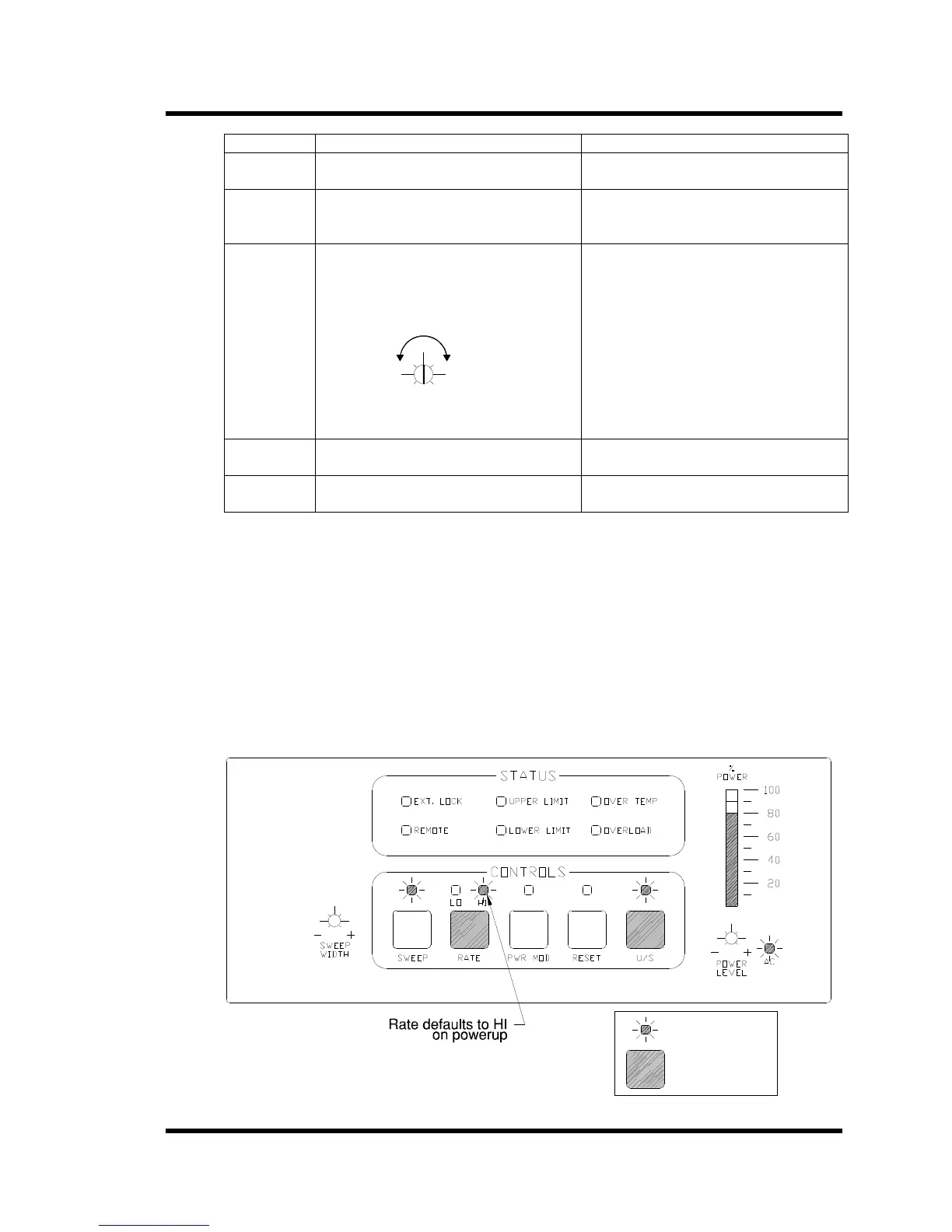
The Rate switch allows you to select the speed at which the ultrasonic power supply will sweep
about the operating frequency. (Low rate (LO) = 80 Hz; high rate (HI) = 1 kHz.)
• Rate is inactive at the front panel when operating the ultrasonic power supply in Remote
mode.
• Upon powerup, Rate defaults to HI.
• The Rate switch is used in conjunction with Sweep Mode; refer to Sweep mode, for
instructions on using the Rate function.
• Press the RATE switch to toggle between HI and LO (Low).
Figure 4-9 Rate Switch Operation
LED lit
Press key



 To Next Page