Operation Panel
1648-02F
Operation Panel of Touch Panel Model(P. 97)
Operation Panel of Black and White LCD Model(P. 98)
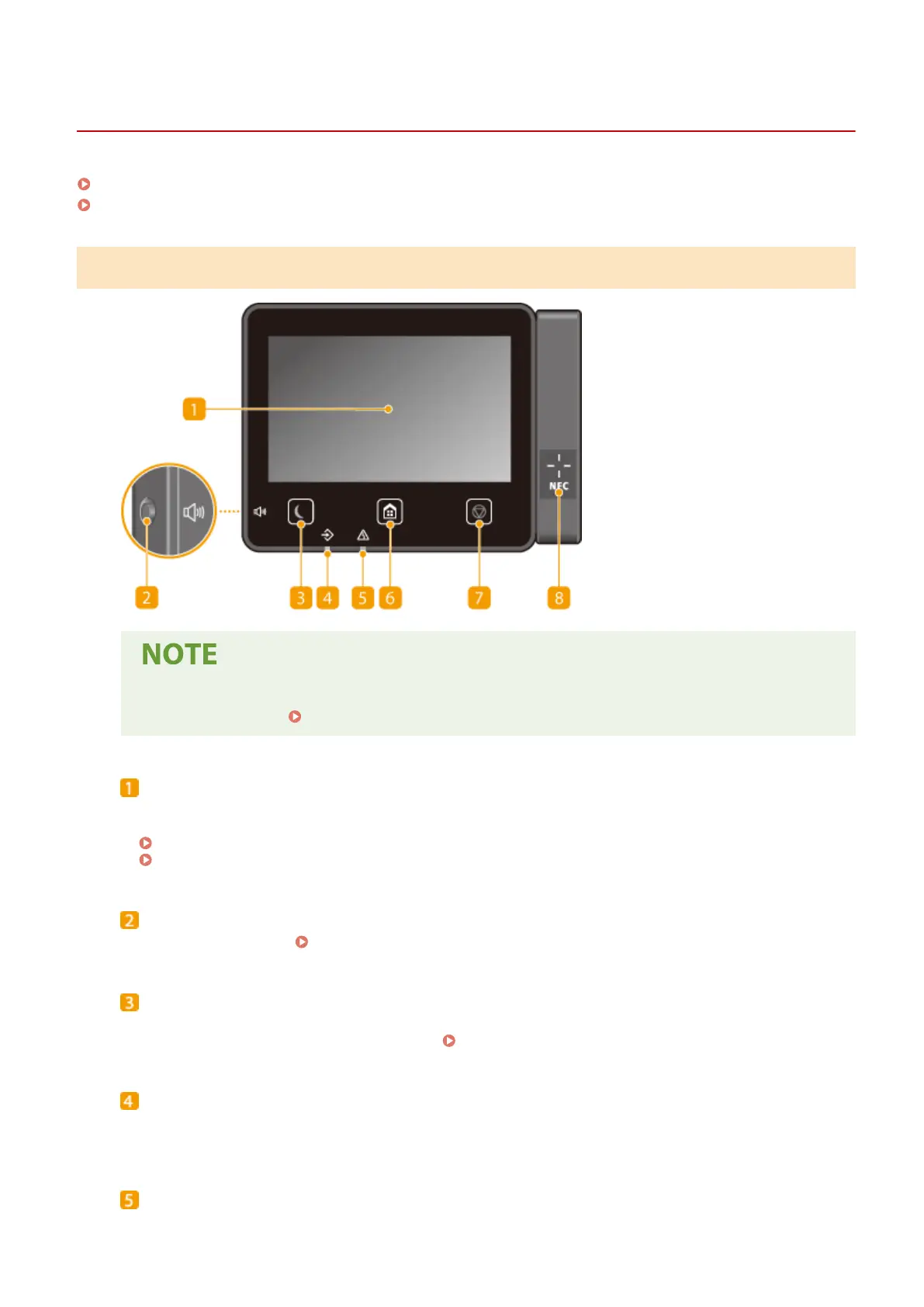
Operation Panel of Touch Panel Model
● The angle of the operation panel can be adjusted. Adjust it to an angle that is most comfortable for
viewing the panel. Adjusting the Angle(P. 98)
Display
You can view the progress of the machine and error statuses. The display is also a touch panel, so you can
specify settings by touching the screen directly.
Basic Screens(P. 106)
Basic Operation(P. 114)
Sound Volume key
Press to adjust volume.
Setting Sounds(P. 162)
Energy Saver key
Press to put the machine into the sleep mode. The key lights up green when the machine is in the sleep
mode. Press the key again to exit sleep mode. Entering Sleep Mode(P. 163)
Data indicator
Blinks while operations such as sending or printing are being performed. Lights up when there are
documents waiting to be processed.
Error indicator
Blinks or lights up when an error such as a paper jam occurs.
Basic Operations
97













 To Next Page