Relocating the Machine
1648-0J5
The machine is heavy. Make sure to follow the procedures below when moving the machine to avoid injury, and also
make sure to read the safety precautions before you begin. Important Safety Instructions(P. 2)
1
Turn OFF the machine and computer.
● When you turn OFF the machine, data that is waiting to be printed is deleted.
2
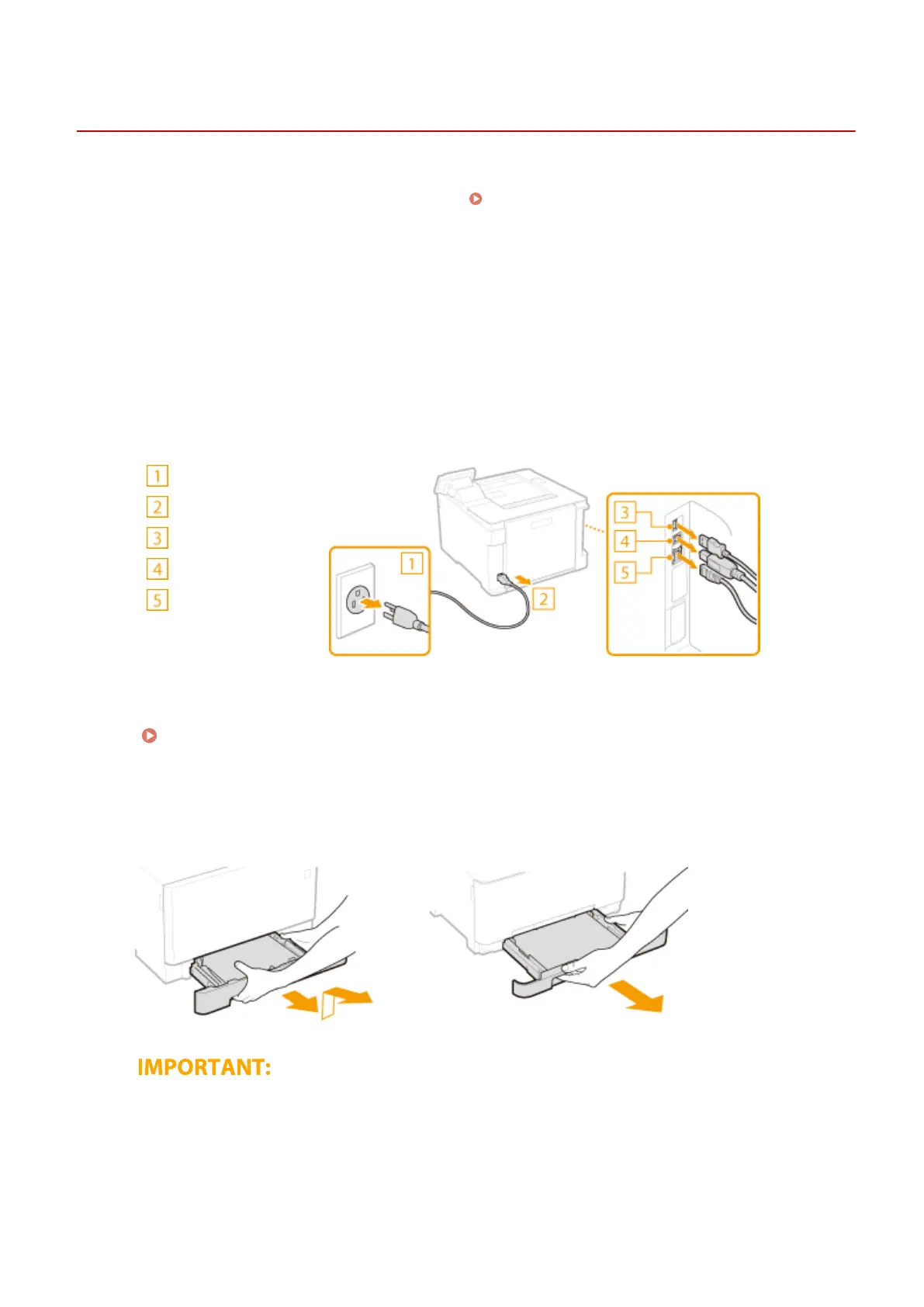
Disconnect the cables and cord from the machine in numerical order as in the
illustration below.
● Whether the cables with "
*
" are connected depends on your environment.
Power plug
Power cord
USB keyboard
*
USB cable
*
LAN cable
*
3
When transporting the machine across a long distance, remove the toner cartridges.
Procedure for Replacing the Toner Cartridge(P. 428)
4
Pull out the paper drawer.
LBP654Cdw
LBP612Cdw
● Make sure to hold the paper drawer with both hands, and pull it out gently. Otherwise, you may damage
the paper drawer by dropping it, if it slides out too easily.
5
Close all the open covers and multi-purpose tray, and move the machine to a new
location.
Maintenance
433













 To Next Page