Home Screen
1648-0H4
The Home screen is displayed when the power is turned ON or by pressing on the operation panel. Use this screen
to specify settings for and register functions.
Home Screen of Touch Panel Model(P. 107)
Home Screen of Black and White LCD Model(P. 108)
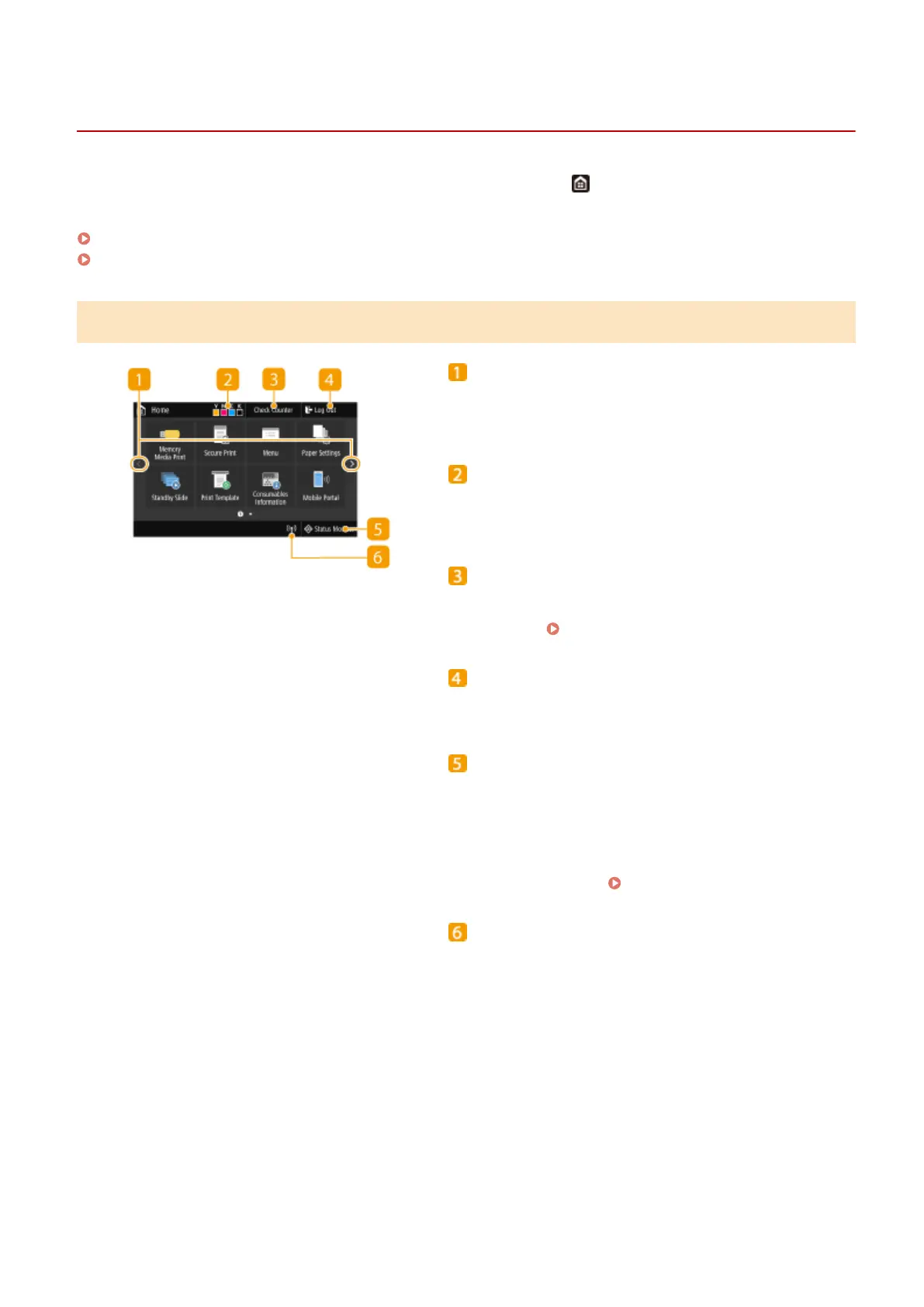
Home Screen of Touch Panel Model
Change page
Use this to view another page in the Home screen. You
can also ick sideways to change pages.
Amount remaining in the toner cartridges
Displays the amount remaining in the toner cartridges in
stages.
<Check Counter>
Displays the totals for black and white and color printouts
separately.
Viewing the Counter Value(P. 440)
<Log Out>
Use this button to log out from the machine.
<Status Monitor>
Press to check the printing status, to view the usage
history, or to view the network settings such as the IP
address of the machine. You can also check the status of
the machine, such as the remaining amount of paper and
the amount remaining in the toner cartridges, or whether
any errors occurred.
<Status Monitor> Screen(P. 110)
Wi-Fi icon
Displayed when the machine is connected to a wireless
LAN.
Basic Operations
107













 To Next Page