132
Contents
Preparation/
Setup
Print Using a
Computer
Appendix
IndexPrint/SaveInput/Edit
Names of
Components
Maintenance/
Printer Settings
Trouble-
shooting
■
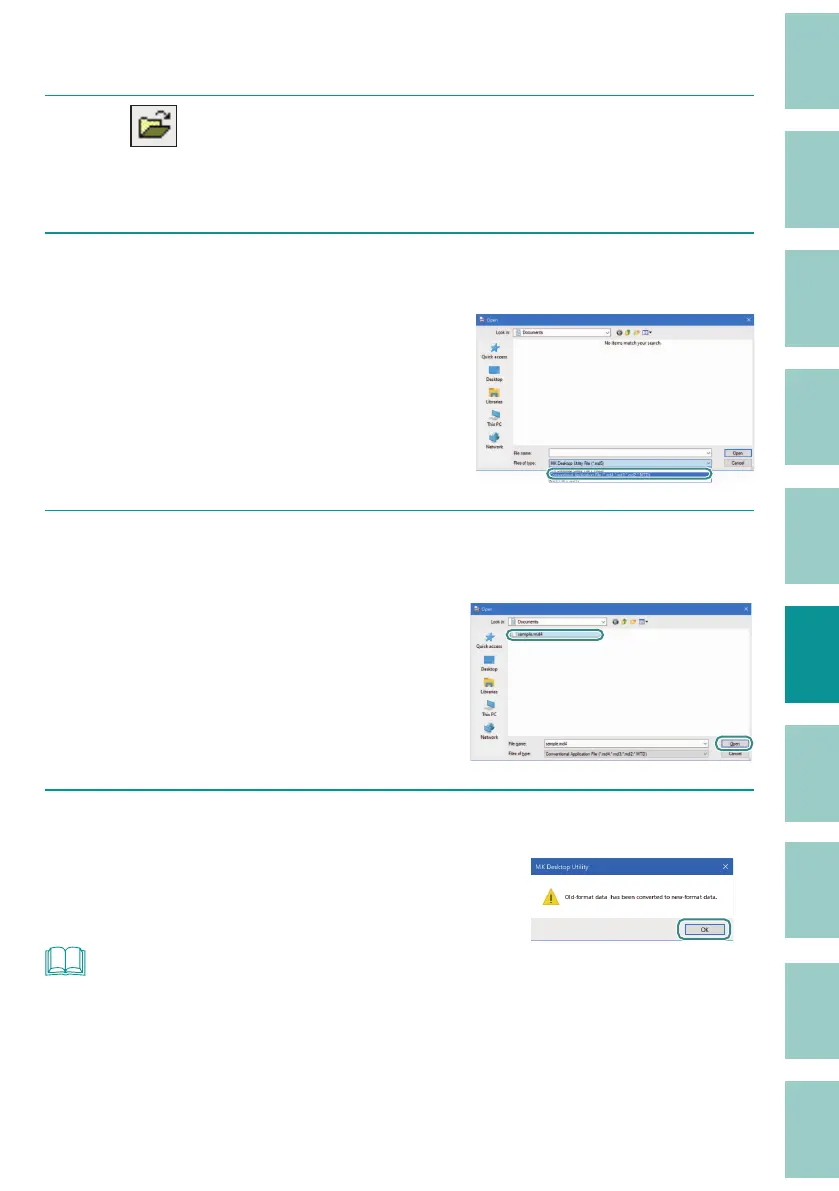
Opening a File Created with a Conventional Application
1
Click (Open).
Or, select [Open] from the [File] menu.
2
Select "Conventional Application File (*.md4; *.md3; *.md2; *.MTD)" for the
le type.
3
Select a le in the conventional application le (*.md4; *.md3; *.md2; *.MTD)
and click [Open].
The speci ed le will open and be displayed in
the data list.
When the le is opened, a message will be
displa
yed informing you that the le has been
converted to the new format (.md5).
4
Click [OK].
The speci ed le will open and be displayed in
the data list.
NOT
• When saving the edited data, save it as an alias using "MK Desktop Utility File (*.md5)" or "CSV File
(*.CSV)."
(P.136)



 To Next Page