133
Contents
Preparation/
Setup
Print Using a
Computer
Appendix
IndexPrint/SaveInput/Edit
Names of
Components
Maintenance/
Printer Settings
Trouble-
shooting
■
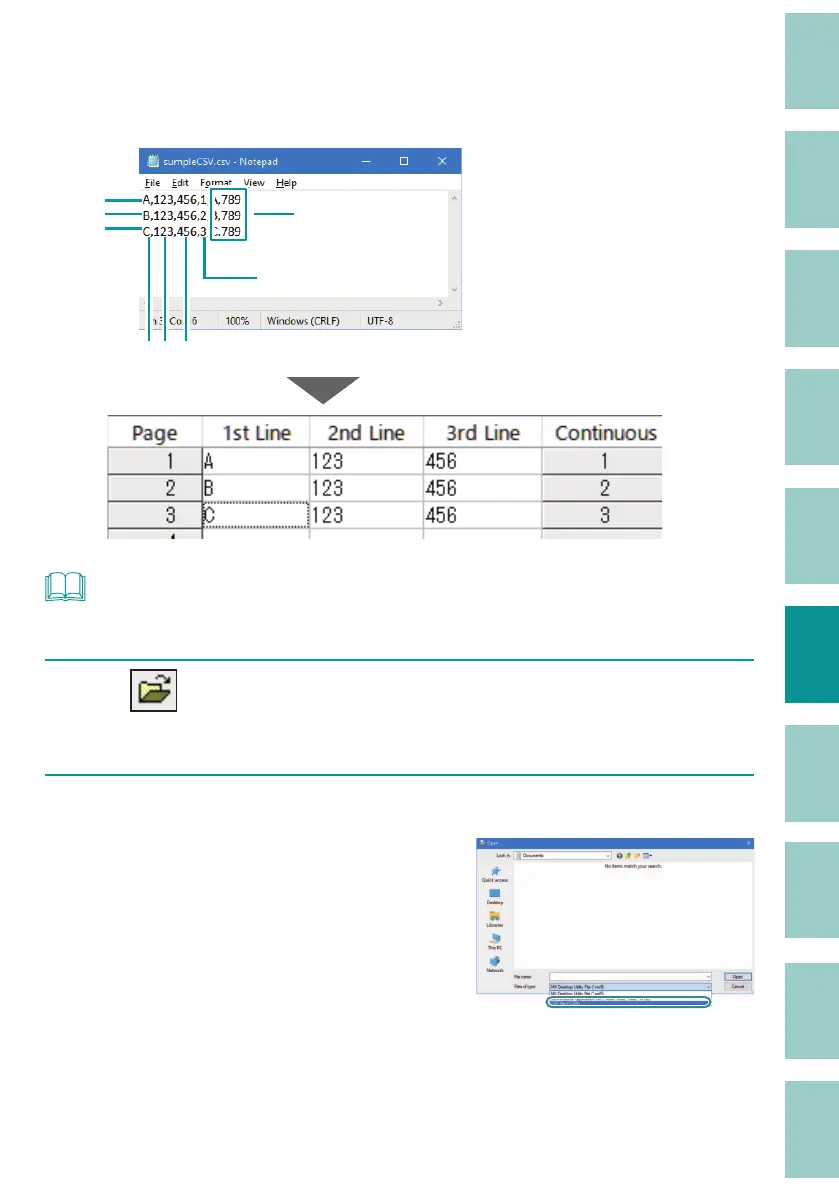
Opening a CSV le
When a CSV le is opened in the MK Desktop Utility, it will be loaded into the data list under the
following conditions.
Continuous
Invalid data
Line 1st 2nd 3rd
1st page
2nd page
3rd page
Row 1: Text data of 1st line
Row 2: Text data of 2nd line
Row 3: Text data of 3rd line
Row 4: Number of continuous
prints
* Data in the fth and subsequent
rows is invalid.
NOT
• The maximum number of lines that can be read is 10000.
1
Click (Open).
Or, select [Open] from the [File] menu.
2
Select [CSV File (*.CSV)] for the le type.



 To Next Page