60
Contents
Preparation/
Setup
Print Using a
Computer
Appendix
IndexPrint/SaveInput/Edit
Names of
Components
Maintenance/
Printer Settings
Trouble-
shooting
7
Press the [Seg Len] key.
8
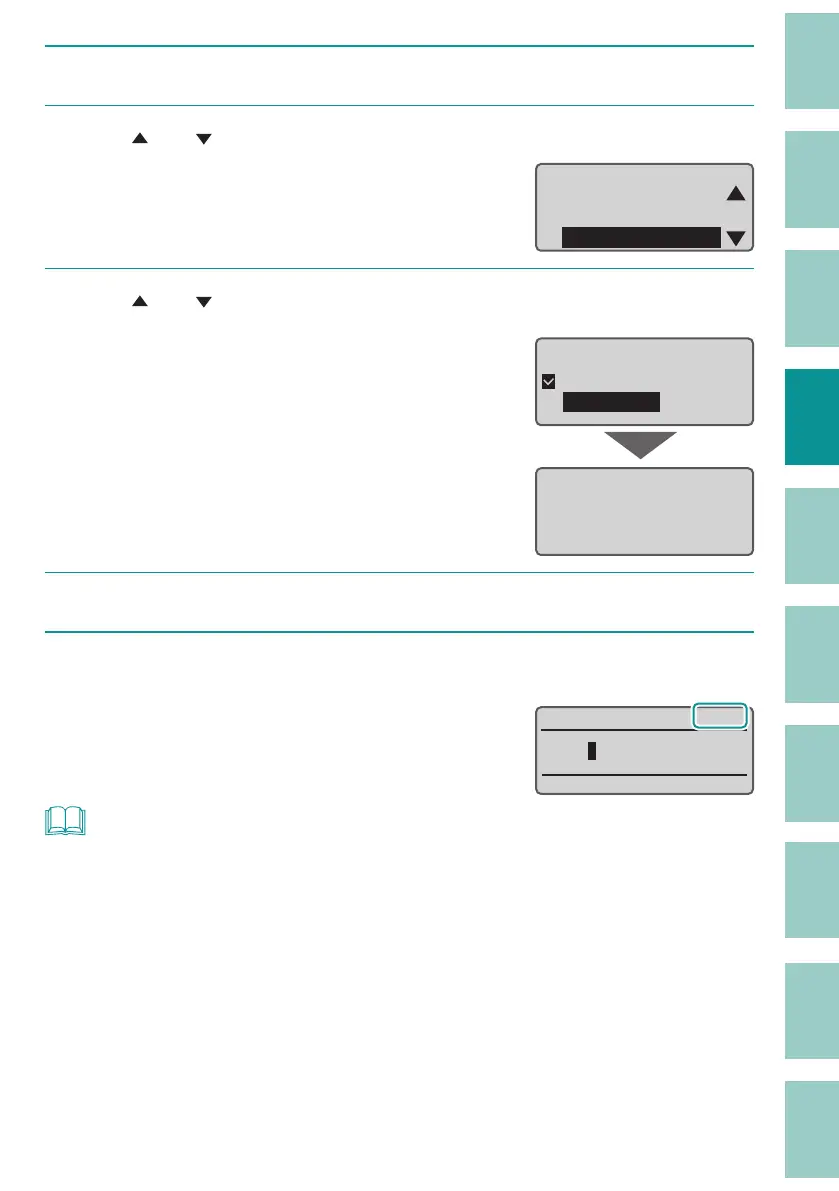
Use [ ] or [ ] to select the "Plate Print Area" and press the [Enter] key.
Cut Length
ɻɻ
Cut Length
Alignment
Plate Print Area
9
Use [ ] or [ ] to select "Expansion," and press the [Enter] key.
When you press the [Enter] key, a message will
appear. Press any key to return to the character
input display.
When "Expansion" is selected, the print media
is aut
omatically changed to "Plate." You cannot
select any other print media except plate.
Plate Print Areaɻ
ɻ1RUPDO
ɻ([SDQVLRQ
When selecting
expansion of Plate
Print Area, only
Plate can be printed.
10
Set the character size to "2 mm half-width."
(P.42)
11
Input text.
The Plate Print Area setting can be checked on
the display.
&(
$
NOT
• The Plate Print Area can be set for each page.
• You can change the setting of the Plate Print Area when the cut length is "Speci ed." When the cut
length is "Automatic," the Plate Print Area cannot be changed.



 To Next Page