94
Contents
Preparation/
Setup
Print Using a
Computer
Appendix
IndexPrint/SaveInput/Edit
Names of
Components
Maintenance/
Printer Settings
Trouble-
shooting
■
Changing the Full Cut Settings
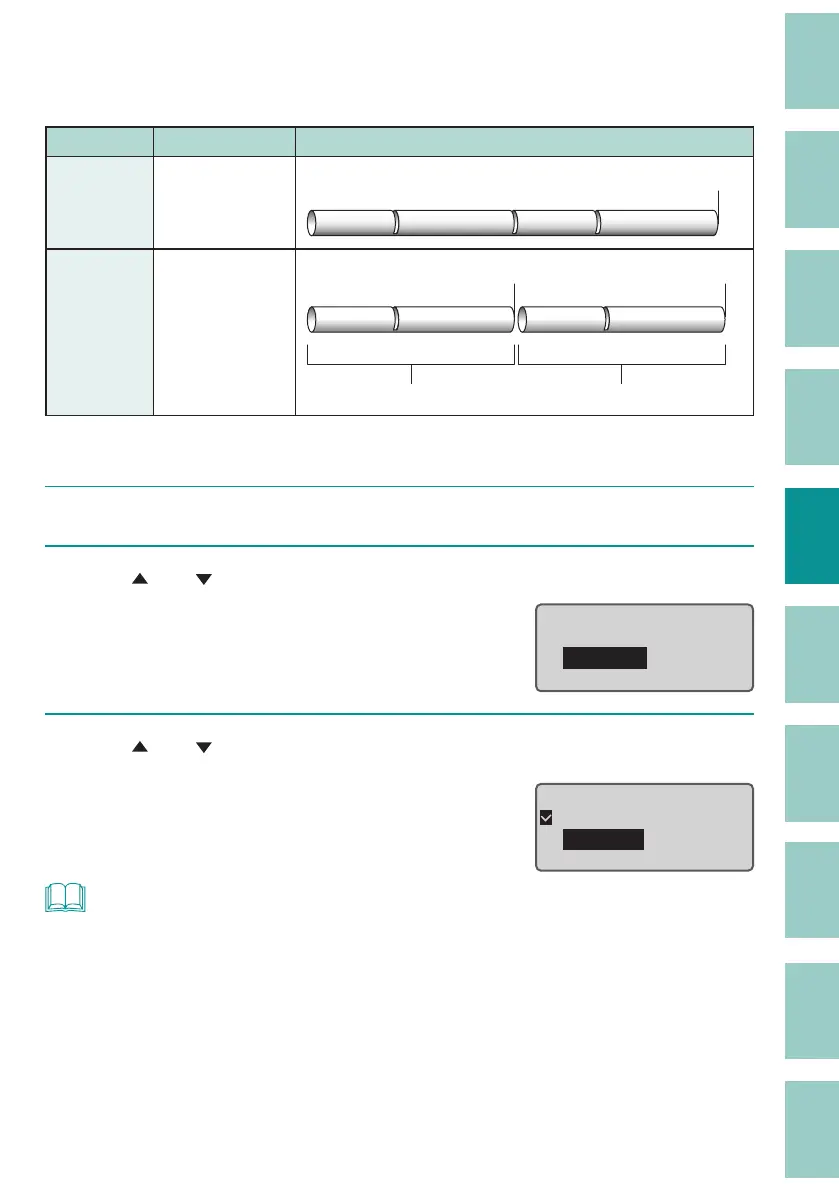
The default setting is "End only."
Setting Details Print Preview
End only
(Default
Setting)
Cuts the print
media at the end
of printing.
Full cut
A1 Pump Room A1 Pump Room
Each set
Cuts match the
number of prints.
1st group 2nd group
Full cut Full cut
A1 Pump Room A1 Pump Room
[Example] Full cut for all pages printed.
1
Press the [Set Cut] key.
2
Use [ ] or [ ] to select "Full cut" and press the [Enter] key.
Set Cut
Half cut
Full
cut
Plate Full cut
3
Use [ ] or [ ] to select "Each set," and then press the [Enter] key.
The display returns to the character input
display.
Full Cut
End only
Each set
NOT
• If you want to use the cutter to cut the plate completely, change the "Plate Full cut."



 To Next Page