6 - USE AND OPERATION
Schermate display (ME)
ME2000S - User Manual
74 - 133
6.9.4 AUTOMATIC JOB (USB)
AUTO
F1
F4
This function allows you to start producing tags by taking the data to be printed from a le (.csv) on a USB memory
stick.
The CSV le is a le made up of records (lines) separated from each other by a CR (Carriage Return).
Each record contains data that can be divided into elds by a separator, such as a "semicolon" (;) or tab.
CSV (Comma Separator Value) data les can be generated via commercial software (Excel
®
, Access
®
, Notepad...)
or using the PowerTag lite application software.
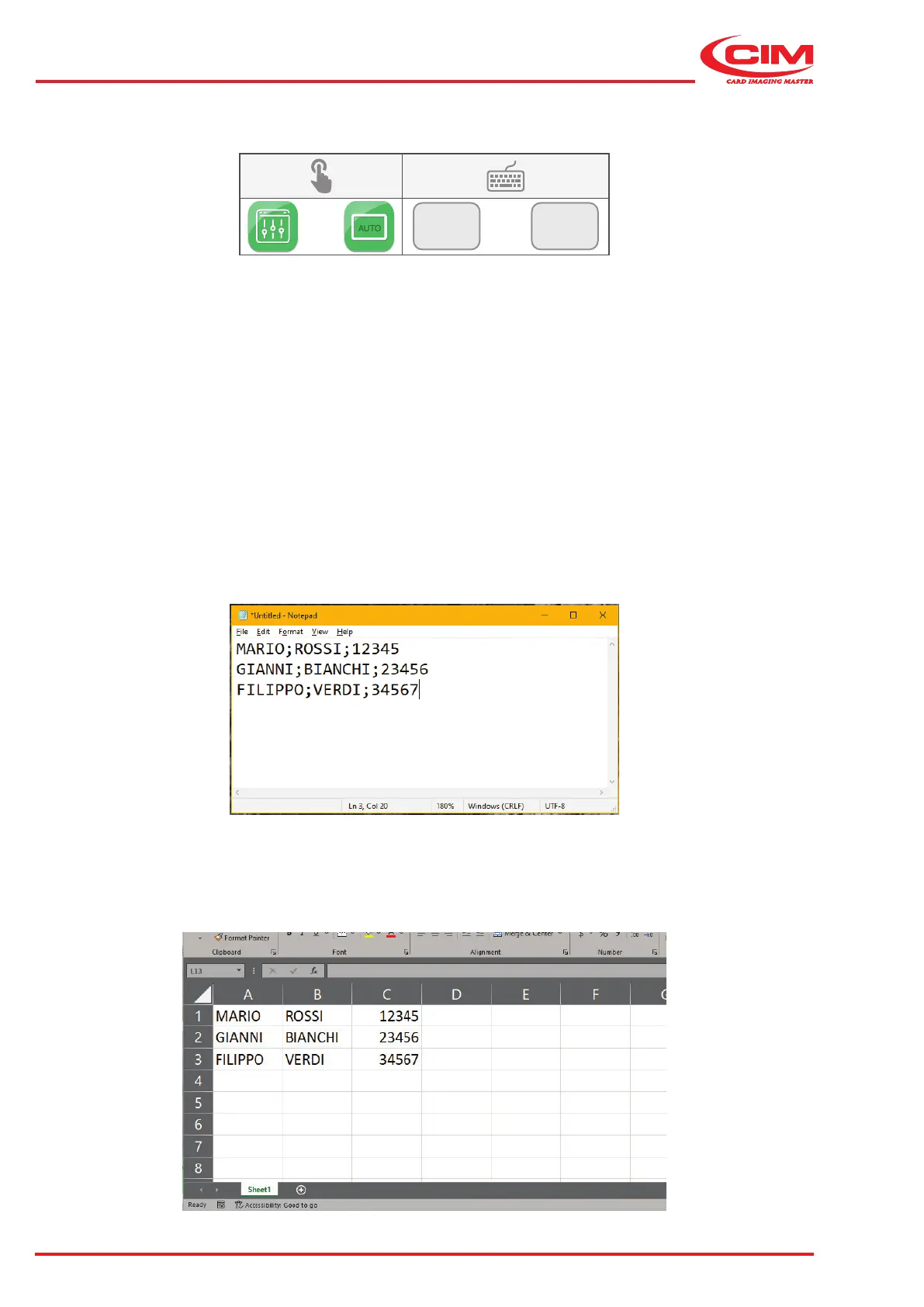
Creating a .csv le using NOTEPAD:
1) Enter / edit data as shown in the example.
2) On each line, enter the data in sequence separated by tabs or semicolons” (;), except at the end of the line.
Each line corresponds to one tag, and the text next to a tab or a semicolon corresponds to one eld.
3) Save the le with a .csv extension on a USB memory stick.
Creating a CSV le using EXCEL
®
:
1) Enter / edit data as shown in the example. Each row corresponds to one tag and each cell corresponds to one eld.
2) Save the le with a .csv extension on a USB memory stick.



 To Next Page