54
44000-UG-01-01-EN_CPI_Paypod Embedded Pay Station_User Guide_V1.1.pdf
Paypod™ Embedded Pay Station
Operation
Published by CPI
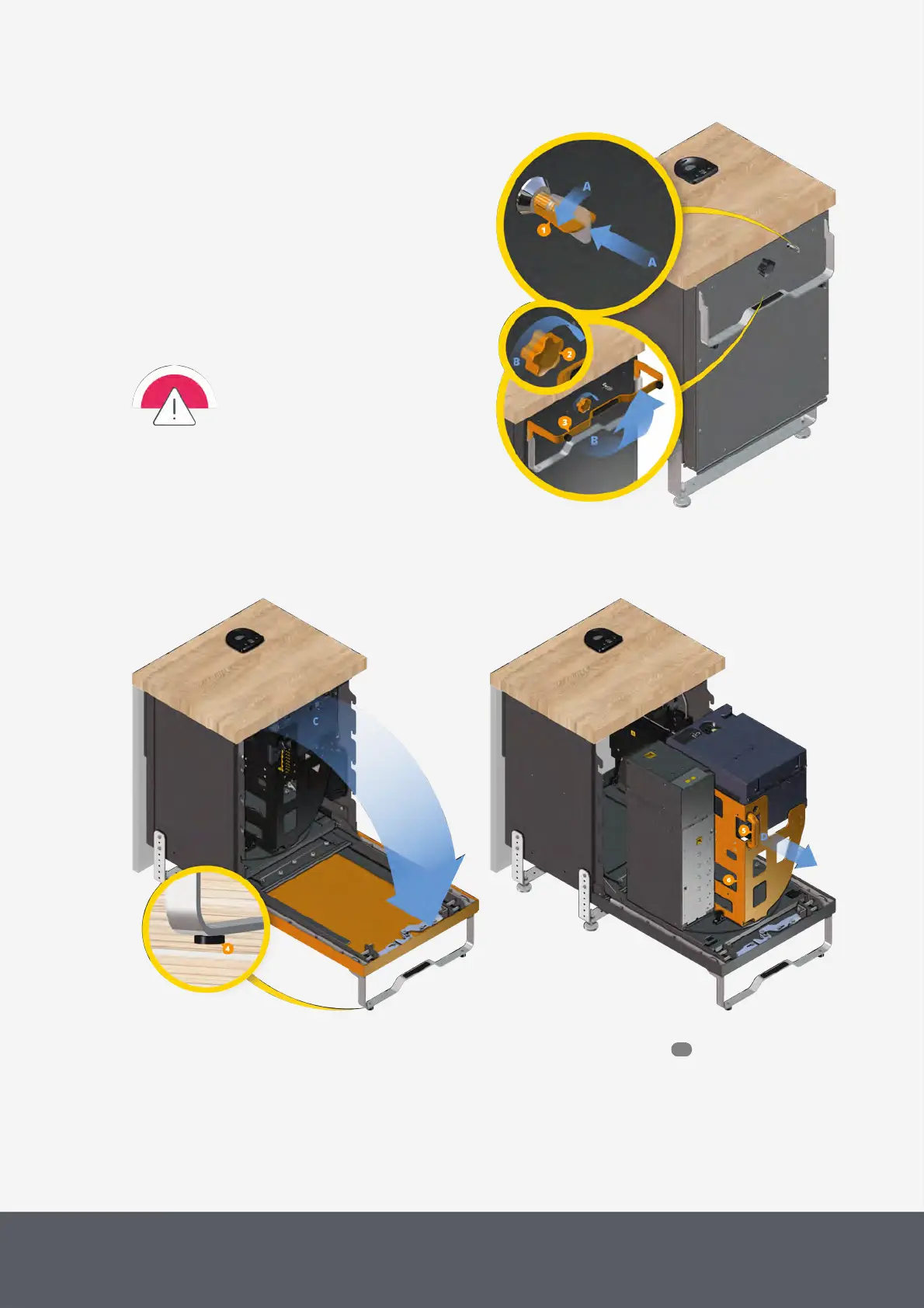
1 If necessary, wait until a transaction has been fin-
ished.
2 Insert pay station key[1] in the lock[A] and turn it
counter-clockwise as far as it will go[A].
3 Turn rotary knob[2] clockwise[B] and
4 simultaneously bring door handle[3] into a perpen-
dicular position[B] until it locks into place.
The door and its handle are unlocked.
5 Open the door[C] until its handle is resting on the
ground[4].
In case
· not all two door feet are in contact
with the ground or the chassis is un-
stable
· the door opens beyond 90degrees
please contact your service partner!
6 Hold cart handle[5] and firmly pull payment com-
ponent cart[6] out to its fully extracted position[D].
Extracting Paypod™ Payment Component Cart
For easier access, the payment components can be rotated clockwise or anti-clockwise :
56



 To Next Page