User’s Manual EM11A015B
intelligent Touch Manager
100
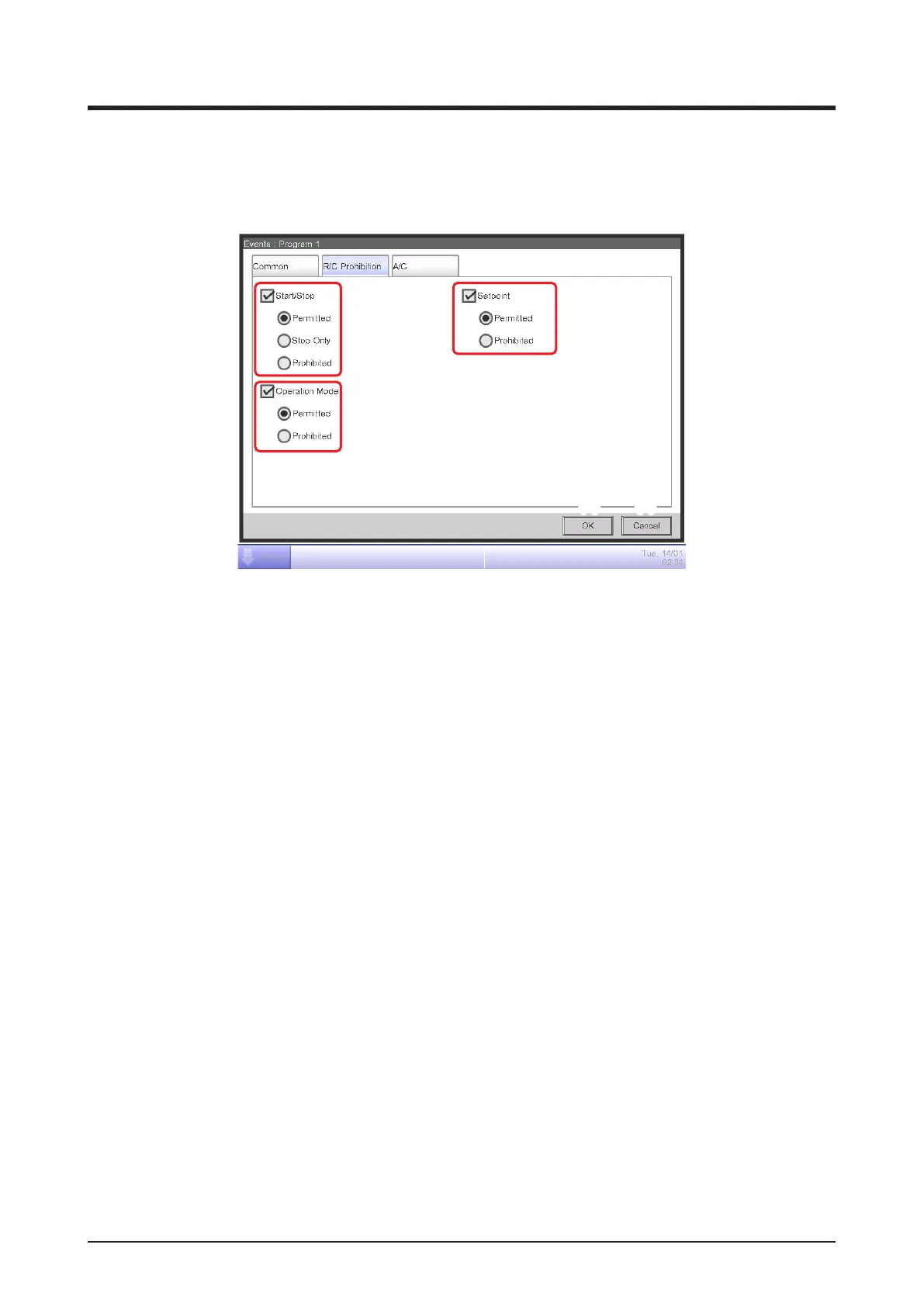
• R/C Prohibition Tab (Events Screen)
This screen is displayed when you touch the R/C Prohibition tab on the Events screen.
It allows you to permission/prohibition the remote controller.
(1) (3)
(4)
(5)
(2)
Select the check box of the items to set up and select the setting from the radio buttons.
(1) R/C Start/Stop permission/prohibition setting area
Restricts starting/stopping from the remote controller.
Select the setting from Permitted, Stop Only, and Prohibited.
(2) R/C Operation Mode permission/prohibition setting area
Restricts changing the operation mode from the remote controller.
Select the setting from Permitted and Prohibited.
This setting area is not displayed when the target is Ventilator.
(3) R/C Setpoint permission/prohibition setting area
Restricts changing the setpoint from the remote controller.
Select the setting from Permitted and Prohibited.
This setting area is not displayed when the target is Ventilator.
(4) OK button
Saves the edit and closes the screen.
(5) Cancel button
Cancels the edit and closes the screen.



 To Next Page