User’s Manual EM11A015B
intelligent Touch Manager
137
6-6 Setting up the Time
You can set up the current time and daylight saving time.
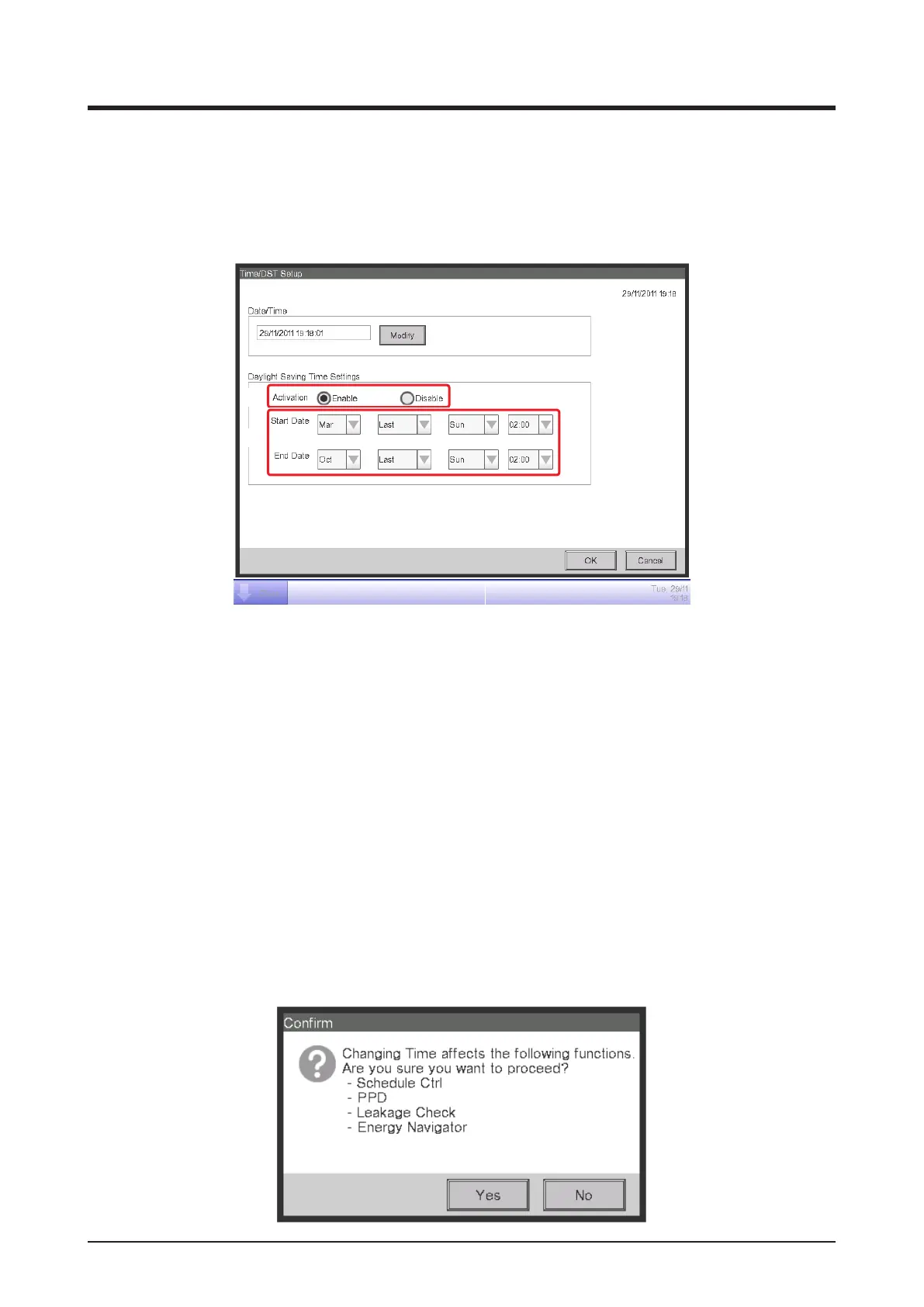
1. Touch the Time/DST button on the System Settings tab of the Menu List screen and display the
Time/DST screen (see “4-5 Menu List Screen: System Settings Tab”).
(2)
(1)
(3)
(4)
2. (1) displays the time when this screen was opened. To change, touch the Modify button (2). Enter
the time in the Time Input dialog box that appears. Touch the OK button and close the screen.
Entering an inappropriate value displays an error dialog where you will be able to enter the correct value.
3. When using daylight saving time, enable it in (3) and select the start and end dates from the
combo boxes (4). When not using daylight saving time, select Disable.
The selectable ranges are as follows.
Start month: Jan – Dec End month: Jan – Dec
Start week: 1st – 4th, Last End week: 1st – 4th, Last
Start day of the week: Sun – Sat End day of the week: Sun – Sat
Start Time: 1 – 4 End Time: 2 – 4
4. When nished, touch the OK button. The following Conrm dialog appears. The following dialog
appears. After conrmation, touch the Yes button to close the screen.



 To Next Page