User’s Manual EM11A015B
intelligent Touch Manager
117
5-4 Checking an Emergency Stop
When an emergency such as re occurs, the iTM automatically stops all management points and
sounds the buzzer in conjunction with devices such as fire alarms. The iTM recovers all
management points automatically when all disaster prevention signals disappear.
When the emergency stop is a result of an operating mistake during maintenance, you can recover
the iTM forcibly.
The following describes how to interpret the Emergency Stop view and release an emergency stop.
• If the optional function is enabled, you can divide the emergency stop by arbitrary disaster
prevention zones (see “8-3 Setting up the Emergency Stop”).
• If the optional function is disabled, all air conditioners are stopped at once.
NOTE
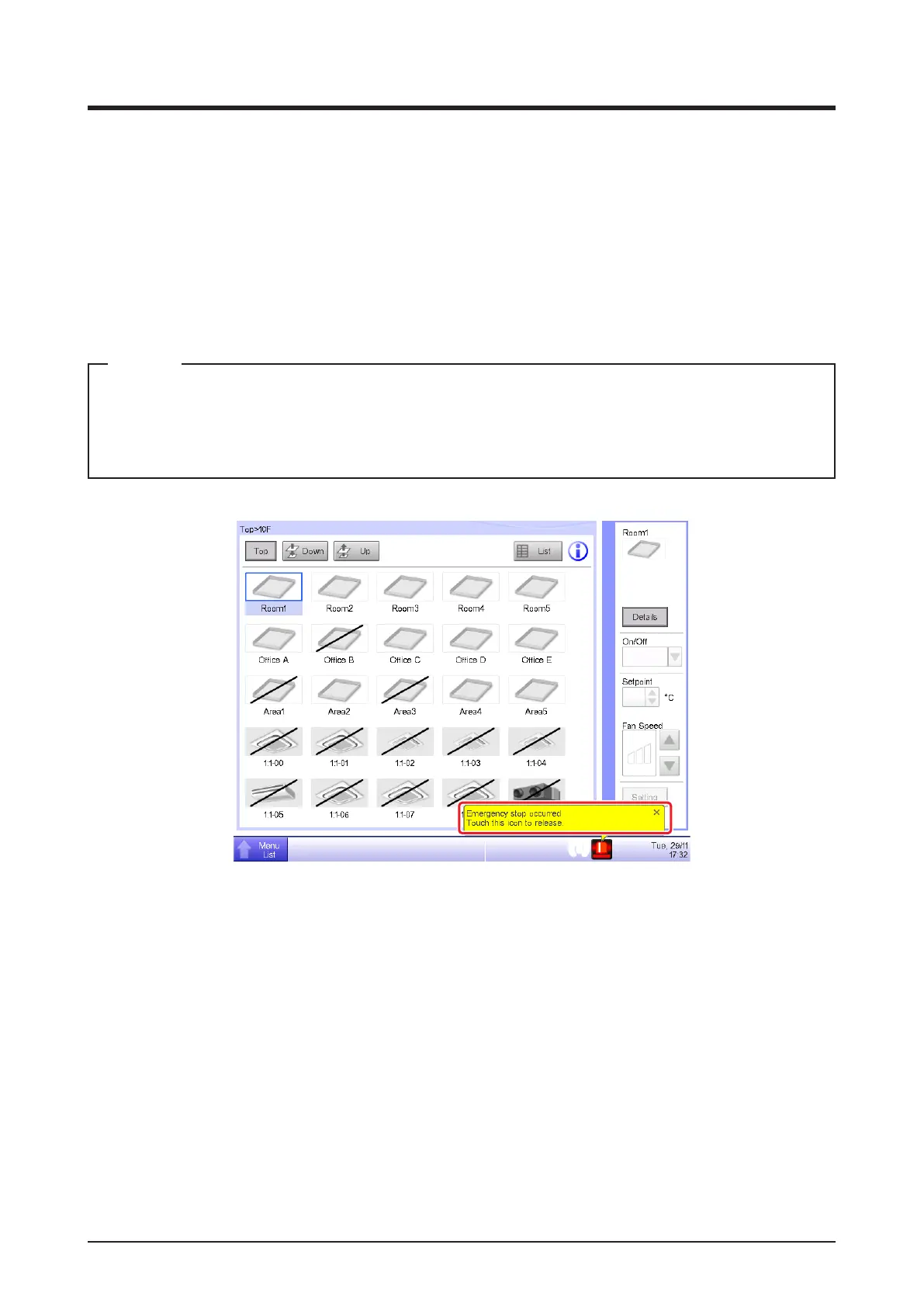
(1)
(2)
1. When an emergency stop occurs, an Emergency Stop icon appears in (1) and the buzzer
sounds. Simultaneously, the message “Emergency Shutdown. Touch this icon to release.”
appears in (2).
2. Touching the icon (1) displays the Emergency Stop Release dialog.



 To Next Page