User’s Manual EM11A015B
intelligent Touch Manager
24
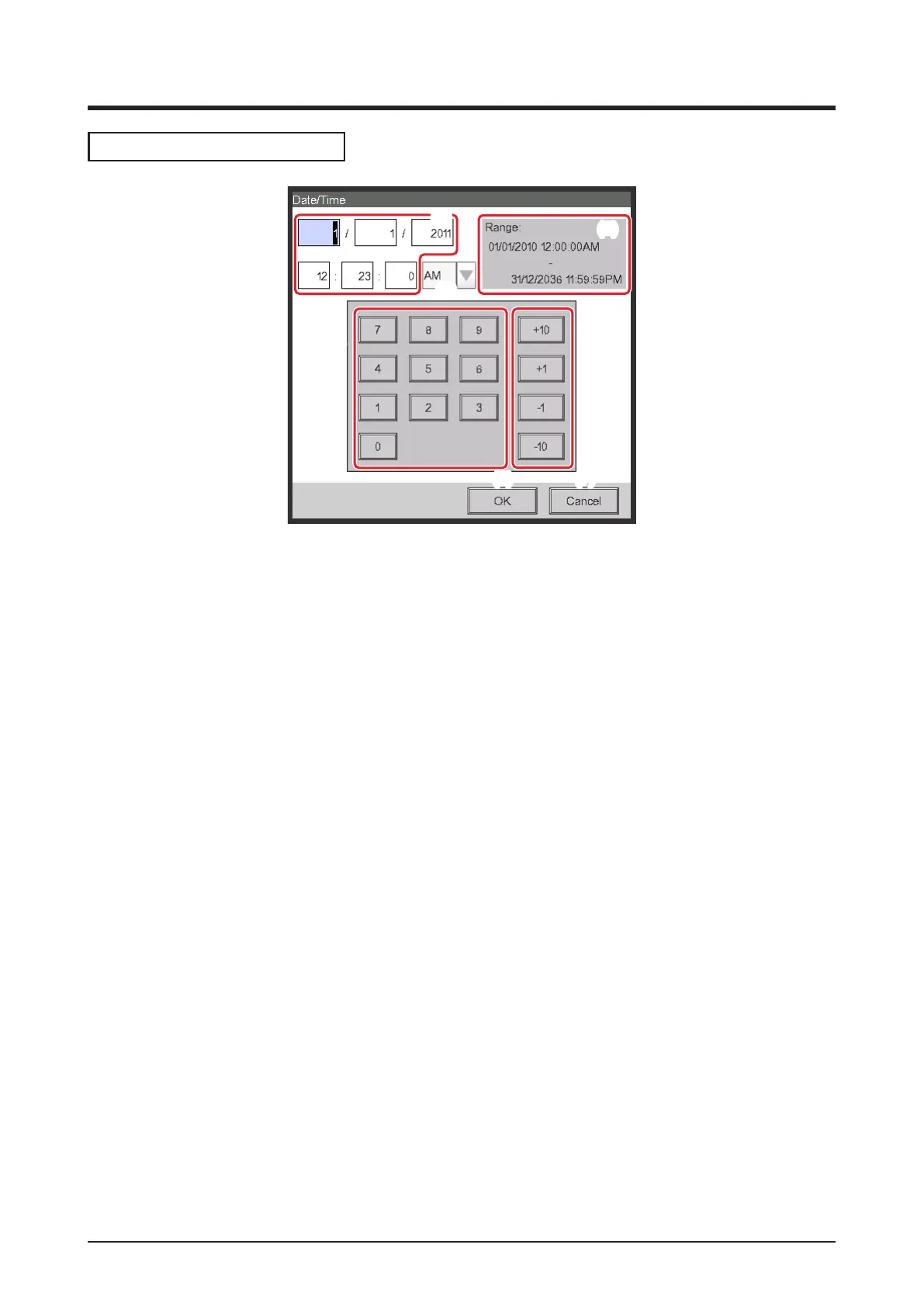
Time input dialog operation
(1)
(5)
(3)
(7)(6)
(4)
(2)
(1) Number key button
Key buttons for entering numeric values.
(2) Input area text box
Displays the entered numeric values. Touch the text box and enter the required numeric value. The
input position changes depending on the locale setting.
(3) Up/Down button
Increases or decreases the numeric value selected in the input area text box (2) by +1, +10, –1, or
–10.
(4) AM/PM setting combo box
Species whether the time is AM or PM when time is indicated using 12-hour clock. This combo
box is not displayed when 24-hour clock is set in the System Settings.
(5) Input range label
Displays the range of values that can be entered.
(6) OK button
Touching this button commits the input.
(7) Cancel button
Touching this button cancels the edit and closes the screen.



 To Next Page