User’s Manual EM11A015B
intelligent Touch Manager
28
(3)
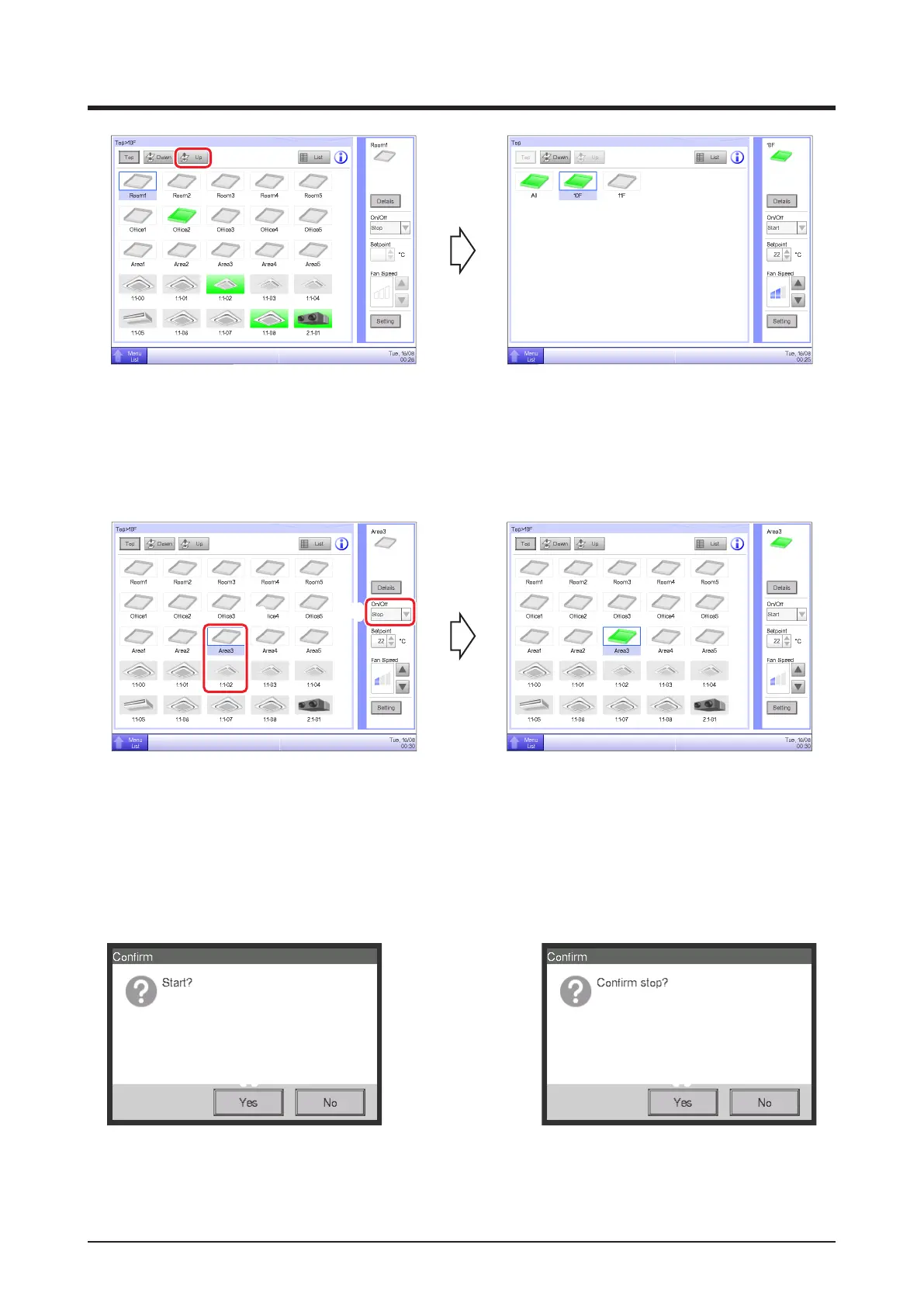
(3) Touch the Up button to move one level up from the currently selected one.
(For detailed operation, see “4-2 Standard View (Icon) Screen”.)
2-3 Starting/Stopping Areas and Management Points
(2)
(1)
(1) Select the area or management point you want to start or stop.
(2) Selecting “Start” in the On/Off combo box starts the selected area or management point while
selecting “Stop” stops the selected area or management point. The icon turns green or red
(depending on the system settings) when the selected area or management point has been started
while the icon turns gray when it is stopped.
(3) (3)
(3) When Conrm is “enabled” in the system settings, a conrmation dialog appears accordingly.
Press the Yes button to commit. (For detailed operation, see “6-9 Setting up the Confirm
Operation”.)



 To Next Page