User’s Manual EM11A015B
intelligent Touch Manager
124
Registering a management point or area to an area
1F North
1F South
Aisle
Lighting A
Lavatory
Building A
Top
All
Indoor
Ventilator
Fig. 7
Office
Meeting Room
Room A
Room B
(6)
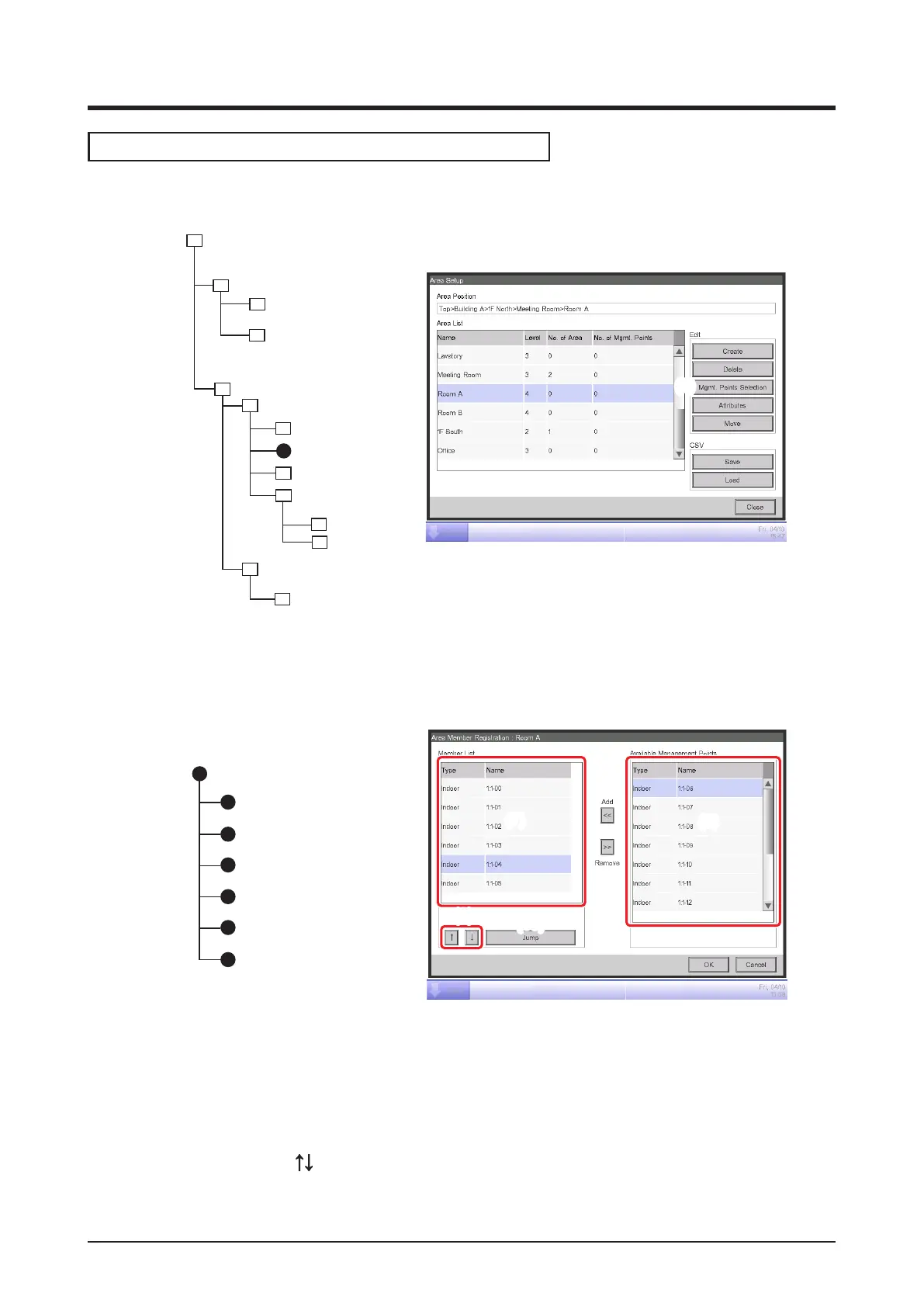
1. On the Area Setup screen, select the area to which you want to register a member and touch
the Mgmt. Points Selection button (6) to display the Area Member Registration screen.
(7)
(9)
(10)
(8)
1:1-00
Indoor
1:1-01
1:1-02
1:1-03
1:1-04
1:1-05
Room A
Fig. 8
2. The list (7) displays management points and areas directly under the area being edited in the
order they were registered. The list (8) displays non-registered management points. Select the
management point you want to register (multiple selection possible). To register, move them
using the Add button. To change the order in which the management points and areas are
displayed in (7), use the
buttons (9). To delete a member, select it from (7) and then touch the
Remove button.



 To Next Page