User’s Manual EM11A015B
intelligent Touch Manager
253
Compared to previous (F)Year Tab (Energy budget/actual management Screen)
(15)
(20)
(19)
(16)
(17)
(18)
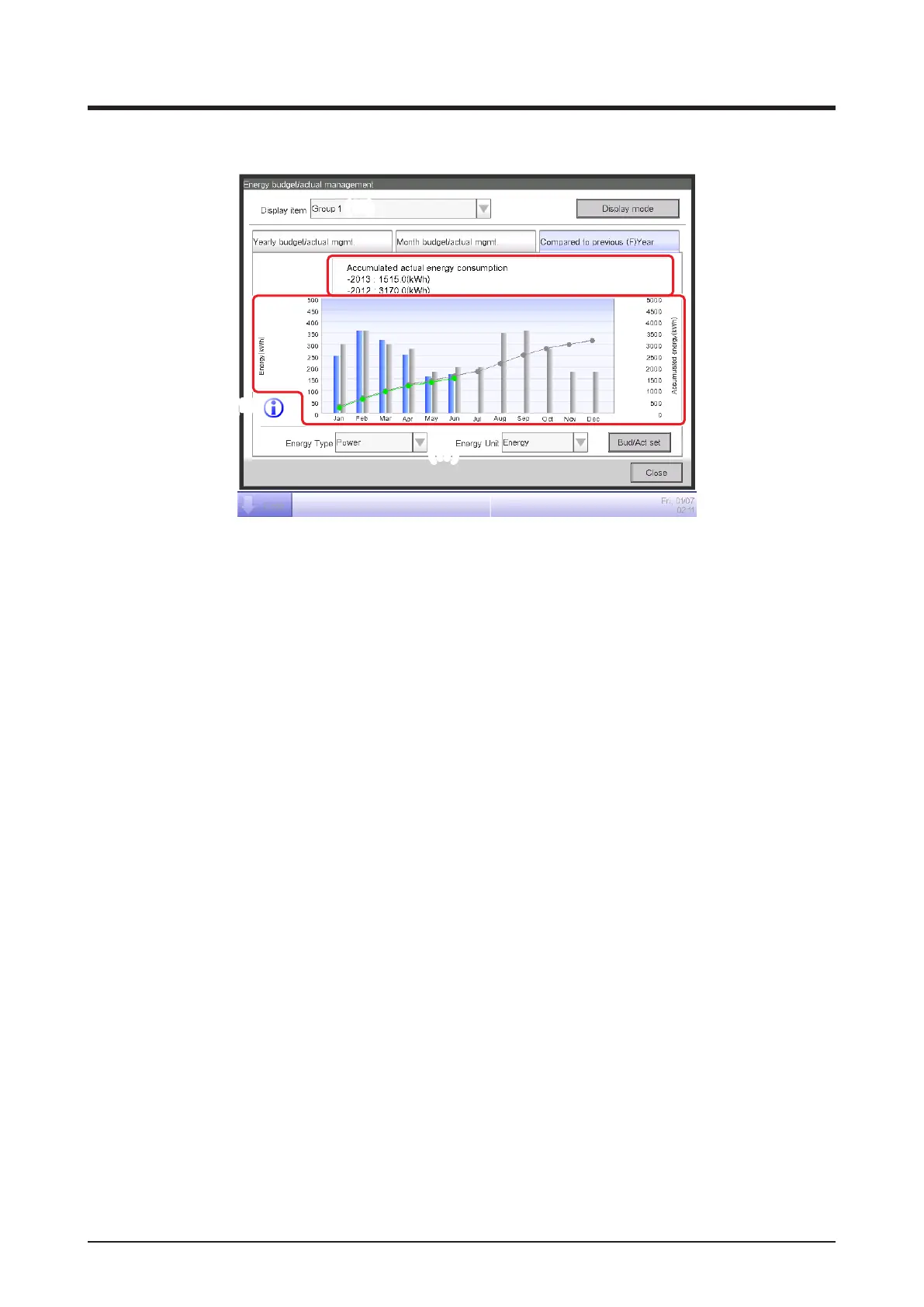
This screen displays the energy consumption of the current year against the previous year on a
monthly basis for the Energy Group selected in the Display item combo box (15).
Select the energy type to plot in the Energy Type combo box (16).
Select from Power, Gas and Water.
Only when the unit of energy is CO
2
or new conversion type, you will be able to select the “total”
of CO
2
emitted by all types of energy.
Selecting the unit of energy to display in the graph from Energy, CO
2
, and new conversion type in
the Energy Unit combo box (17) plots the graph in (18).
In the graph, the horizontal axis represents each month of the year from the collection start
month, the left vertical axis the energy consumption of each month for the energy type selected
in the Yearly budget/actual mgmt. tab of the Energy budget/actual management screen, and the
right vertical axis, similarly to the left axis, the accumulated energy consumption corresponding
to each month of the Yearly budget/actual mgmt. tab.
By using this graph, you can easily gure out the result of this year’s energy saving measures
with regard to last year’s.
Touching the Information button (19) displays a legend of each symbol in the graph.



 To Next Page