User’s Manual EM11A015B
intelligent Touch Manager
97
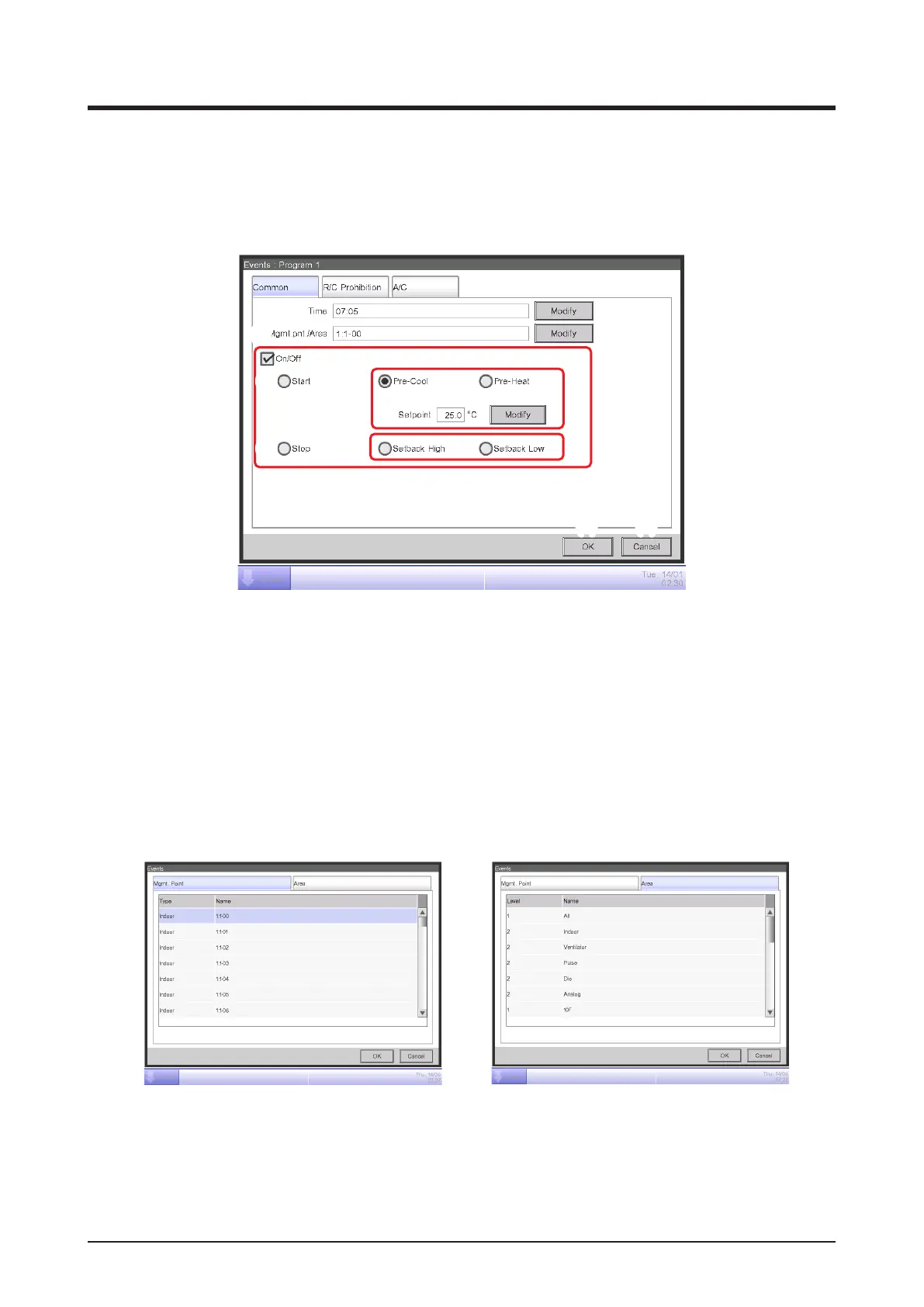
• Common Tab (Events Screen)
This screen is displayed when you touch the Create or Edit button on the Event List screen.
It allows you to set up the event’s operating time, target management point/area, as well as the
start/stop action for the event.
(1)
(2)
(3)
(4)
(6)
(7)
(8) (9)
(5)
(1) Time setting area
Sets the event’s operating time. Touch the Modify button and enter the time in the Time Input
dialog that appears.
The range of values you can enter is 00:00 to 23:59 (AM00:00 to PM11:59 when using 12-hour clock).
(2) Mgmt. Pnt./Area setting area
Sets up the management points or areas to control (target).
Touch the Modify button and select one from the list in the Event dialog that appears.
<Management Points Selection dialog> <Area Selection dialog>
(3) On/Off setting area
Select the On/Off check box to start/stop the target.
In the case of the system with Hydrobox, the button (4), (6) and (7) are able to control the air
conditioners only, but they are unable to control the water heater.



 To Next Page