Xtium-CL MX4 User's Manual Appendix B: Troubleshooting Installation Problems • 129
Driver Information via the Device Manager Program
The Device Manager program provides a convenient method of collecting information about the
installed Xtium-CL MX4. System information such as operating system, computer CPU, system
memory, PCI configuration space, plus Xtium-CL MX4 firmware information is displayed or written
to a text file (default file name – BoardInfo.txt). Note that this program also manually uploads
firmware to the Xtium-CL MX4 (described elsewhere in this manual).
Execute the program via the Windows Start Menu shortcut Start • Programs • Teledyne DALSA
• Xtium-CL MX4 Device Driver • Device Manager. If the Device Manager Program does not
run, it will exit with a board was not found message. Possible reasons for an error are:
• Board is not in the computer
• Board driver did not start or was terminated
• PCI conflict after some other device was installed
Information Window
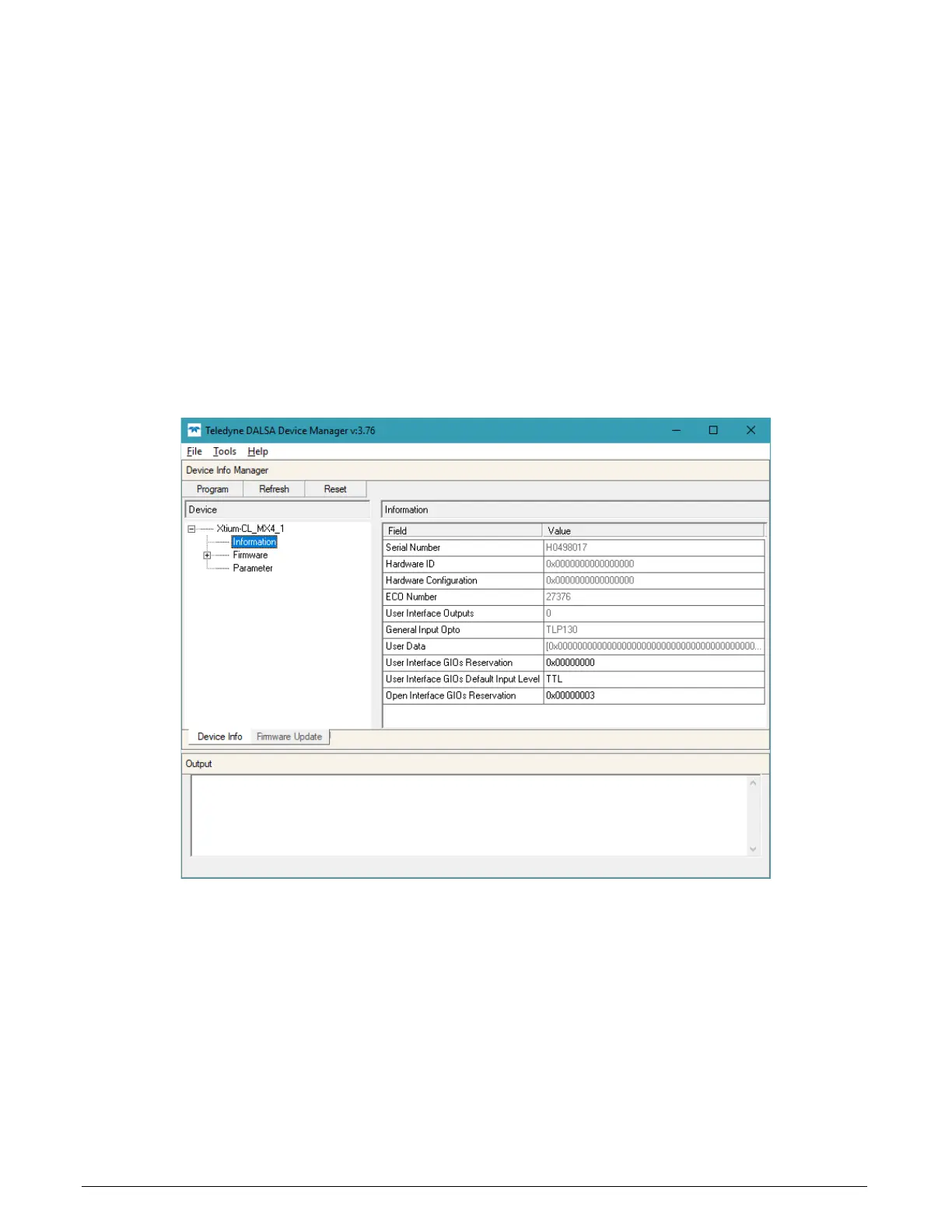
The following figure shows the Device Manager Information screen. Click to highlight one of the
board components and its information shows in the right hand window, as described below.
Figure 50: Board Firmware Version
• Select Information to display identification and information stored in the Xtium-CL MX4
firmware.
• Select Firmware to display version information for the firmware components.
• Select one of the firmware components to load custom firmware when supplied by Teledyne
DALSA engineering for a future feature.
• Click on File • Save Device Info to save all information to a text file. Email this file when
requested by Technical Support.


 To Next Page