34 • CamExpert Quick Start Xtium-CL MX4 User's Manual
Using CamExpert with Xtium-CL MX4
The Sapera CamExpert tool is the interfacing tool for Xtium-CL MX4 frame grabbers and connected
cameras; it is supported by the Sapera library and hardware. CamExpert allows a user to test
frame grabber and camera functions. Additionally CamExpert saves the frame grabber settings
configuration as individual camera parameter files on the host system (*.ccf).
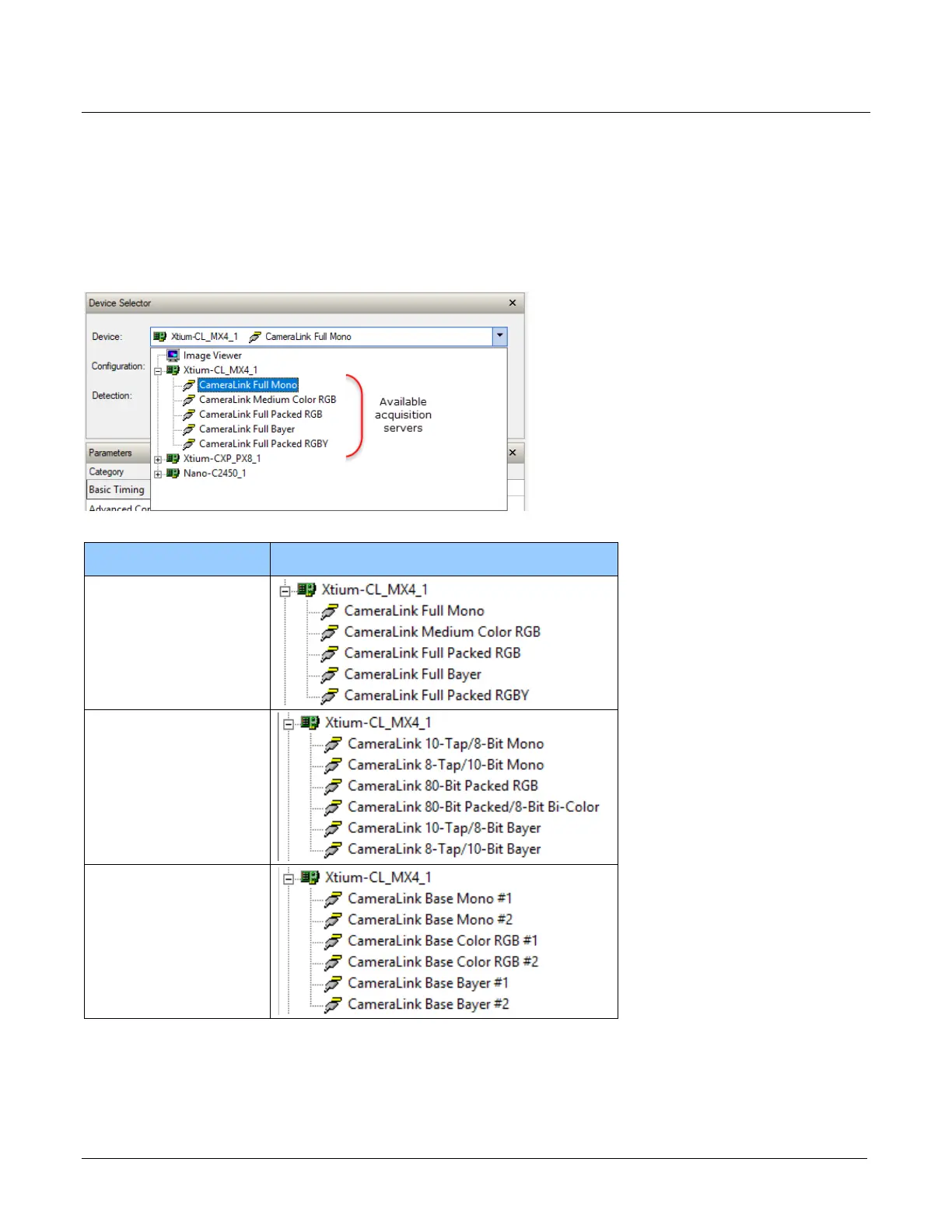
When an acquisition server is selected, CamExpert only presents parameters supported by the
selected device.
The three Xtium-CL MX4 firmware options provide the following acquisition servers:
Firmware Acquisition Servers
1 x Full Camera Link
(default configuration)
80-Bits Camera Link
2 x Base Camera Link
Depending on the selected server, different parameters may be displayed. For example, with an
RGB acquisition server, the Color Type parameter is not displayed since its value is not
configurable.
For more information, see the Sapera Servers & Resources section.


 To Next Page