EasyManua.ls Logo

Det-Tronics Eagle Quantum Premier - Page 78

Det-Tronics Eagle Quantum Premier
142 pages
Print Icon
To Next Page IconTo Next Page
To Previous Page IconTo Previous Page
Loading...
95-8533
4-3
18.2
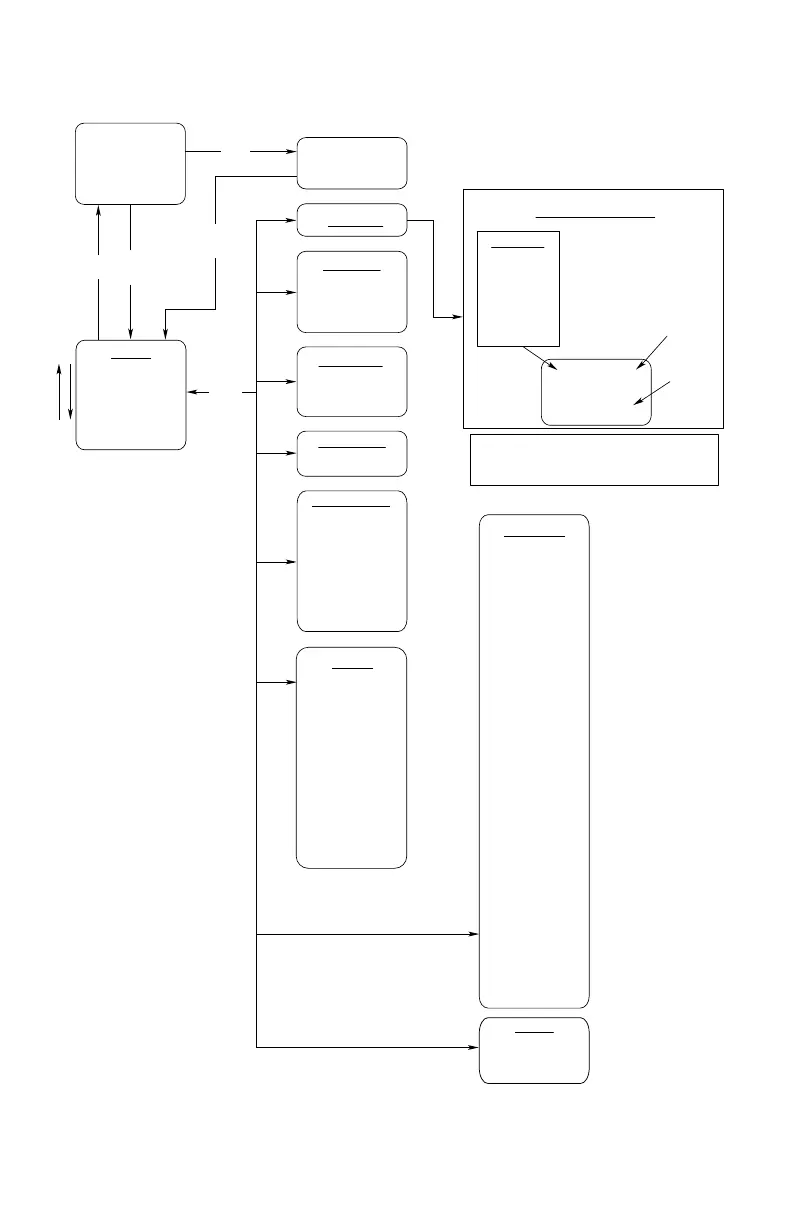
Next and Previous buttons are used to scroll the lists.
The Enter button is used to navigate to the next level.
The Cancel button is used to back out a level.
Alarm Type Off/On
Tag Name
Alarm Description
Time and Date ack
Visible if the
alarm was
acknowledged
Display Alarms Screen
Current
Input State
Pressing the ack
switch acknowledges
the visible alarm.
Display Alarms
Enter / Cancel
Auto Scrolling Alarm
Screen
Marque Display
Display Current Time/Date
(no active alarms)
Communication Ports*
Configuration Port
Serial Port 1
Serial Port 2
Serial Port 3
Serial Port 4
Redundancy Port
Ethernet Port 3
Ethernet Port 4
LON 1
LON 2
Redundancy Info
Fault: No Fault
Lst Flt: Cntr LON
Cntr Mode: Master
My Config: Primary
Mem Tx: 304 ms
Mem Blk: 9 of 200
HSSL Status: Good
Version Match: Good
SIL Constant: Good
Reduced Node: Good
Parser: Good
Comm Ack: Good
Cntr LON: Good
Msg Error: Good
--Master Errors--
Program Flow: Good
LON A Inf: Good
LON B Inf: Good
User Logic CS: Good
User Logic: Good
Config: Good
Dead LON: Good
Cntrl Fault: Good
--Standby Errors--
Program Flow: Good
LON A Inf: Good
LON B Inf: Good
User Logic CS: Good
User Logic: Good
Config: Good
Dead LON: Good
Cntrl Fault: Good
Power 1: Good
Power 2: Good
Option Bd: Good
RTC: Good
LON Gnd: Good
LON Fault: Good
RS485 Gnd Flt: Good
Comm Bd: Good
Rx State: Good
My State: Sending
Main Menu
Display Alarms
Display Devices
Device Tagnames
Set Time & Date
Communication Ports
Diagnostics
Redundancy Info
User Logic
Device Tagname
Add: xxx Device Type
Fault/ No Fault
Device dependent info
Display Devices*
Device Tagnames*
Tag Name for Device n
Set Time and Date
Edit Time/Date
Previous
Next
Enter
Next
Prev
Cancel
Reset
Enter
Next
Prev
Alarm
Enter
Cancel
Diagnostics
Lamp Test – Enter
Display: Traditional
HW Version: X
Extra Device: 0
Watchdog Count: 0
SRR0 = XXXXXXXX
Run Time = 66 Hrs
CNET Rev = 002.000
CNET Error Code = 0
OSC Value = XXXXXXX
SIL: False
Reduced Nodes: False
HW Option Board: 3
OS 0000
DR 0000
LLF = False (6) Sec
Rx 0 0
User Logic
General Info
Program Memory
View Time
Display Alarms
Fire Alarms
Gas Alarms
Trouble
Supervisory
Inhibits
Output Inhibits
User Events
All Alarms
Figure 4-3—EQP Controller Message Display Menu Outline

Table of Contents

Related product manuals