Field Service Ver. 1.0 Apr. 2005 10. Service Mode
107
ineo 161
ineo 210
Adjustment / Setting
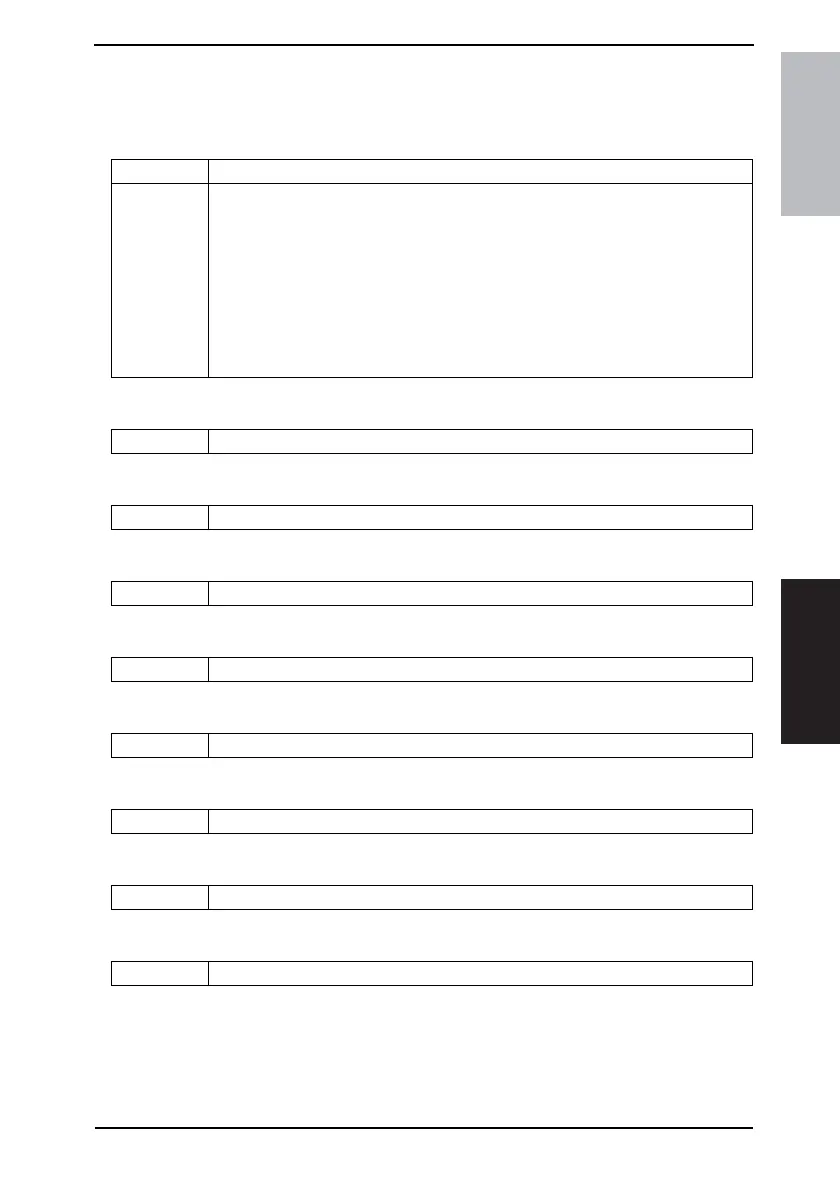
10.3.9 CLEAR DATA
• CLEAR DATA is used to clear data of various types.
A. MEMORY CLEAR
B. PM COUNTER
C. MAINTENANCE COUNTER
D. SUPPLIES LIFE COUNT.
E. APPLICATION COUNTER
F. SCAN COUNTER
G. PAPER SIZE COUNTER
H. MISFEED COUNTER
I. TROUBLE COUNTER
Purpose/Use To clear the setting values listed on the right, resetting them to the default values.
Setting/
Procedure
• Settings of the Utility mode
• Settings of Service’s Choice of the Service mode
• Settings of Adjust of the Service mode
• Setting of Administrator Number Registration of the Service mode
• Settings of Fixed Zoom Change of the Service mode
• Settings of Security of the Service mode
• Settings of copy programs
NOTE
• After Memory Clear has been executed, be sure to turn OFF and ON the Power
Switch.
Purpose/Use To clear each of the counts of the PM Counter.
Purpose/Use To clear the count of the Maintenance Counter.
Purpose/Use To clear the count of the Supplies Life Counter.
Purpose/Use To clear each of the counts of the Application Counter.
Purpose/Use To clear the count of the Scan Counter.
Purpose/Use To clear each of the counts of the Paper Size Counter.
Purpose/Use To clear each of the counts of the Misfeed Counter.
Purpose/Use To clear each of the counts of the Trouble Counter.










 To Next Page