Field Service Ver. 1.0 Apr. 2005 5. Firmware upgrade
25
ineo 161
ineo 210
Maintenance
5.2.2 Procedure when Upgrading the Firmware has failed
NOTE
• Perform upgrading using BIOS only when upgrading from PC using ordinary USB
connection has failed and the PC has not started properly.
• To perform this procedure, you need the Fax board, BIOS ROMs (U17, U19) and the
TWAIN Driver dedicated to this specific purpose.
1. Turn off the power switch of copier.
2. Disconnect the USB cable from the copier and host computer.
3. Remove the rear cover.
☞ 31
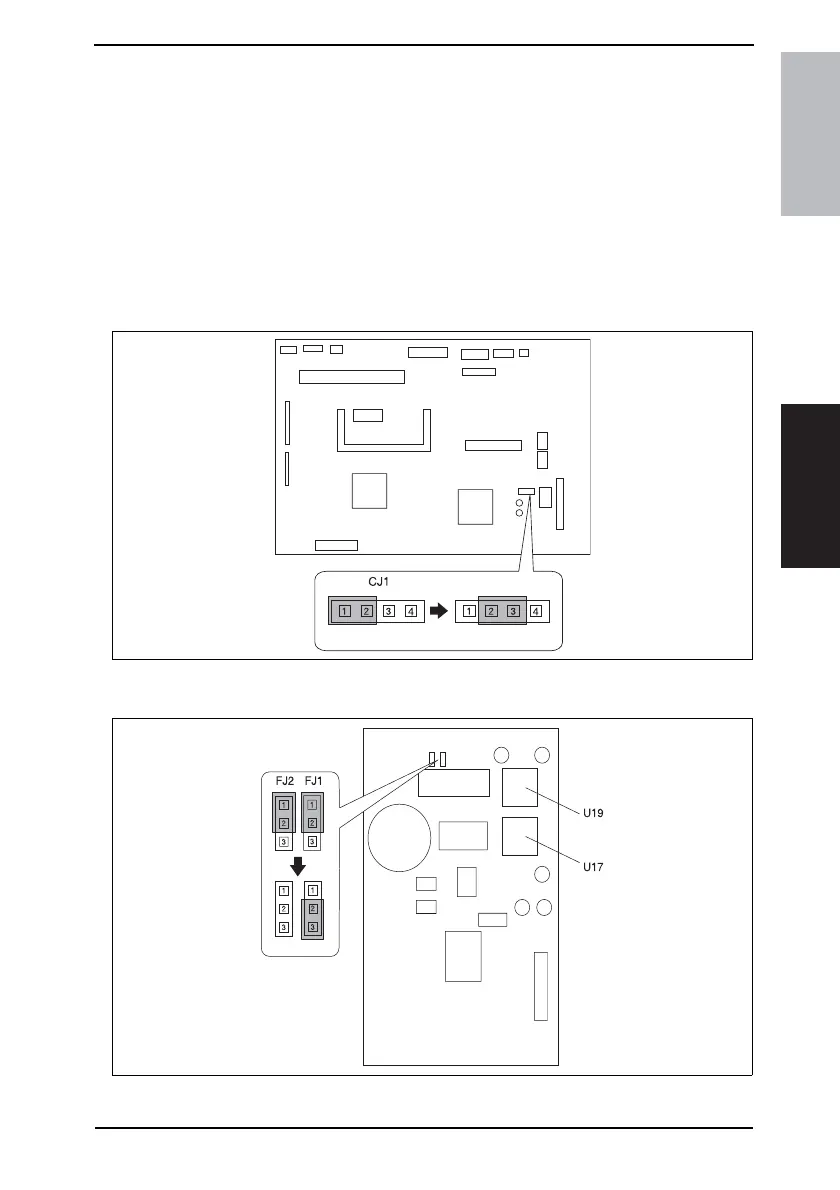
4. Disconnect jumper [CJ1] on the Control board (PWB-C/C) from 1-2 and connect it to 2-
3.
5. Disconnect jumper [FJ1] on the Fax board from 1-2 and connect it to 2-3.
6. Disconnect jumper [FJ2] on the Fax board.
4035D535AA
4035D536AA










 To Next Page