3. Periodical check Field Service Ver. 1.0 Apr. 2005
16
ineo 161
ineo 210
Maintenance
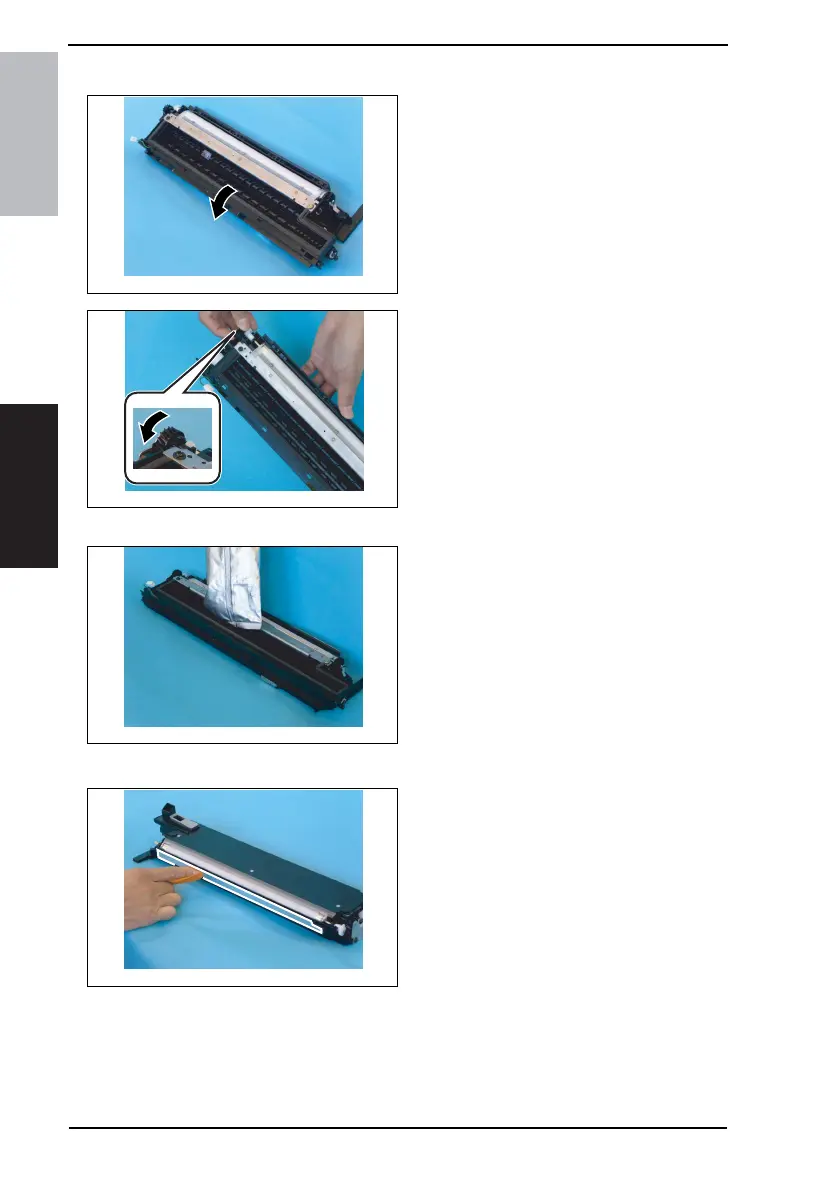
3.3.12 Replacing the Developer
1. Dump the developer.
<<How to Dump Developer>>
• Dump developer on the surface of the
Sleeve Roller by turning the gear in
the direction of the arrow with the
Developing Unit tilted as shown.
NOTE
• Turning the gear backward at this
time could damage the Mylar for
cleaning the ATDC Sensor.
• Dump developer until almost no devel-
oper sticks to the Sleeve Roller.
2. Pour one packet of developer.
NOTE
• Shake the packet of developer well
before pouring.
• When the developer has been
changed, make the ATDC AUTO
ADJUST and enter the adjustment
value on the Adjust Label.
☞ 103
3.3.13 Cleaning of the Pre-Image Transfer Guide Plate
1. Using a soft cloth dampened with
alcohol, wipe the Pre-image Trans-
fer Upper Guide Plate clean of dirt.
4035D037AA
4035D038AA
4035D039AA
4035D040AB










 To Next Page