Field Service Ver. 1.0 Apr. 2005 11. Security
109
ineo 161
ineo 210
Adjustment / Setting
11. Security
11.1 Security Function Setting Procedure
• Security is used to set the security functions.
11.1.1 Procedure
1. Call the Service mode to the screen.
2. Press the following keys in this order:
Stop → 9
3. The Security mode screen will appear.
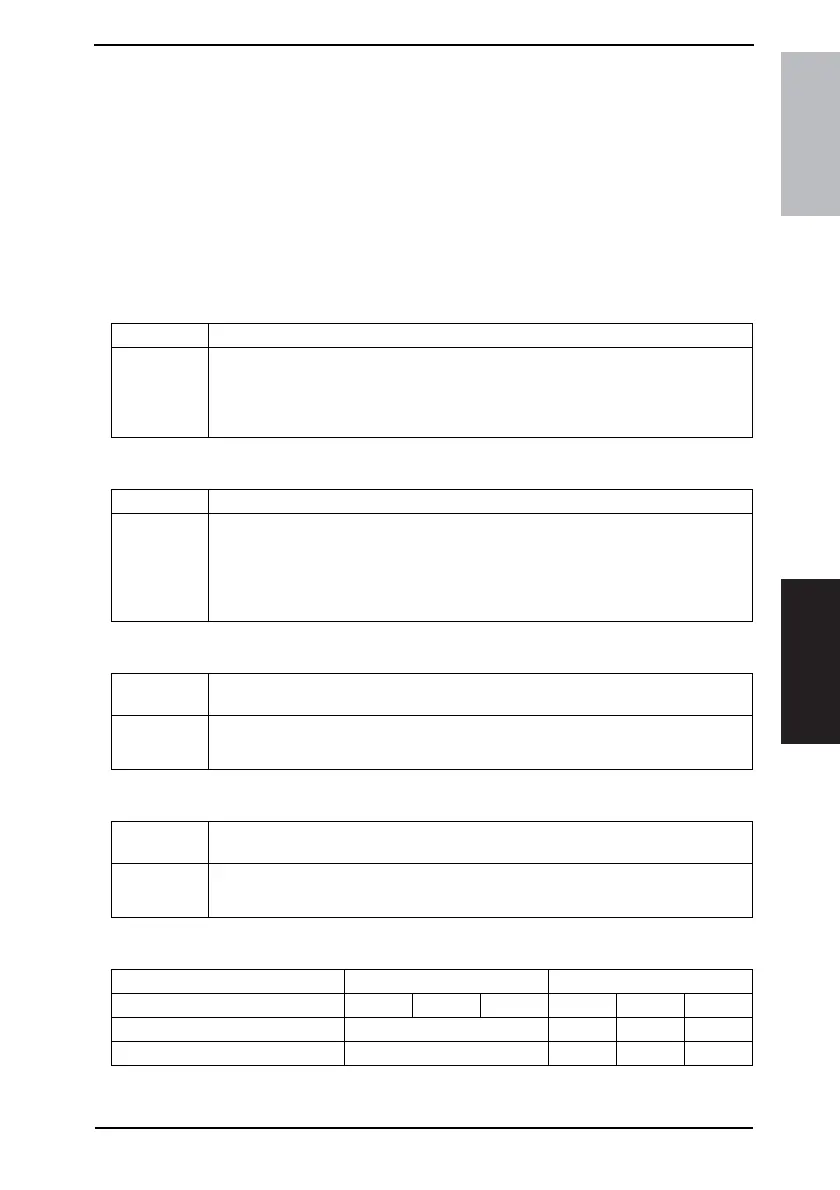
A. TOTAL COUNTER COUNT
B. SIZE COUNTER COUNT
C. PLUG-IN COUNTER COPY
D. MACHINE COUNTER
<Count-up Table>
1: 1 count 2: 2 counts
Purpose/Use To set the count-up method.
Setting/
Procedure
• The default setting is “0.”
“0” : One count-up for each copy cycle (ordinary mode)
1 : Multiple count-up according to the paper size and copy mode.
2 : Multiple count-up according to the paper size and copy mode.
Purpose/Use To set the paper size to be counted.
Setting/
Procedure
• The default setting is “1.”
0 : Not counted
“1” : A3/LEDGER L
2 : A3/B4/LEDGER L/LEGAL L/8K L
3 : A3/B4/FLS/LEDGER L/LEGAL L/11 × 14 L/8K L
Purpose/Use To select whether to enable or disable copying according to whether the Plug-in
Counter is mounted or not.
Setting/
Procedure
• The default setting is “ENABLE.”
“ENABLE” DISABLE
Purpose/Use To select whether to enable or disable copying according to whether the Machine
Counter is mounted or not.
Setting/
Procedure
• The default setting is “DISABLE.”
ENABLE “DISABLE”
Size Counter Count Mode Size other than those set Set size
Total Counter Count Mode 012012
Total Counter 1 1 2 2
Size Counter Not Count 1 1 2










 To Next Page