15. Malfunction code Field Service Ver. 1.0 Apr. 2005
134
ineo 161
ineo 210
Troubleshooting
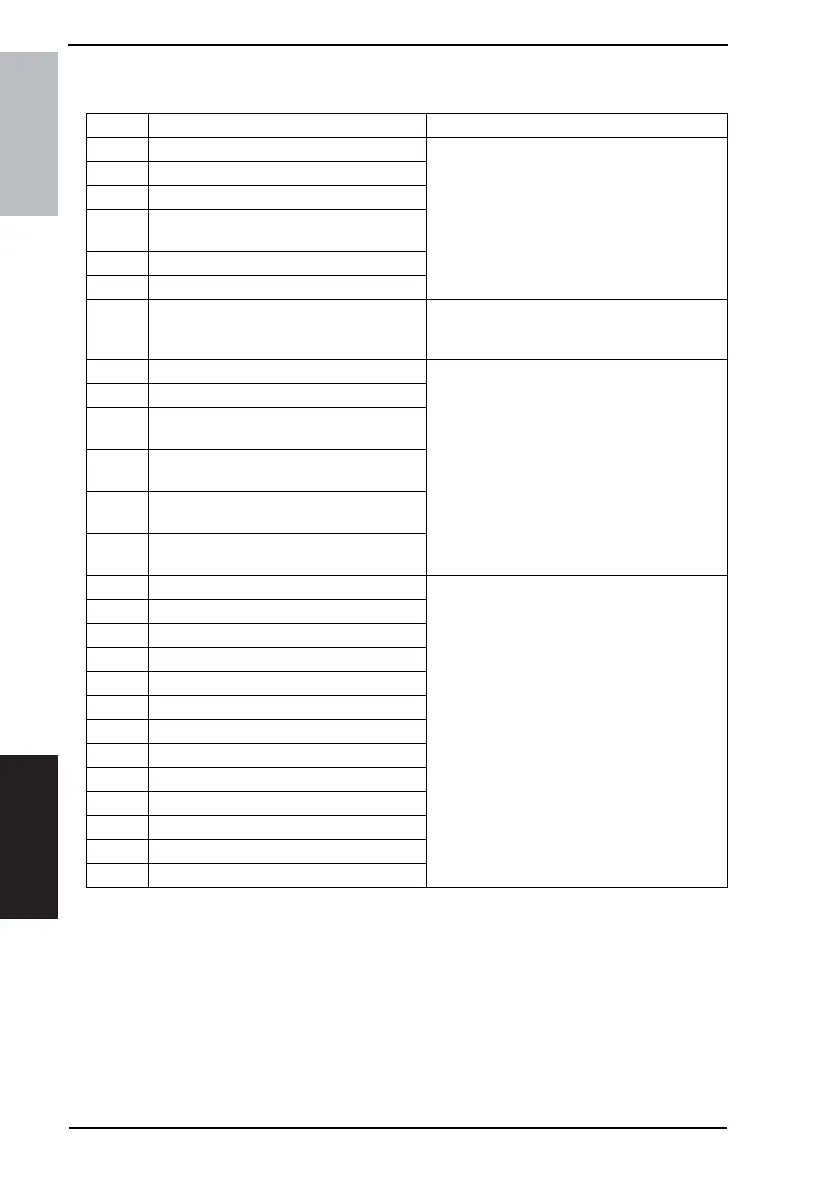
15.2 How to reset
Code Description Procedure
C0000 Main Motor malfunction
• Turn OFF and ON the Power Switch.
C0044 ADF Cooling Fan Failure
C0045 Fusing Cooling Fan Motor malfunction
C004E
Power Supply Cooling Fan Motor malfunc-
tion
C0070 Toner Replenishing Motor malfunction
C0210 Abnormal image transfer voltage
C03FF Faulty Model Setting
• Make the correct setting for “Model Setting”
of “Adjust” available from the Service mode.
☞ 97
C0500 Warm-up failure
• Turn ON the Power Switch with the Stop key
held down.
C0501 Warm-up failure 2
C0510
Fusing failure
(abnormally low fusing temperature)
C0511
Fusing failure
(abnormally low fusing temperature 2)
C0520
Fusing failure
(abnormally high fusing temperature)
C0521
Fusing failure
(abnormally high fusing temperature 2)
C0650 Faulty Scanner Home Position Sensor
• Turn OFF and ON the Power Switch.
C0B60 Bin Switching Motor malfunction
C0B80 Shift Motor malfunction
C0F32 Faulty ATDC Sensor
C0F33 Improperly adjusted ATDC Sensor
C1038 Engine connection failure
C1200 Faulty ASIC/memory
C1300 Polygon Motor malfunction
C133B Communication with option error
C133D ROM check error
C13F0 Faulty HSYNC
C1468 Faulty Parameter Chip
C14A3 IR fluorescent lamp fault










 To Next Page