Field Service Ver. 1.0 Apr. 2005 6. Other
43
ineo 161
ineo 210
Maintenance
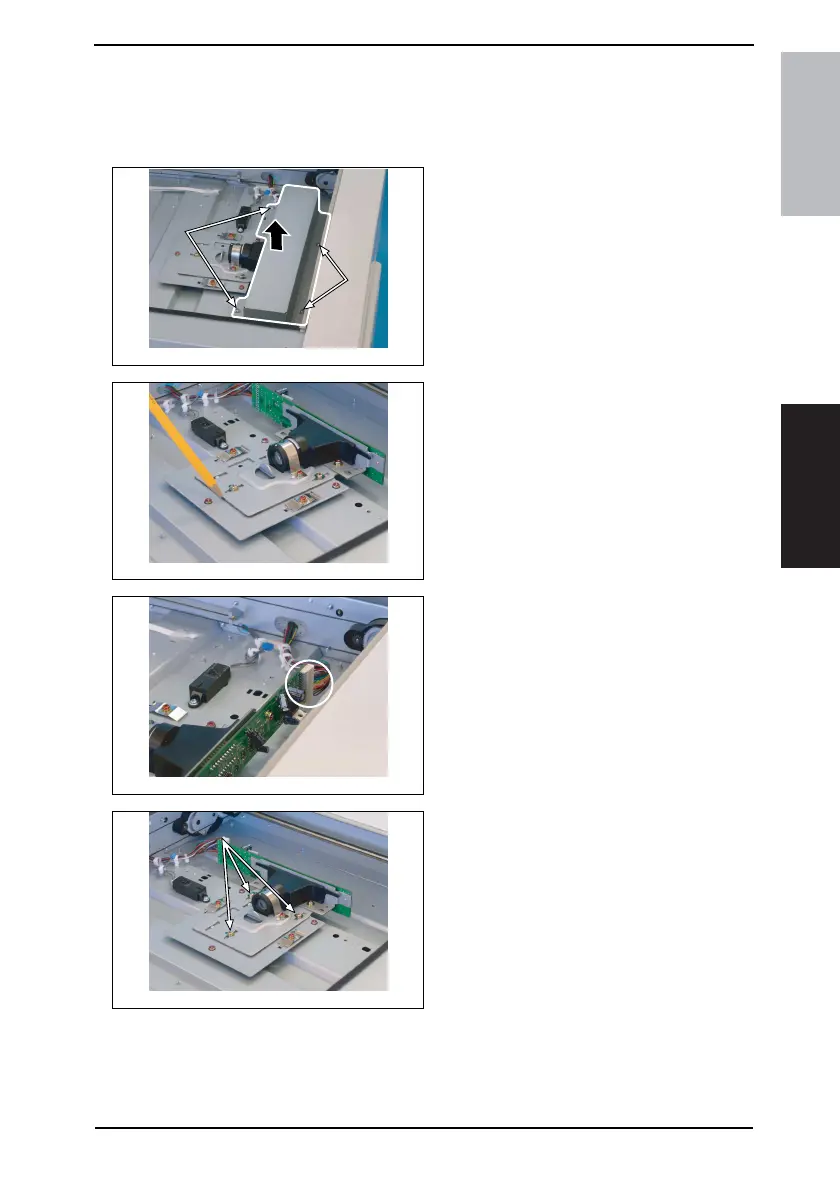
6.3.14 CCD Unit
A. Removal Procedure
1. Remove the Original Glass.
☞ 31
2. Remove four screws and the CCD
Unit Cover.
3. Mark a line along the profile of the
CCD Unit mounting bracket as
shown on the left.
4. Unplug one connector.
5. Remove three screws (to which
green paint has been applied) and
the CCD Unit.
NOTE
• When removing the CCD Unit,
loosen or remove only these speci-
fied screws.
4035D016AA
4035D075AA
4035D076AA
4035D077AA










 To Next Page