3. Periodical check Field Service Ver. 1.0 Apr. 2005
14
ineo 161
ineo 210
Maintenance
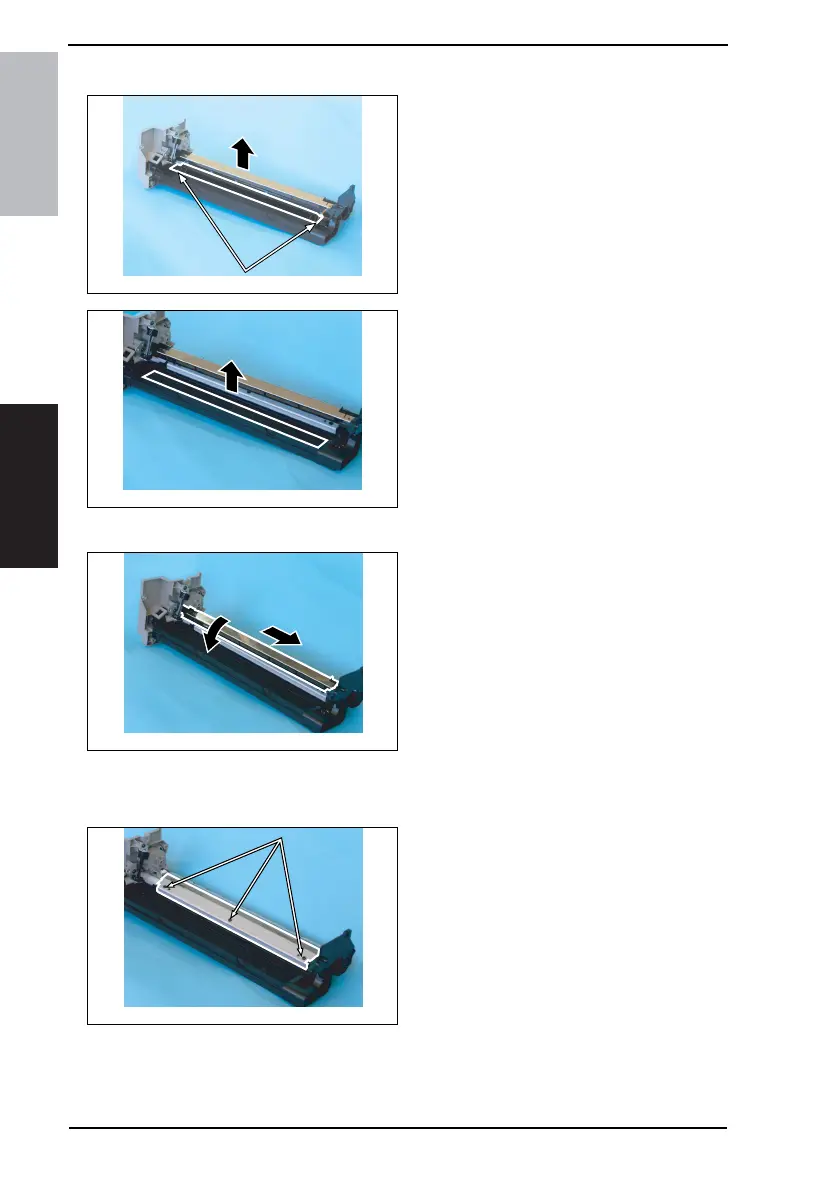
3.3.6 Replacing the Ozone Filter
1. Remove two screws and the Main
Erase.
2. Remove the Ozone Filter.
3.3.7 Replacing the PC Drum Charge Corona Assy
1. Remove the PC Drum.
2. Remove the Main Erase.
3. Turn the holder in the rear in the
direction of the arrow to remove it
from the side bracket.
4. Slide out the PC Drum Charge
Corona in the direction of the arrow.
3.3.8 Replacing the Cleaning Blade
1. Remove the PC Drum Charge Corona Assy.
2. Remove three screws and the
Cleaning Blade.
NOTE
• When securing the Cleaning Blade,
tighten screws in the order of one
on one edge, one at the center, and
one on the other edge.
• When the Cleaning Blade has been
replaced, apply a coat of toner to
the surface of the PC Drum.
☞ 17
4035D029AB
4035D030AA
4035D031AB
4
3
4035D032AA










 To Next Page