Configuration Menu Overview 2-41
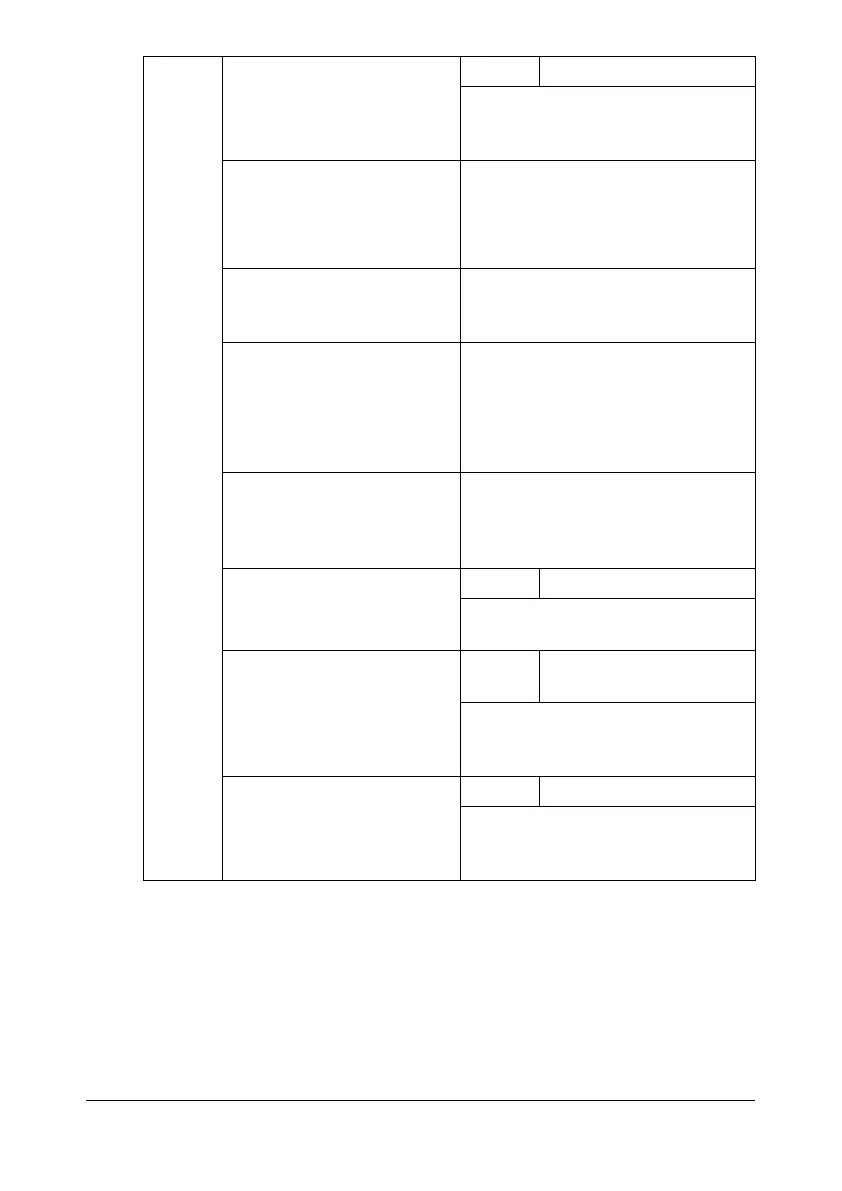
[E-MAIL
SET-
TING]
[SMTP] Settings [DISABLE] / [ENABLE]
Select whether to enable or disable
e-mail transmission operations for
this machine.
[SENDER NAME] Specify the name of the e-mail
sender (up to 20 characters) used
for network scanning.
The default setting is [bizhub_C25].
[E-MAIL ADDRESS] Specify the e-mail address (up to
64 characters) of the e-mail sender
used for network scanning.
[DEFAULT SUBJECT] Specify the subject (up to 20 char-
acters) of the e-mail message used
for network scanning.
The default setting is [from bizhub
C25].
[SMTP SERVER ADDR.] Specify the IP address or host
name (up to 64 characters) for the
SMTP server.
The default setting is [0.0.0.0].
[SMTP PORT NO.] Settings 1-65535 (Default: [25])
Specify the port number communi-
cating with the SMTP server.
[SMTP TIMEOUT] Settings 30-300 sec (Default: [60
sec])
Select the amount of time (in sec-
onds) until the connection with the
SMTP server times out.
[TEXT INSERT] Settings [OFF] / [ON]
Select whether or not the specified
text is inserted into the e-mail mes-
sage.










 To Next Page