Operation Manual D900
49-MD900EN05
24
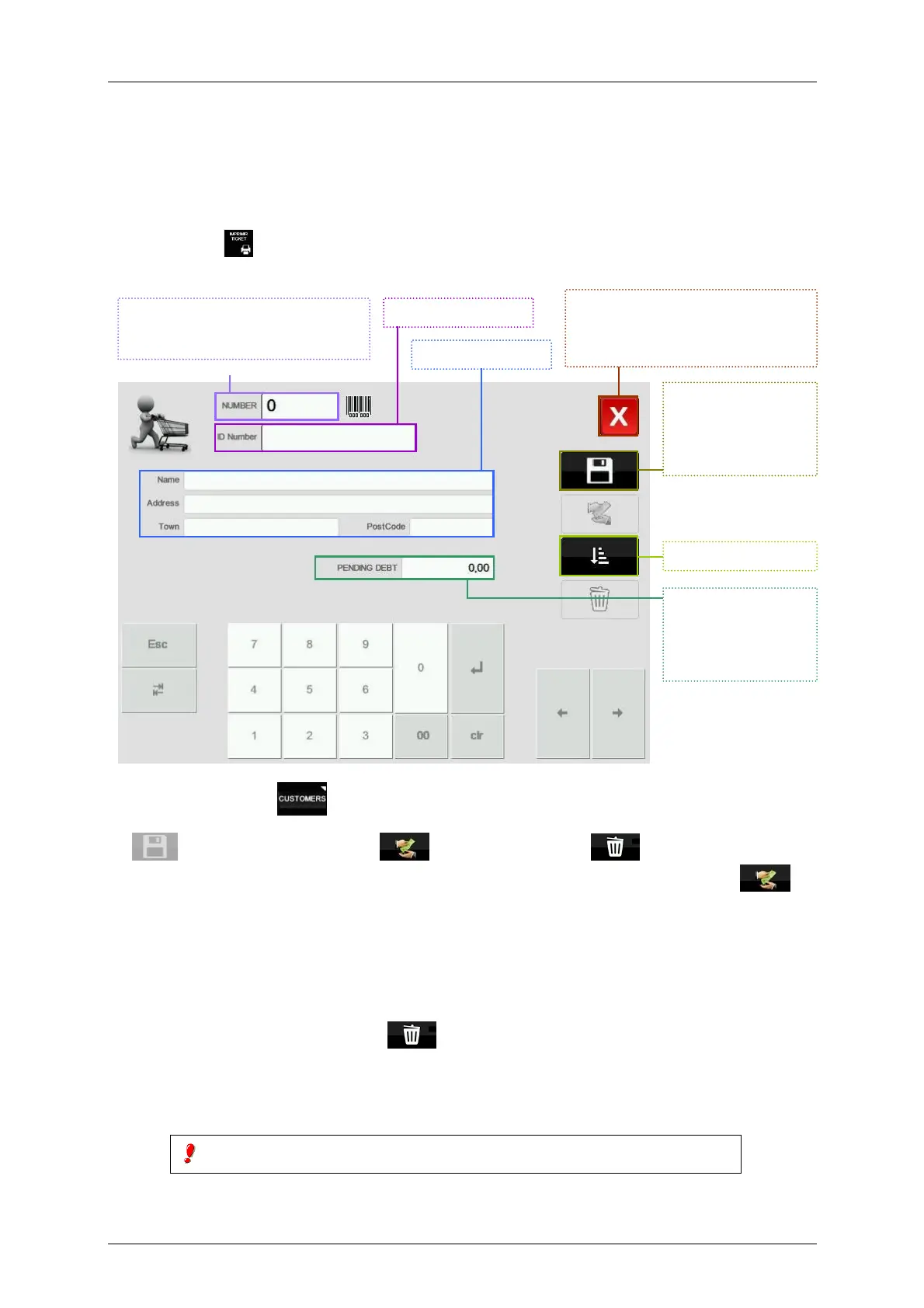
2.8.2.6.1 Payment on Account
To activate the payment mode on account, program the parameter Client Number (User Menu Receipt
Receipt printing Customer Number 4 to 7, see paragraph 3.9.3.2 Customer Number).
After recording a sale in receipt mode, the scale will show the window for entering the payment mode. If
the payment mode “Account” is selected the scale will show the window for entering the client data after
pressing the key .
By pressing the key
in normal working mode it is possible to see the customers in memory.
The window shown is the same as the one in payment Mode on Account but the key Save is not active
and the key Payment of Debt and Customer Deletion are enabled.
In this case, the customer can make the partial payment of the quantity owed, to do it press .
The quantity paid will be deducted from the quantity owed by the customer.
A record will be printed of the time and date, customer code, customer name and sum owed before
payment, the amount paid and the amount pending payment. The format of this record has the same
parameters as the receipt, i.e., the same headings, logos, etc.
A customer may leave a certain amount as a deposit, and this is reflected as a pending negative sum.
Customers can be removed by pressing
only if the balance is 0.
In the Lists menu it is possible to see the List of customers on credit (see paragraph 3.5.2.16 On
credit customers).
A customer memory does not become free even if his/her balance is at zero.
Customer Number (máx. 5 digits).
Enter with numeric keypad or by
reading a barcode.
Return to the Payment mode
selection window, canceling the
payment mode on ACCOUNT and
setting it on CASH.
Save changes and
print ticket. The ticket
will include the text
“Payment on
Account”.
Show customer List
Customert Debt. The
amount of the ticket
will be added to the
previous debt of the
client.
Fiscal Identification
Customer data.



 To Next Page