OPERATOR’S MANUAL
NOTE: The Road Watch
TM
temperature sensor or Surface
Patrol
TM
temperature sensor
must be disconnected and the
DICKEY-john temperature
sensor adapter connected to
the main harness for successful
calibration. If the DICKEY-john
temperature sensor adapter is
disconnected when calibration
is performed, an error screen
displays.
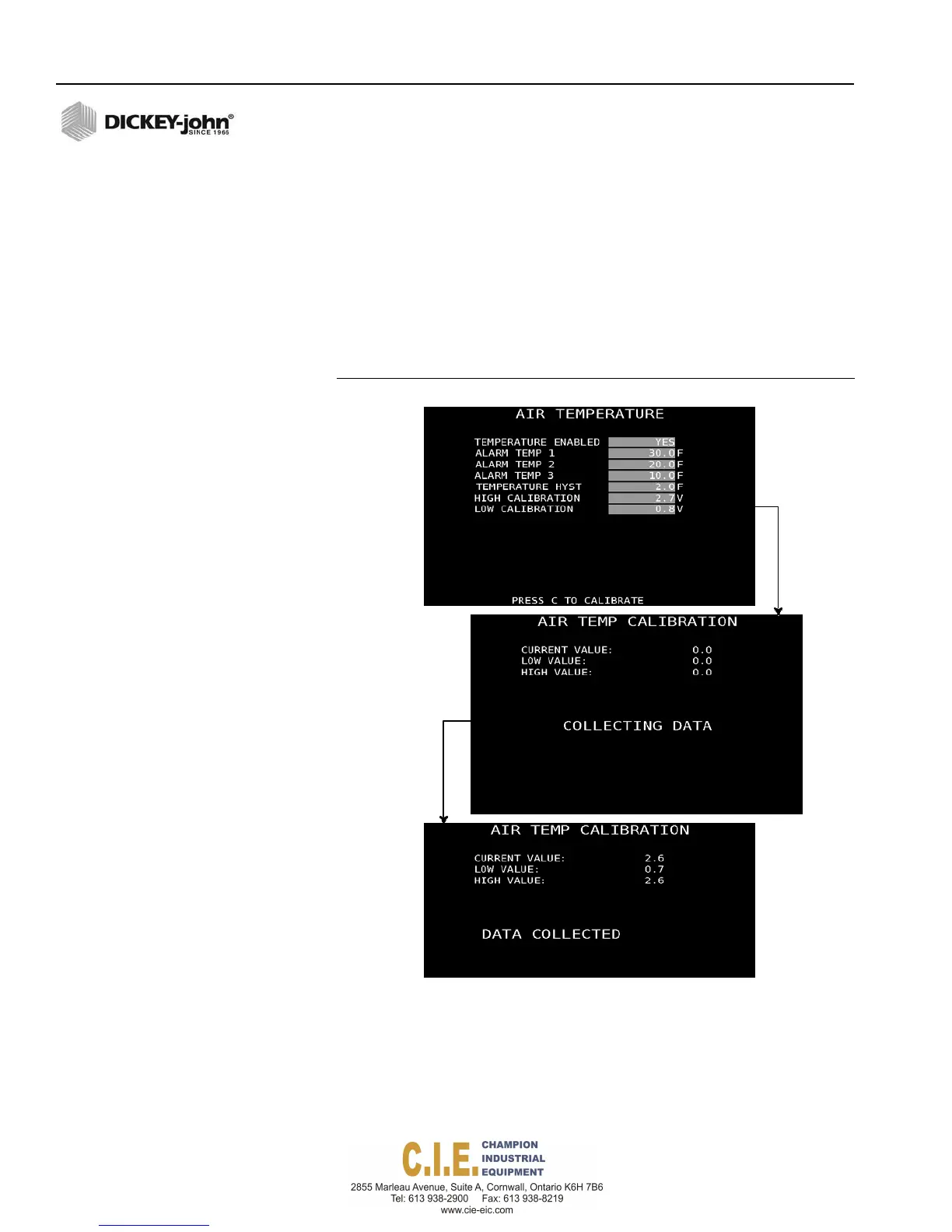
AIR TEMPERATURE SENSOR
An air temperature sensor monitors air temperature changes. When
enabled, an alarm on the Operate screen identifies when defined air
temperature changes occur. Refer to Road Temperature section for display
appearance on Operate screen.
To enable Air Temperature Sensor Values:
1.
Air temperature sensor input values and calibration procedures are
similar to road temperature sensors. Refer to Road Temperature
Sensor section for entering values.
Figure 68
Air Temperature Sensor Screens
IMPORTANT: The Road Watch
TM
sensor adapter must be connected to
the Flex4 interface cable that connects to the rate
control module harness. The interface cable must be
connected to the rate control module connectors labeled
as Analog 1, 2, 3 or 4. The connection point for the road
temperature and air temperature must be identified at
the F9 Accessory Sensor screen.
76 / SYSTEM PROGRAMMING
Flex4 Pro
TM
Control System
6010541 Rev A



 To Next Page