OPERATOR’S MANUAL
DIGITAL ACCESSORIES
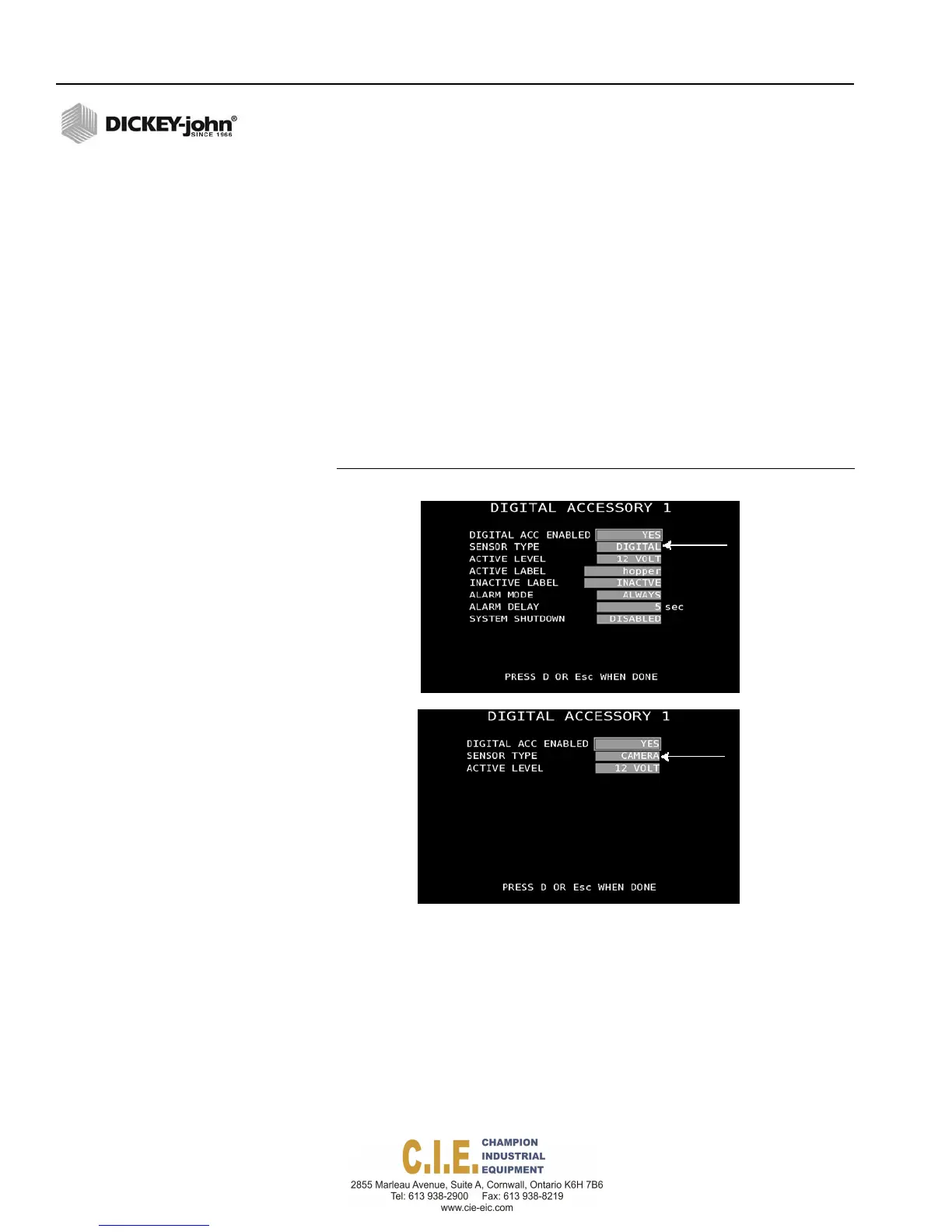
Two digital sensors can be installed to monitor critical operation parameters
on the vehicle.
To enable a Digital Accessory Sensor:
1.
At the F9 Accessory screen, press 6 or 7 to open a Digital Accessory
screen.
2.
Select Yes at the Digital Acc Enabled input box.
3.
At the Sensor Type input box, select the appropriate sensor as digital,
frequency, or camera. Sensor type determines what parameters
appear on the screen.
4.
Select the Active Level power supply as either 12V or ground.
5.
Enter an appropriate active and inactive label that identifies the sensor
type and status on the Operate screen.
6.
Select the Alarm Mode as either Never, Auto, or Always.
Figure 72
Digital Accessory Screens
SENSOR TYPE
DIGITAL and FREQUENCY - Select the sensor type as digital or frequency.
CAMERA - Select camera to automatically view camera video on the
display screen when it senses a 12V input. Typically used when the truck is
placed in reverse and 12V is sensed; the camera automatically appears on
the display.
ACTIVE LEVEL (Digital or Camera)
Active level sets the sensor output signal as either Ground or 12V to sense
the sensor as on or off.
80 / SYSTEM PROGRAMMING
Flex4 Pro
TM
Control System
6010541 Rev A



 To Next Page