OPERATOR’S MANUAL
ACTIVE LABEL
A user-defined name that identifies the sensor type or function that displays
on the Operate screen providing sensor status, i.e. active label name
(HOPPER FULL).
INACTIVE LABEL
A user-defined name that identifies the sensor type or function that displays
on the Operate screen providing sensor status, i.e., inactive label name
(HOPPER LOW).
ALARM MODE
NEVER - Alarms are turned off and will not trigger an alarm condition during
operation.
AUTO - Alarm occurs after the defined alarm delay only when the system is
active and controlling.
ALWAYS - Alarm occurs after the defined alarm delay during operate mode
and shutdown mode.
ALARM DELAY
Amount of time delay in seconds that occurs before an alarm is triggered
based on user-defined sensor parameters.
SYSTEM SHUTDOWN
Select Enabled to shutdown the system from operating anytime an alarm is
triggered.
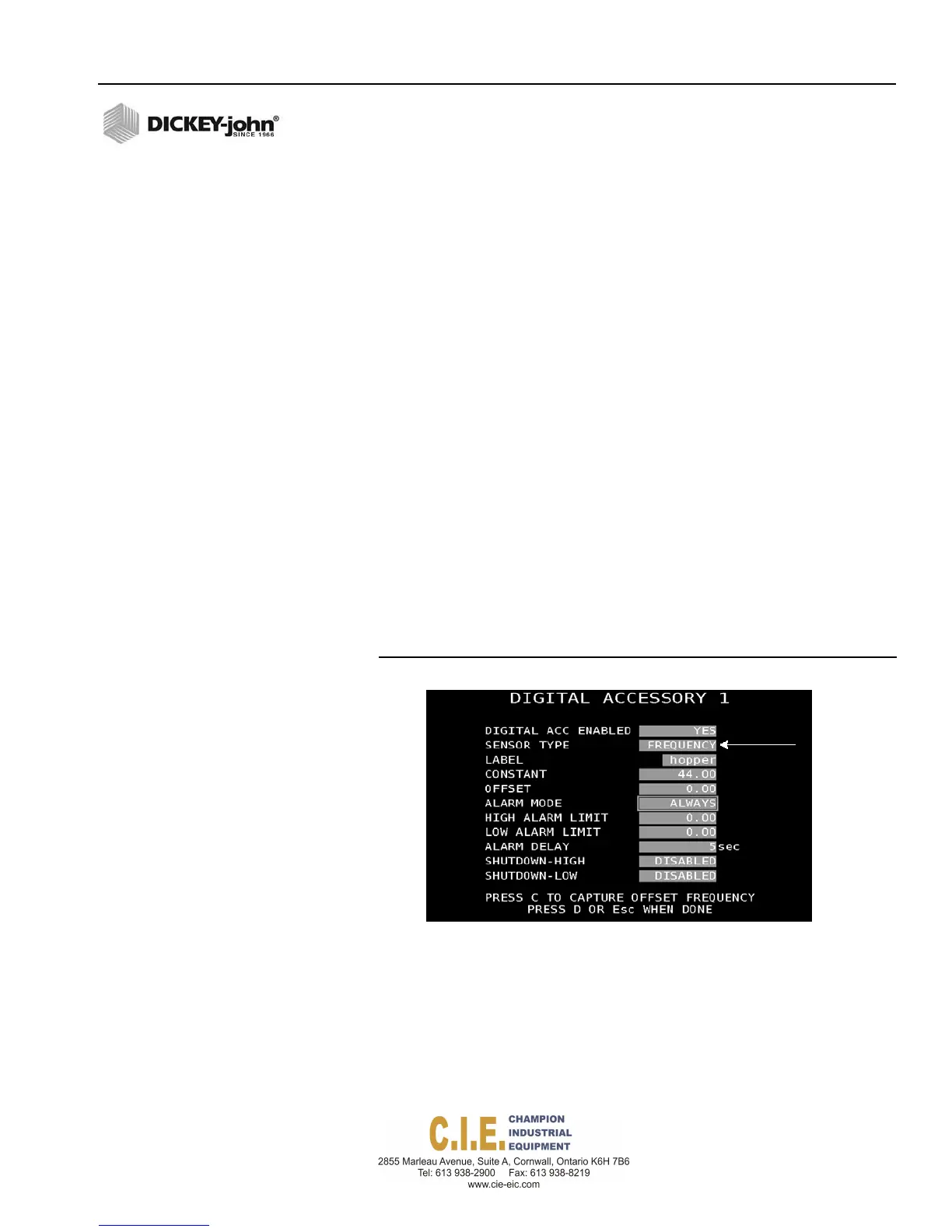
Figure 73
Accessory Sensor Screen (Frequency)
LABEL (Frequency)
A user-defined name that identifies sensor type and displays on the
Operate screen providing sensor status (7 character maximum).
CONSTANT (Frequency)
Constant establishes the number of pulses for one revolution of the
application rate sensor.
Flex4 Pro
TM
Control System
6010541 Rev A
SYSTEM PROGRAMMING / 81



 To Next Page