171
4.4.3 Naming Rule of Video files
NVR writes and memorizes videos to HDD in every 5 minutes. This way can ensure all
videos are well saved when encountering power outage or other accidents. Besides,
when exporting videos, each videos file is in around 5 minutes as well. In this way, it
is clear for users to search for the videos they are aiming for.
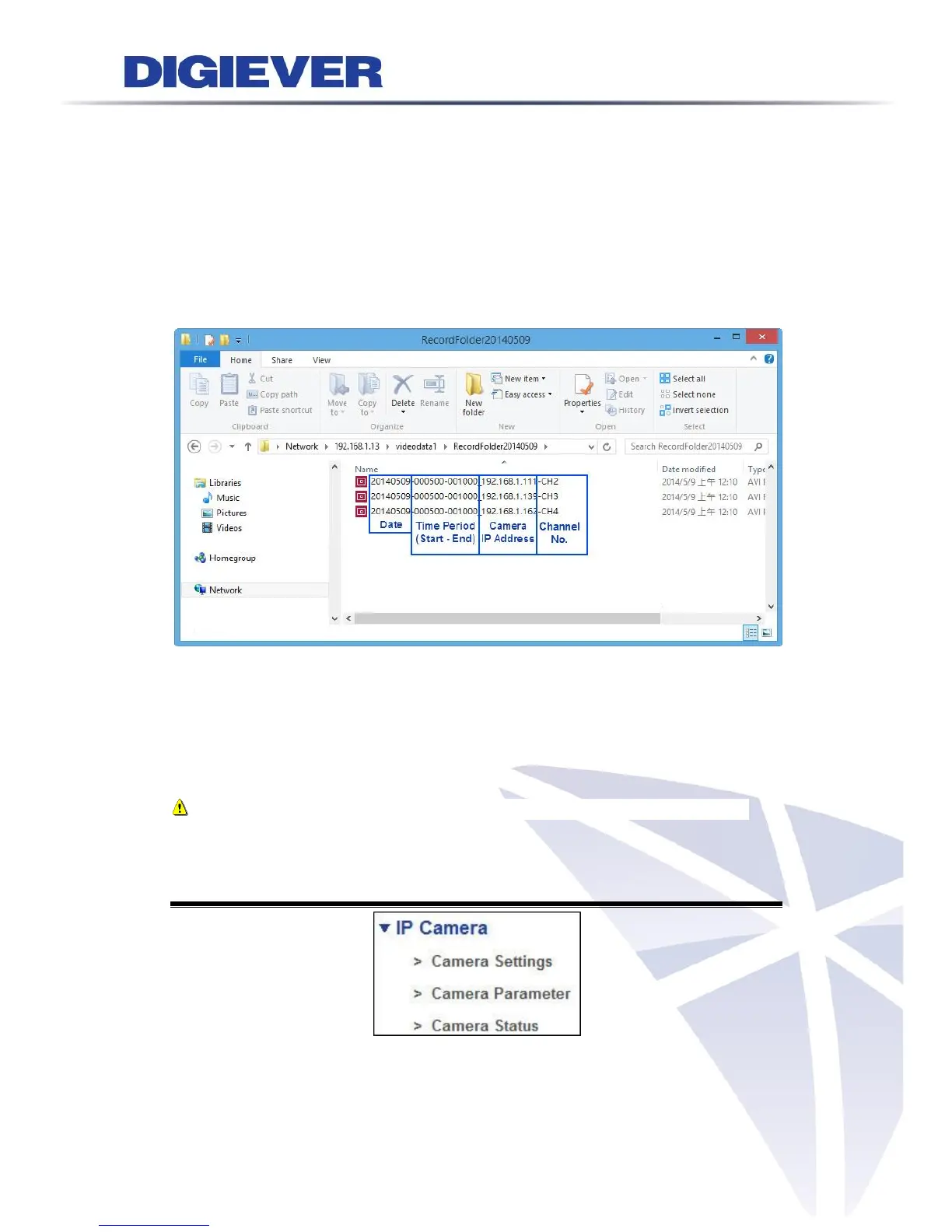
The naming rule of video files is “(year)(month)(day)-(hour)(minute)(second)-
(hour)(minute)(second)_(Camera IP Address)-(Channel No).”
Chapter 5. Configuration
In configuration page, users can configure Quick Configuration, IP Camera,
Recording & Event, Disk Management, NetworkManagement and System from each
drop-down menu.
Note: NVR will automatically log out from configuration page after idle for 10
minutes.
5.1 IP Camera
5.1.1 Camera Settings
Please refer to Chapter2 - 2.3.6 Camera Settings.



 To Next Page